On February 10, 1998, XML (the eXtensible
Markup Language) became a recommended standard of the World Wide Web Consortium.
After that, you couldn't open a trade magazine (now including Interact)
without seeing a reference to XML. What is XML? Will it replace Hypertext
Markup Language (HTML)? Why do we need it? Who owns it? Can MPE/iX users
benefit from it? In order to answer these questions, it helps to study
some ancient history.
Back in 1986, the International Standards Organization (ISO) first published
the Standard Generalized Markup Language, or SGML. The purpose of SGML
is to provide a standard way to describe documents using markup. Most users
are familiar with the concept of markup. It is used in word processing
and in Web page development. For example, consider this HTML markup:
<B>This is bold</B>. A Web browser knows to bold all text
between the start and end tags. The user does not see the tags, only the text
between the tags. This kind of markup is specific to the presentation of a
document. Generalized markup describes the content of a document.
Developers use SGML to describe hundreds of different types of documents, from
financial documents to recipes. One of these SGML applications is HTML the
markup language of the Web.
In the Internet's infancy, its purpose was to enable institutions to
share research data. For the most part, this data started out as text files.
If you wanted information from another computer, FTP (File Transfer Protocol)
would be used to retrieve the file. As the number of files became larger,
people used tools such as Gopher, Veronica, and Archie to help find particular
files of interest. HTML appeared on the scene and provided a way to link
related documents regardless of type or location. Since the early Internet
involved many types of computers, it was important to provide information
in a platform-independent manner. Each type of computer had to have a browser
that could display an HTML document. In these early days, many people used
Lynx, a text-based browser that can be found today on many UNIX boxes and
on the HP 3000 (Lynx is available at
//jazz.external.hp.com/ in the Freeware section). Later
on, a graphical browser called Mosaic, written at the National Center for
Supercomputing Applications (NCSA), would change the face of the Web forever.
At this point, the approach was still to let the browser render documents
as it saw fit. As time went on, however, the pressure to control presentation
began to build. Soon a young man left the NCSA and started a small company
called Netscape. The Netscape browser was the first to add display enhancements
to HTML, such as frames and tables. The emphasis on separating content
from presentation was beginning to wane. As more companies joined the browser
wars, presentation took on greater significance. For the sake of sanity,
browsers did not validate HTML documents. The browser would simply render
what it could and ignore any markup it did not understand.
As the Web grew bigger and bigger, new problems arose. With new sites
springing up at every moment, there was a need for search tools to help
find information. To use these search tools, you need to be more of an
artist than a scientist. For example, a search on the word POPE
returns pages on a U.S. Air Force base, a poet, a slew of folks with the
last name of Pope, articles written about the current or past leaders of
the Roman Catholic Church, pages in foreign languages with the four letters
"POPE" in some of their words, and, of course, a few pornographic
sites. Today's search engines do not search in context. HTML describes
only the presentation of data and not the meaning of the text within a
document.
While WWW stands for World Wide Web, the Web is not friendly
to non-Roman alphabets. Many search requests return unreadable pages because
the browser is not told which type of character encoding to use.
Oddly enough, one of HTML's strengths is also one of its greatest weaknesses.
HTML linking is too manual and error prone. Links are hard coded and disbursed
throughout each document. This makes link maintenance virtually impossible,
and users encounter the inevitable ERROR 404 Not Found all too
often. Even with all of the enhancements made to HTML, it was clear that
no single markup language ever could handle everything that people would
want to do on the Web.
If HTML is so terrible and SGML so wonderful, why did HTML become the
language of the Web? There are two reasons. First, SGML predates the popular
Web. It was not designed for network usage. Second, SGML is not only large,
it is complicated. It is so complicated, in fact, that many software programs
have a hard time implementing all of its features. Worse yet, the most
difficult features are the ones that are rarely used. So XML developers
decided to take the most commonly used and most powerful features of SGML
and make them efficient to use on the Web. Think of XML as SGML on a diet
rather than HTML on steroids.
To get a better feel for XML, let us break down a simple XML document,
such as the one shown in Listing 1. In many ways, this document
has the look and feel of HTML, except for the unfamiliar tags. Sections
of XML documents that start with <? and end with ?>
are called processing instructions. This is where an author can
pass information to the XML parser. In this case, it tells us which version
of XML the document uses.
Unlike HTML, an XML document must be well-formed. An XML document consists
of elements composed of a start tag, content, and an end tag. Tags are
the tokens surrounded by angle brackets. Among other criteria, a document
is well-formed when all elements are properly nested. This means every
element is fully contained within another element. For example:
<B><I>This is well formed</I></B> and
<B><I>This is not</B></I>. Note that many HTML
browsers will accept both.
Another difference between XML and HTML is that XML is case sensitive.
<B>For example, this sentence is not a valid XML element, but
it will work in HTML.</b> If the case is not the same for both
the start and end tags, the document will not be well-formed. The document
in Listing 1 is well-formed. Notice there
is one element that does not have an end tag. How can the document be
well-formed if the support element is not closed? The support
element is a special case because it has no content. Instead of forcing you to
add an end tag immediately after the start tag, XML allows you to put the
forward slash before the closing angle bracket to indicate the element
is empty. So our document is indeed well-formed.
There is a reason why proper nesting of elements is so important. When
a document is properly nested, you can view it as a tree. Elements at the
same level are sibling leaves and all subordinate elements are children
leaves. Many of the XML-based technologies rely heavily on this tree structure.
Listing 1: A Sample XML Document
<?XML version="1.0"?>
<!-- A simple XML document -->
<systemConfig>
    <hardware>HP3000<series>918DX</series></hardware>
    <software>
       <opSys>MPE/iX<release>5.5</release><patch>PP4</patch></opSys>
       <application>CA-MANMAN<release>11.0</release></application>
    </software>
    <support level="PHONE"/>
</systemConfig>
In addition to being well-formed, a document can also be valid. In order
for an XML document to be valid, it must be well-formed and it must comply
with the rules of a Document Type Declaration, or DTD. A DTD describes
the entities, elements, and attributes of an XML document. If an XML document
has a DTD, it must appear at the beginning of the document. The DTD may
be included in the document or it may exist in an external file. (Since
HTML is an SGML application, it has a DTD of its own. Actually, there are
three HTML DTDs, one for each version of HTML: 2.0, 3.2, and 4.0. Some
Web pages indicate HTML version by specifying the DTD with the DOCTYPE
tag.)
Usually some of the first items found in the DTD are entities. XML entities
allow you to associate a part of the document with a single name. There
are three types of entities: internal, external, and parameter. An internal
entity is a simple text replacement. For example, instead of typing
"INTEREX, the International Association of HP Computing
Professionals" several places in one document, you could create the
entity &INTX;. Now you can use &INTX; throughout the
document.
All entities begin with an ampersand (&) and end with a semicolon.
XML predefines several internal entities. Since the angle brackets (<
, >) and the ampersand (&) mean something to
the XML parser, you must use an entity to include them in a document. For
example, to say that X is less than three, you would code that as
X < 3. There are also internal entities for the apostrophe
(') and the double quote ("). You also
can use entities to insert any UNICODE character into an XML document.
Simply put the UNICODE number, decimal or hexadecimal, in between the
&# and the semicolon. As a quick aside, if you have a large section
of content riddled with reserved characters, like an XML example, you can
"escape" the whole chunk using CDATA.
See Listing 2. All text between <![CDATA[ and
]]> gets passed to the application unchanged.
Listing 2: Using CDATA to Bypass the Parser
<?XML version="1.0"?>
<example>Here is an example XML document with one element:
<![CDATA[
    <?XML version="1.0"?>
    <COMPANY>Hewlett Packard</COMPANY>
]]>
</example>
External entities point to data outside the current document. If the
external entity is text, the parser inserts it as though it were typed
at that point. If the entity is binary, such as a picture or video clip,
it is not parsed but held for future reference. There are many good reasons
to use external references. You can break a document up into pieces for
easier handling or store commonly used text strings such as "Standard
Sales Terms" or long legal disclaimers in a single file for insertion
into many documents.
The third type of entity is a parameter entity. It is used only in document
type declarations. Normally, entities remain unchanged in the DTD and are
expanded by the parser. Parameter entities are expanded first, and the
text becomes a part of the DTD. Listing 3
shows an internal entity, a binary external entity, a text external entity,
and a parameter entity, respectively.
Listing 3: Entity Declarations
<!ENTITY INTX         "INTEREX, the International Association of HP Computing Professionals">
<!ENTITY INTLOGO      SYSTEM "/usr/local/pics/interex.gif">
<!ENTITY CHAPTER2     SYSTEM "/usr/users/mybook/chap2.xml">
<!ENTITY %MYENTITIES  SYSTEM "/usr/users/common/entities.xml">
After entities, the element declarations come next in a DTD. Actually,
an XML document has only one element in it. That is to say, there is only
one element that holds all of the other elements.
Listing 4 is an element listing for the XML document in Listing
1. Notice that the systemConfig element contains in parentheses
the major elements that describe the computer system. Elements separated
by a comma must occur in that order. You can also indicate a choice of
elements by separating them with a vertical bar (|). After each element
or element group, you can indicate how often the element can appear. The
DTD can indicate whether an element can exist zero times or one time
(? operator), zero or more times (* operator), or one or more times (+
operator). In our example, the software element contains one
opsys element and at least one application element. It is important to
note that the DTD restricts only the element structure. At this point, the DTD
has absolutely no control over the content of an element. Several groups are
working on data typing of content. For now, data is represented with the
term #PCDATA, which stands for parsed character data.
Listing 4: Element and Attribute List Declarations
<!DOCTYPE systemConfig [
<!ELEMENT systemConfig (hardware, software, support)>
<!ELEMENT hardware (desc, series)>
<!ELEMENT desc (#PCDATA)>
<!ELEMENT series (#PCDATA)>
<!ELEMENT software (opSys, application+)>
<!ELEMENT opSys (release, patch)> <!ELEMENT application (desc, release)>
<!ELEMENT release (#PCDATA)>
<!ELEMENT patch (#PCDATA)>
<!ELEMENT support (#PCDATA)?>
<!ATTLIST support
level NOTATION (NONE, PHONE, WEB, FULL, CUSTOM) #REQUIRED "NONE">
]>
After specifying the elements, you can specify which attributes an element
takes. Attributes in XML look like those in HTML. They are named data pairs
that appear within the start tag. In the system configuration example,
the support element takes a single attribute, level. Listing
4 shows the attribute declaration for the support element. XML attributes
give XML and related technologies a lot of power. You can declare an attribute
to further describe the element's data. If you had a date element, an attribute
would tell the receiving application what type of calendar the date used
(Gregorian, Julian, Atmarian, and so on).
Attribute values have several flavors. The simplest is just a string
of characters, or CDATA. This stands for character data,
# but unfortunately it has nothing to do with the <![CDATA[..]]>
described earlier. The next type of attribute is an ID attribute.
Every value of an ID attribute in the document must be unique. This
essentially puts a key field on any element that has this type of attribute.
Other attributes can only take ID field values; in other words,
this attribute becomes a pointer to another element. Finally, you can
enumerate a list of possible values. This last type is the one used by the
support element in our example.
After you set the type of attribute, you can assign default value instructions.
There are four kinds of default values. The first is that the attribute
is required (#REQUIRED). It must be specified on every element for
the given attribute list. The next is just the opposite (#IMPLIED).
It means the attribute is not required and no default value will be set
by the parser. Although it does not sound useful, there is also a fixed
default (#FIXED). This says if the attribute is on an element, it
must have the given fixed value. This type is used when declaring links
in XML documents. Finally, there is just a string value. If the attribute
is not specified, this attribute will take on the default value. XML requires
quotes around every attribute value, unlike HTML.
One of the goals of XML is to separate content from presentation. In
the previous section, we focused entirely on structuring the data. Now
how do we display it? One of the issues that XML addresses is data reuse.
In today's Web, after we write the user manual or owner's guide, we start
over and write the Web pages. In order to distribute the manual on CD,
often we have to start over again. (Yes, you can save word processing documents
as HTML, but often that creates one very large page, or else you must do
significant reworking to make it efficient for network use.) This is where
style sheets come into play. SGML users are already familiar with style
sheets. ISO standard 10179, Document Style and Semantic Specification Language,
or DSSSL, can be used to format SGML documents. At the time of this writing,
XSL, the eXtensible Style Language, is still in the proposal stages at
the World Wide Web Consortium. Many expect it to be a subset of DSSSL and
more powerful than existing HTML cascading style sheets.
Although there is no XSL standard yet, there is a philosophical goal
of XSL: write a style sheet for each type of output. If you want to publish
a document on the Web, write a style sheet that creates HTML. To create
a printed document, write a style sheet that creates PostScript. Publish
on a CD? You guessed it*write a style sheet. From some of the technical
previews, this is what we can expect from XSL.
XSL is a data-driven scheme. You write rules that search for certain
situations and format the data accordingly. Cascading style sheets instruct
the browser to display defined styles in a particular manner. XSL takes
this idea further. It is possible to format elements based on their position
within the document. Listing 5 is an XSL
fragment and, not coincidentally, an XML file. This fragment says, "Look
for 'Section' elements that exist inside of 'chapter' elements and prespace
eight points down before displaying and make the font size twelve points.""
Of course, this is a trivial rule.
Listing 5: Style Sheet Fragment
<rule>
    <-- Target pattern -->
    <element type="Chapter">
        <target-element type="Section"/>
    </element>
    <-- Perform Action -->
    <sequence>
        <paragraph space-before="8pt" font-size="12pt"
    </sequence>
</rule>
The proposed XSL specification really tries to make the standard extensible.
You can filter elements. By selecting only certain elements, it is very
easy to create a table of contents or a map for a Web site. Style sheets
can also reorder elements. Using filtering and reordering, it is possible
to make a user's guide and a reference manual all from the same XML document.
If you need more control over the formatting, it is possible to call an
ECMAScript, which returns a formatted string. ECMAScript is a standardized
version of Netscape's JavaScript scripting language. Members of the W3C
working committee hope to have XSL approved as a recommended standard by
the end of 1998.
Several other W3C working groups are also working toward standardization.
Formerly known as XLL, the eXtensible Linking Language group has split
into the XLink and XPointer groups. As with XML and XSL, document linking
is based on existing technologies, most notably HyTime and Text Encoding
Initiatives (TEI). See the Web Sightings resources for further information
on these specifications.
Like HTML, the XLink specification allows one to include an address
of another document as a way to move to a new document. This is called
a simple link. It is a one-way path to another target. Unlike HTML,
the element does not have to be an anchor tag: <A>. XLink
gives you the ability to make any element a link target. This is done by
declaring a particular attribute list for the element. In fact, while HTML
documents contain the target addresses within the document, XML links can
be stored in an external file. The former link type is called in-line,
the latter out-of-line. XLink also supports the notion of link groups.
Instead of just one target, imagine a small pop-up window giving the user
a choice of links. These types of links are called extended links.
Unlike a simple link, an extended link group automatically sets up links
from each target to every other target in the group. Imagine doing that
by hand in HTML!
XLink enhances linking by giving more control to the document author.
As in HTML, a link may specify a document fragment with the # operator
(//www.hp.com/index.html#support).
This operator means to load the entire document and point the browser to
the element named support. XLink introduces the | fragment
operator. It works like the # operator but does not require that
the browser load the entire document. A Web server could retrieve only
the requested element, saving time and bandwidth. XLink also gives control
over the context of the target. You can specify that the target be displayed
in a new window, replace the current window, or be embedded in the current
window.
Note that a window makes sense only in a browser context. It may have
different meaning in print or on CD. Finally, XLink gives you some control
over link activation. You can set a link to traverse when the user clicks
on it, or it can be activated automatically when the document loads.
While XLink gives more control in getting to other documents, XPointer
provides more control after you have made it to the target. Using the XPointer
syntax, you can jump to particular elements, groups of elements, or parts
of elements. This technology relies heavily on the tree structure of the
document. This syntax provides absolute or relative movement within the
tree. XPointer will help make it easier for programs and agents to work
with XML documents.
What does XML mean to the HP 3000 and MPE/iX? A frequent complaint about
MPE/iX is the user interface. Users love their graphical interfaces. Now
that there is a movement to separate data serving from presentation, can
one of the best systems for serving data take advantage? Absolutely. Currently,
MPE/iX users can serve up XML files from a Web server. (You need only to
add new MIME types such as text/xml.) And there is a popular saying
in the XML community: "XML gives Java something to do." Indeed,
much of the XML work to date has been done in Java. Many MPE/iX users may
wonder what they will do with Java/iX when it arrives in Version 6.0 of
the operating system. Let's look at some potential uses for XML on MPE/iX.
XML can represent complex data in a single document. This gives you
the ability to make data transfers look more like objects. An XML parser
could pick out the "properties" of the data transfer and manipulate
them as needed. For example, you could write an MPE/iX server program that
"exposed" MPE objects. In April 1998, there was talk on the HP3000-L
listgroup about a new format for the :LISTF command. The discussion was
about how to display the file sizes for the new larger files in 6.0. The
main concern was that many users wrote CI command files that expect data
to be in certain places and will break if the format changes too much.
If there was a LISTFILE object server that returned an XML file with all
of the properties for each file, no one would care about the format of
the display.
In fact, a brisk business may be created for those who would write style
sheets to improve the look and feel of MPE/iX. The old character-format
LISTF command would be just a command file that formats and echoes LISTFILE
properties. There can be other MPE/iX objects: a SYSGEN object for system
parameters, an ACCOUNTS object for managing accounts and users, or a SESSIONS
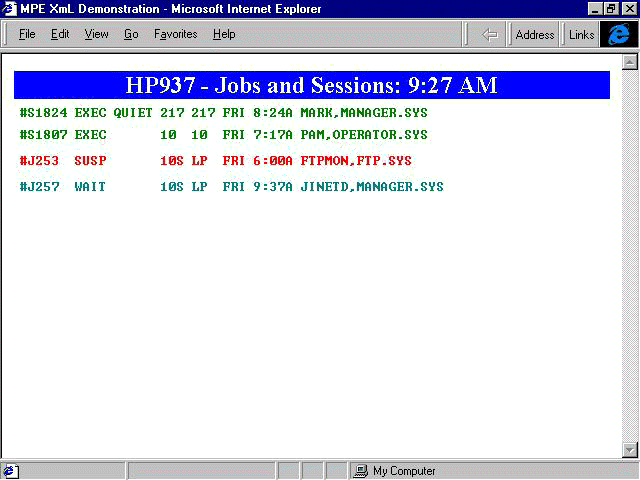
object for managing jobs and sessions. Figure 1
shows an example of how the SHOWJOB command might look with jobs displayed in
different colors for different states (green for EXEC, red for SUSP, teal for
WAIT, and so on).
What about current MPE/iX applications? You could write data servers
too. Instead of writing a single VPlus application that maintains data,
you would write an XML server and VPlus program that parses the XML file
and sends the results back to the server. Want a Web page for the same
application? The server is already written! By using XML documents, your
presentation programs could pull data from other MPE/iX systems as well
as
HP-UX, NT, or any other operating system that serves up XML pages. Software
developers and third-party shops could extend their current offerings,
too. Imagine being able to listen to multiple performance servers running
on your HP 3000 network and displaying the load for all of those machines
on one screen. Imagine report writers and data-extraction tools creating
snapshot XML documents for analysis in spreadsheets and statistical programs.
The possibilities are endless.
So what is the downside of XML? First, the standards are not set yet.
That makes it difficult for new development. Moving to a client-server
environment brings with it all of the issues of client-server computing*security,
resource sharing, and updating. XML files are larger than their binary
counterparts, but because of the duplication of tags they should compress
well. Also, if anyone can create a markup language, will there be so many
that we end up exactly where we are today? For example, if half of the
book catalogs use a <written-by> tag and the other half uses
<author>, will network searches improve? Only time will tell.
There is no doubt that XML is here to stay. It has a lot of momentum
and the backing of the World Wide Web Consortium. It will grow first where
it is useful for applications that want to download data and manipulate
it at the client level. Once some of the standards and markup languages
firm up, we will see some of the benefits on the Internet, especially in
searching and linking. But the lasting benefit will come in the area of
data sharing across multiple platforms. It is fair to say that the system
that can serve up data the best will have a bright future. MPE/iX already
has an edge in the online transaction processing market. If managed correctly,
it will remain the leader for some time to come.
References Books
Presenting XML, Richard Light; Sams. One of the first books on
XML, it provides a fine theoretical foundation.
XML: A Primer, Simon St. Laurent; MIS/IDG Books. Also an early
book, but a favorite among many in the XML-L listgroup.
XML Complete, Steven Holzner; McGraw Hill. Because this book
has all of its examples in Java, it is not only a good resource for XML
but a nice Java primer as well.
News Groups
microsoft.public.xml
comp.text.sgml
XML-L - LISTSERV@listserv.hei.ie subscribe XML-L <Full name>
Mark Wonsil is president of 4M Enterprises, Inc. He
has worked with the HP 3000 since 1982. You can send comments to him at
wonsil@4m-ent.com.