 HP 3000 Manuals HP 3000 Manuals




Migration Planning Tool Operation
MPT is a package of programs that provides a first look at the potential
issues arising from migrating files from an MPE V/E-based computer system
to an MPE/iX-based computer system. As a part of the Migration Toolset,
MPT is an addition to the capabilities of RTM and OCA. MPT is a TELESUP
utility and, therefore, not a fully supported PUB.SYS product. When RTM
is run prior to creating the MPT database, MPT can combine the
information compiled by RTM into the final MPT reports. MPT can identify
those program and segmented library files that require further analysis
by OCA.
MPT performs the following tasks:
1. Generates a report listing the Hewlett-Packard software products
that are fully or partially installed on your MPE V/E-based
system.
2. Creates a database (MPTDB) containing migration-related
information about files on your MPE V/E-based system.
3. Generates six types of migration planning reports from information
collected from the database. The reports contain information on:
* Disk capacity estimates for files migrating from an MPE
V/E-based system to an MPE/iX-based system.
* Problem areas in files that may be encountered after the
files are migrated to an MPE/iX-based system.
MPT runs entirely on an MPE V/E-based HP 3000 Computer System in either
interactive mode or batch mode. MPT is easy to use by inexperienced
programmers and analysts, yet provides in-depth detail for more
sophisticated users.
MPT is not intended to be an all-encompassing tool, but rather an aid for
providing a sense of direction to the migration process. Its purpose is
to communicate estimated MPE/iX disk capacity requirements and to uncover
incompatibilities that might affect the migration effort. The MPT
package does not deal with the implications of adding new applications
nor any consequences related to system performance.
In order to obtain the greatest benefit from MPT, you should install RTM
and have it log data for a period of time (at least one week, preferably
throughout one entire business cycle) so that as many of your programs as
possible will be run and monitored by it.
If you have been running RTM on your system, this data should be made
available to MPT during its analysis run. Normally this is accomplished
by making sure the MPE log files containing RTM data are present in
PUB.SYS. If you have had to purge the MPE log files containing RTM data,
you must restore them from backup tapes.
Figure I-1 illustrates the major modules of MPT and how they work
together to create the MPTDB database and to generate reports.
Descriptions of each of the major modules follow.
The following files are included in the Migration Planning Tool product:
File Name Description
MPTPROD.MPT.TELESUP The MPT program that identifies Hewlett-Packard
products installed on the system.
MPT.MPT.TELESUP The major data collection program for MPT. It
scans each disk file found on the system for
potential migration difficulties. It creates
the MPTDB database then loads the collected
data into this database
MPTRTM.MPT.TELESUP An MPT program that extracts RTM migration
event data from MPE log files and adds the data
to the MPTDB database. You must have
previously used RTM to collect and log the
events.
MPTOPTNS.MPT.TELESUP A parameter file used to select specific
migration options. This file is used by the
MPTREPT program.
MPTREPT.MPT.TELESUP The program that generates six types of reports
from information collected from the MPTDB
database.
MPTJOB.MPT.TELESUP A job stream file that can be used to create
the MPTDB database. It also generates several
levels of migration planning reports and the
installed products report.
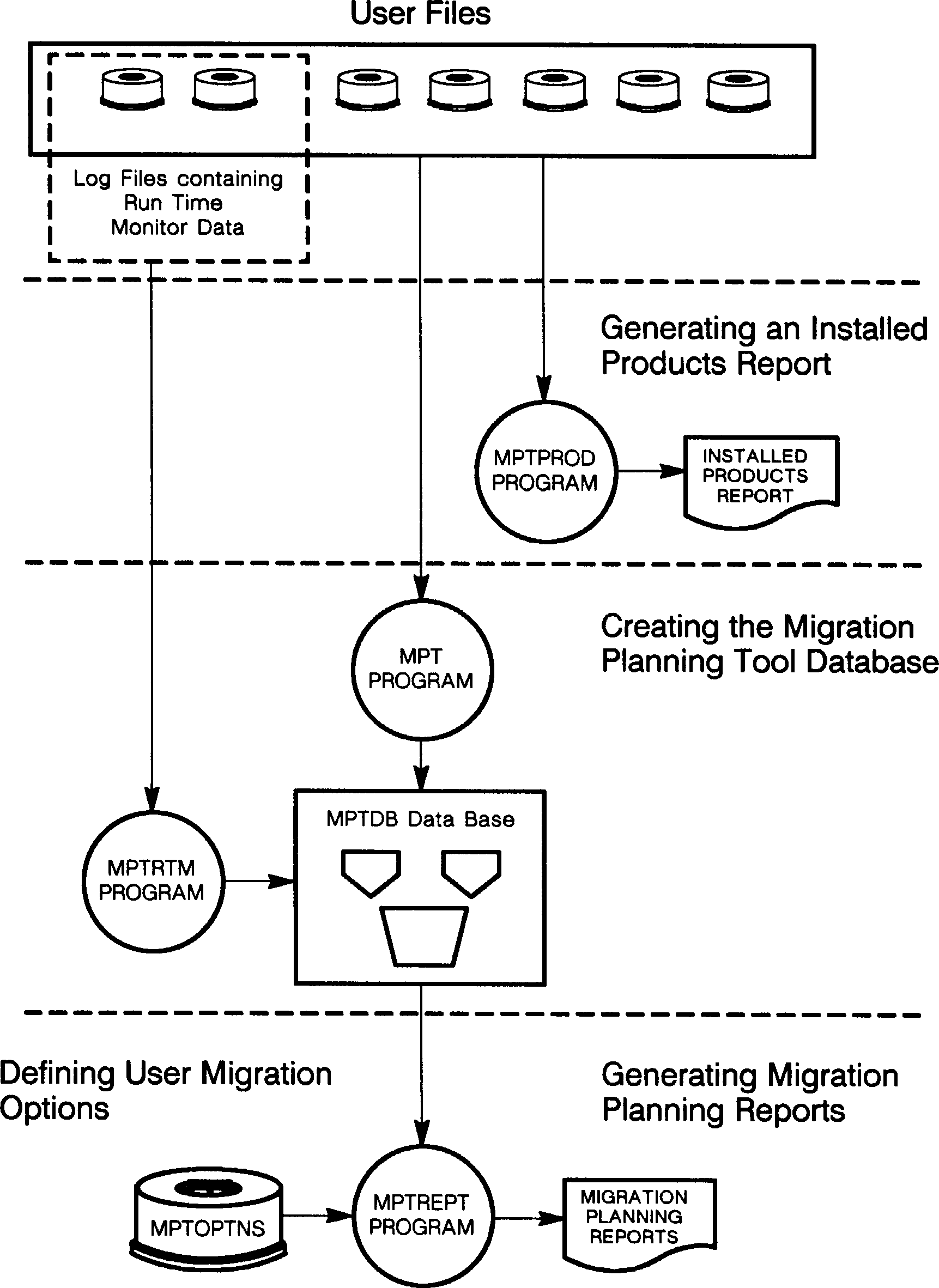 Figure I-1. Migration Planning Tool Program Flow