 HP 3000 Manuals HP 3000 Manuals




Using RTMREP
RTM does not automatically generate reports. However, all run-time
events that are captured are recorded in a system log file. A report of
events logged can be generated by running RTMREP. Descriptions of the
events logged by RTMSYS are found in Appendix D, "Incompatibilities".
There are two report formats.
* A program summary (the default), a brief report that shows all
events generated by each program. A counter shows the number of
times that a particular segment/offset caused the event. The
report is sorted by date, program name, and event class.
* A detailed report shows all events logged. These events are
sorted by date, program name, and event class. All information in
the log record is formatted and displayed in chronological order.
NOTE RTMREP cannot access the current system log file. If you want to
generate a report from the current system log file, you must first
close it with the :SWITCHLOG command.
To generate a report, enter the following:
:RUN RTMREP.PUB.SYS
:RTMREP prompts you for the choice of a program summary or detailed
report.
Additionally, LISTLOG5.PUB.SYS can be used to examine the log file for
entries. Refer to the MPE V/E Utilities Reference Manual (32033-90008)
for more information on LISTLOG5.
RTMREP has a HELP facility can be invoked at any time by entering ?. An
explanation of the current prompt is then displayed, followed by the same
prompt. You may also issue any MPE V/E command that can be executed
programmatically be prefixing it with a colon (:).
Output Device Specification
The output formal file designator is RTMLIST, which by default is opened
with device class LP. The :FILE command can be used to redirect the
output as necessary.
Figure C-5 charts the flow of control with RTMREP prompts. The
prompts are described under the following headings. Defaults for all
prompts are shown in upper case.
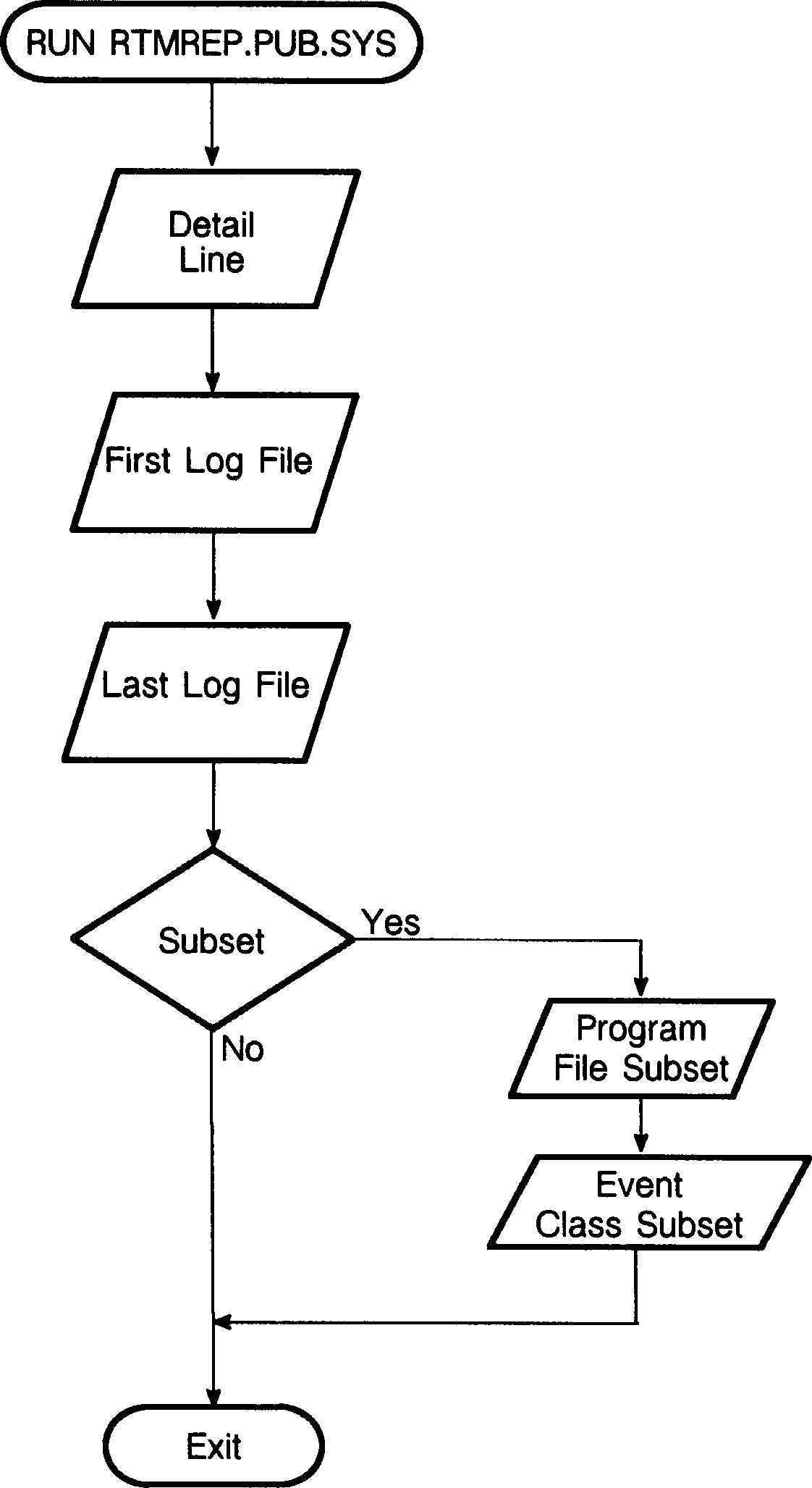 Figure C-5. RTMREP
Detail Line Prompt.
HP30364A.00.00 Run Time Monitor (C)
HEWLETT PACKARD COMPANY 1986
Enter a question mark (?) at any prompt for help.
Default answers for all prompts are shown in upper case.
Do you want a detail line for each event [yes/NO]?
* A positive answer to this prompt gives you the detailed report.
* A negative answer (the default) to this prompt gives you the
summary report. Either response takes you to the Log File
Specification prompts.
Log File Specification Prompt.
You may specify a range of log files to be
analyzed for the report
Enter first log file:
Enter last log file:
To examine a range of log files, type the starting log file number and
the last log file number.
To examine only one log file, enter the log file number in response to
the Enter First Log File prompt and a Return to the Enter Last Log File
number.
Either response takes you to the Subset prompt.
Subset Prompt.
Do you want to report on a subset of available data [yes/NO]?
* A positive response allows you to tailor the report to your needs
by selecting specific a subset of programs. This takes you to the
Enter Program File Subset prompt.
* A negative response (the default) reports on all available
information.
Enter Program File Subset Prompt.
Enter program file subset [CR will select all]:
You are being prompted for the name of a file(s) you want RTMREP to
create a report about. In addition, you can specify a set of program
files using wild card characters (@, #, ?) in conjunction with MPE V/E
file specifications. For example, the following file set specification
indicates all program files that start with the letter "C":
C@.MYGROUP.MYACCT
Enter Class Numbers Prompt.
Enter class numbers, separated by commas, or CR for all:
You are being prompted for the event classes you want included in the
report RTMREP creates.
Exiting RTMREP
After report specifics are complete, RTMREP prints the report, then
exits.
Figure C-5. RTMREP
Detail Line Prompt.
HP30364A.00.00 Run Time Monitor (C)
HEWLETT PACKARD COMPANY 1986
Enter a question mark (?) at any prompt for help.
Default answers for all prompts are shown in upper case.
Do you want a detail line for each event [yes/NO]?
* A positive answer to this prompt gives you the detailed report.
* A negative answer (the default) to this prompt gives you the
summary report. Either response takes you to the Log File
Specification prompts.
Log File Specification Prompt.
You may specify a range of log files to be
analyzed for the report
Enter first log file:
Enter last log file:
To examine a range of log files, type the starting log file number and
the last log file number.
To examine only one log file, enter the log file number in response to
the Enter First Log File prompt and a Return to the Enter Last Log File
number.
Either response takes you to the Subset prompt.
Subset Prompt.
Do you want to report on a subset of available data [yes/NO]?
* A positive response allows you to tailor the report to your needs
by selecting specific a subset of programs. This takes you to the
Enter Program File Subset prompt.
* A negative response (the default) reports on all available
information.
Enter Program File Subset Prompt.
Enter program file subset [CR will select all]:
You are being prompted for the name of a file(s) you want RTMREP to
create a report about. In addition, you can specify a set of program
files using wild card characters (@, #, ?) in conjunction with MPE V/E
file specifications. For example, the following file set specification
indicates all program files that start with the letter "C":
C@.MYGROUP.MYACCT
Enter Class Numbers Prompt.
Enter class numbers, separated by commas, or CR for all:
You are being prompted for the event classes you want included in the
report RTMREP creates.
Exiting RTMREP
After report specifics are complete, RTMREP prints the report, then
exits.