 HP 3000 Manuals HP 3000 Manuals




Using RTMSYS
RTM is controlled by the program RTMSYS. RTMSYS can be run interactively
or in batch mode by any user possessing OP or SM capability by entering:
: RUN RTMSYS.PUB.SYS
You only need to run RTMSYS to change the status of an event class.
Figure C-1 charts the flow of control with RTMSYS prompts.
Additional information on the prompts is provided in subsequent headings.
Defaults for all prompts are shown in upper case.
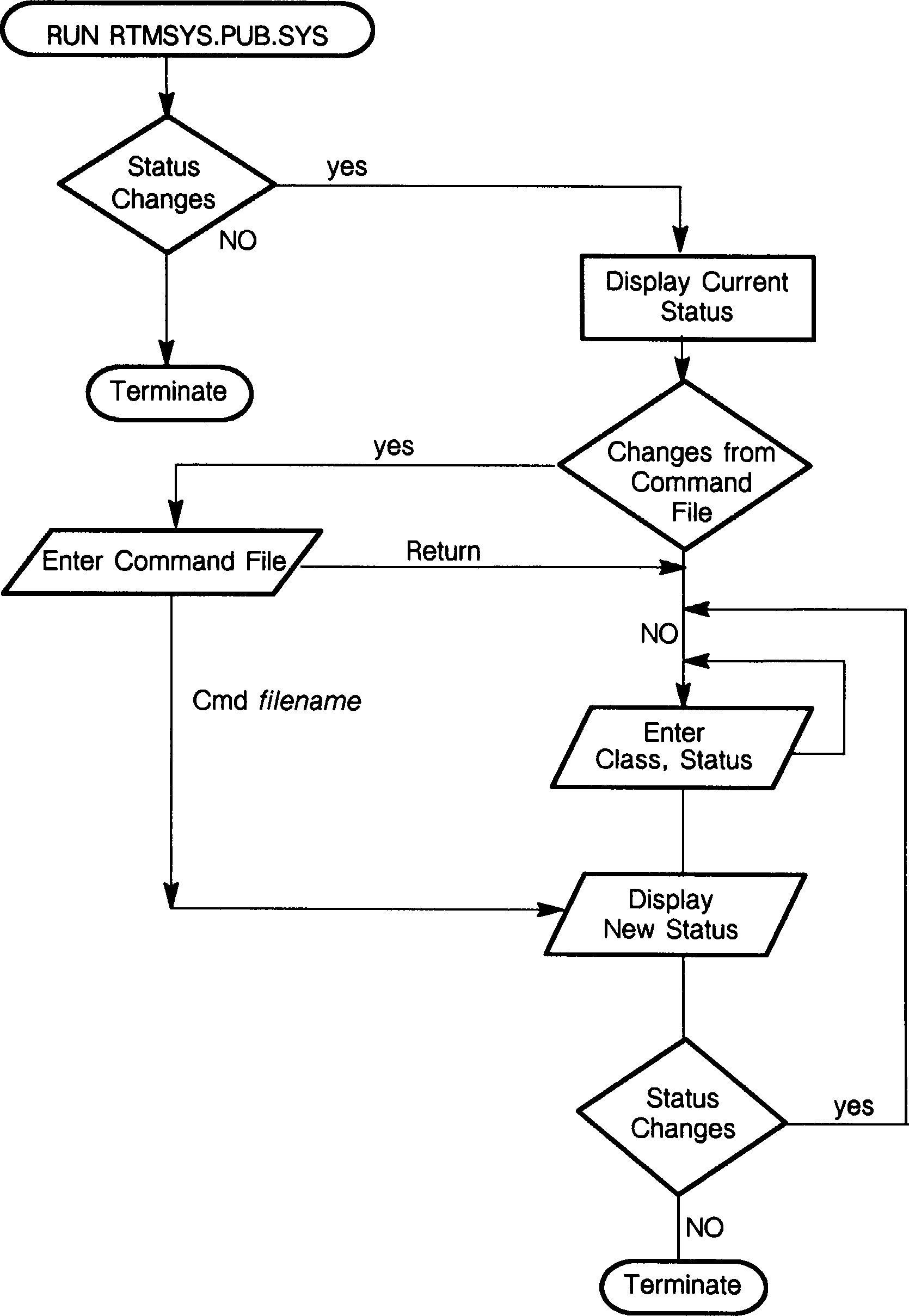 Figure C-1. RTMSYS
Status Changes Prompt
RTMSYS initially displays all event classes and their current status.
The first prompt asks you if you want to make changes to the classes of
events that RTM detects:
* A positive response causes RTMSYS to continue and takes you to the
command file prompt.
* A negative response, or Return, terminates RTMSYS
______________________________________________________________________________
| |
| |
| HP30364A.00.00 Run Time Monitor (C) HEWLETT PACKARD COMPANY 1986 |
| |
| Enter a question mark (?) at any prompt for help. |
| Default answers are shown in upper case. |
| |
| Do you want to make RTM status changes [yes/NO]? |
| |
| |
| CLASS DESCRIPTION STATUS |
| |
| 0 - LOGGING ENABLED OFF |
| 1 - Native Mode EVENTS OFF |
| 2 - COMMAND INTRINSIC OFF |
| 3 - FFILEINFO OFF |
| 4 - FGETINFO OFF |
| 5 - FCONTROL OFF |
| 6 - GENERAL FILESYS OFF |
| 7 - RESERVED |
| 8 - MISCELLANEOUS OFF |
| |
______________________________________________________________________________
Command File Prompt
Do you want to make changes from a command file [yes/NO]?
You are being asked if you have a file that contains information
regarding the classes of events that you want to alter the status of.
* A positive response takes you to the Enter Command File prompt.
* A negative response (the default), takes you to the Enter Class
prompt.
Enter Command File Prompt
Enter name of command file:
At this prompt, you should enter the name of the command file. Valid
responses include any valid file name of a file containing the event
classes and desired status. This file can be any standard, EDIT/3000
compatible file, either numbered or unnumbered, that contains records
indicating the class number and desired status. Each line contains a
class number and the desired status for that particular class.
1 0,ON
2 1,ON
3 5,OFF
Enter Class Prompt
ENTER CLASS, ON/OFF?
You are being prompted for event class changes. To change the status of
an event class, enter the class number and the desired status, ON or OFF,
separated by a comma. Continue to enter class numbers and desired status
until all changes have been made. When all desired changes have been
entered, press Return. This returns you to the Status Changes prompt.
Exiting RTMSYS
A negative response, or Return, at the Status Changes prompt causes
RTMSYS to terminate.
Running RTMSYS in Batch Mode
Figure C-2 , Figure C-3 , and Figure C-4 are three sample job
stream files that illustrate how you can enable and disable events from
batch mode, and generate a report on all programs run from a specified
account.
_____________________________________________________________________
| |
| :job rtmstart, manager.sys, pub |
| :comment |
| :comment check to see if rtmstart.pub.sys exists |
| :comment |
| :setjcw cierror=O |
| :listf rtmstart.pub.sys |
| :comment |
| :comment if rtmstart.pub.sys does not exist then create it |
| :comment |
| :if cierror = 907 then |
| :editor |
| a |
| 0,on |
| 1,on |
| 2,on |
| 3,on |
| 4,on |
| 5,on |
| 6,on |
| 7,on |
| 8,on |
| // |
| k rtmstart.pub.sys |
| e |
| :endif |
| :comment |
| :comment run rtmsys.pub.sys with command file created above|
| :comment |
| :run rtmsys.pub.sys;info="rtmstart.pub.sys" |
| :eoj |
_____________________________________________________________________
Figure C-2. Job Stream to Enable RTM for All Event Classes
__________________________________________________________________
| |
| :job rtmstop, manager.sys, pub |
| :comment |
| :comment check to see if rtmstart.pub.sys exists |
| :comment |
| :setjcw cierror=0 |
| :listf rtmstop.pub.sys |
| :comment |
| :comment if rtmstop.pub.sys does not exist then create it |
| :comment |
| :if cierror = 907 then |
| :editor |
| a |
| 0,off |
| 1,off |
| 2,off |
| 3,off |
| 4,off |
| 5,off |
| 6,off |
| 7,off |
| 8,off |
| // |
| k rtmstop.pub.sys |
| e |
| :endif |
| :comment |
| :comment run rtmsys.pub.sys with command file created above|
| :comment |
| :run rtmsys.pub.sys;info="rtmstop.pub.sys" |
| :eoj |
__________________________________________________________________
Figure C-3. Job Stream to Disable RTM for All Event Classes
______________________________________________________________________________________
| |
| :job rtmrep, manager.sys, pub |
| :comment |
| :comment The responses to the RTM prompts below have the |
| :comment following meanings: |
| :comment |
| :comment Response Meaning |
| :comment |
| :comment :file rtmlist;dev=epoc redirect the report to the |
| :comment epoc printer. |
| :comment n do not want a detail line for|
| :comment each incompatibility detected|
| :comment 1300 start with log file 1300 |
| :comment 1305 end with log file 1305 |
| :comment y subset the data |
| :comment @.@.finance report on all programs run |
| :comment out of the finance account |
| :comment 1,2,3,4,5 report on events in event |
| :comment classes 1 through 5 |
| :comment |
| :run rtmrep.pub.sys |
| :file rtmlist;dev=epoc |
| n |
| 1300 |
| 1305 |
| y |
| @.@.finance |
| 1,2,3,4,5 |
| :eoj |
______________________________________________________________________________________
Figure C-4. Job Stream to Generate a Report for All Finance Programs
Figure C-1. RTMSYS
Status Changes Prompt
RTMSYS initially displays all event classes and their current status.
The first prompt asks you if you want to make changes to the classes of
events that RTM detects:
* A positive response causes RTMSYS to continue and takes you to the
command file prompt.
* A negative response, or Return, terminates RTMSYS
______________________________________________________________________________
| |
| |
| HP30364A.00.00 Run Time Monitor (C) HEWLETT PACKARD COMPANY 1986 |
| |
| Enter a question mark (?) at any prompt for help. |
| Default answers are shown in upper case. |
| |
| Do you want to make RTM status changes [yes/NO]? |
| |
| |
| CLASS DESCRIPTION STATUS |
| |
| 0 - LOGGING ENABLED OFF |
| 1 - Native Mode EVENTS OFF |
| 2 - COMMAND INTRINSIC OFF |
| 3 - FFILEINFO OFF |
| 4 - FGETINFO OFF |
| 5 - FCONTROL OFF |
| 6 - GENERAL FILESYS OFF |
| 7 - RESERVED |
| 8 - MISCELLANEOUS OFF |
| |
______________________________________________________________________________
Command File Prompt
Do you want to make changes from a command file [yes/NO]?
You are being asked if you have a file that contains information
regarding the classes of events that you want to alter the status of.
* A positive response takes you to the Enter Command File prompt.
* A negative response (the default), takes you to the Enter Class
prompt.
Enter Command File Prompt
Enter name of command file:
At this prompt, you should enter the name of the command file. Valid
responses include any valid file name of a file containing the event
classes and desired status. This file can be any standard, EDIT/3000
compatible file, either numbered or unnumbered, that contains records
indicating the class number and desired status. Each line contains a
class number and the desired status for that particular class.
1 0,ON
2 1,ON
3 5,OFF
Enter Class Prompt
ENTER CLASS, ON/OFF?
You are being prompted for event class changes. To change the status of
an event class, enter the class number and the desired status, ON or OFF,
separated by a comma. Continue to enter class numbers and desired status
until all changes have been made. When all desired changes have been
entered, press Return. This returns you to the Status Changes prompt.
Exiting RTMSYS
A negative response, or Return, at the Status Changes prompt causes
RTMSYS to terminate.
Running RTMSYS in Batch Mode
Figure C-2 , Figure C-3 , and Figure C-4 are three sample job
stream files that illustrate how you can enable and disable events from
batch mode, and generate a report on all programs run from a specified
account.
_____________________________________________________________________
| |
| :job rtmstart, manager.sys, pub |
| :comment |
| :comment check to see if rtmstart.pub.sys exists |
| :comment |
| :setjcw cierror=O |
| :listf rtmstart.pub.sys |
| :comment |
| :comment if rtmstart.pub.sys does not exist then create it |
| :comment |
| :if cierror = 907 then |
| :editor |
| a |
| 0,on |
| 1,on |
| 2,on |
| 3,on |
| 4,on |
| 5,on |
| 6,on |
| 7,on |
| 8,on |
| // |
| k rtmstart.pub.sys |
| e |
| :endif |
| :comment |
| :comment run rtmsys.pub.sys with command file created above|
| :comment |
| :run rtmsys.pub.sys;info="rtmstart.pub.sys" |
| :eoj |
_____________________________________________________________________
Figure C-2. Job Stream to Enable RTM for All Event Classes
__________________________________________________________________
| |
| :job rtmstop, manager.sys, pub |
| :comment |
| :comment check to see if rtmstart.pub.sys exists |
| :comment |
| :setjcw cierror=0 |
| :listf rtmstop.pub.sys |
| :comment |
| :comment if rtmstop.pub.sys does not exist then create it |
| :comment |
| :if cierror = 907 then |
| :editor |
| a |
| 0,off |
| 1,off |
| 2,off |
| 3,off |
| 4,off |
| 5,off |
| 6,off |
| 7,off |
| 8,off |
| // |
| k rtmstop.pub.sys |
| e |
| :endif |
| :comment |
| :comment run rtmsys.pub.sys with command file created above|
| :comment |
| :run rtmsys.pub.sys;info="rtmstop.pub.sys" |
| :eoj |
__________________________________________________________________
Figure C-3. Job Stream to Disable RTM for All Event Classes
______________________________________________________________________________________
| |
| :job rtmrep, manager.sys, pub |
| :comment |
| :comment The responses to the RTM prompts below have the |
| :comment following meanings: |
| :comment |
| :comment Response Meaning |
| :comment |
| :comment :file rtmlist;dev=epoc redirect the report to the |
| :comment epoc printer. |
| :comment n do not want a detail line for|
| :comment each incompatibility detected|
| :comment 1300 start with log file 1300 |
| :comment 1305 end with log file 1305 |
| :comment y subset the data |
| :comment @.@.finance report on all programs run |
| :comment out of the finance account |
| :comment 1,2,3,4,5 report on events in event |
| :comment classes 1 through 5 |
| :comment |
| :run rtmrep.pub.sys |
| :file rtmlist;dev=epoc |
| n |
| 1300 |
| 1305 |
| y |
| @.@.finance |
| 1,2,3,4,5 |
| :eoj |
______________________________________________________________________________________
Figure C-4. Job Stream to Generate a Report for All Finance Programs