 HP 3000 Manuals HP 3000 Manuals




Evaluating Migration Planning Reports
Migration planning reports generated by the MPTREPT program provide
information that will assist you in deciding upon the MPE/iX execution
mode best suited for migrated MPE V/E program and SL files. MPE/iX
provides two major modes of program execution: CM and NM. A third mode
of program execution is provided through object code translation of MPE
V/E program code. For example, you may want to run a particular set of
applications in CM for immediate productivity on the new system. You may
want another set of applications to be immediately migrated to NM in
order to fully utilize the features of MPE/iX and HP-PA.
MPT attempts to classify program files and generic ASCII data files
according to the programming language they contain. This is a subjective
classification which should be used as general guidance only. It is
possible for this package to incorrectly classify the language of a
program or source file.
Migration Events
MPT detects and reports on incompatibilities found in selected MPE V/E
files. Incompatibilities are separated into individual migration events
for clarity. Each migration event is defined as the presence or use of
certain features of MPE V/E that are known to require attention when
migrating those files to an MPE iX-based system.
The first look at MPT migration planning reports may seem to indicate
that migration will be extremely difficult (due to the number of events
reported). This is not usually the case. Many migration events are
handled simply and quite a few can be dismissed. Remember, MPT gives you
too much information rather than too little.
Not every reported event will cause difficulty in migrating to MPE/iX.
Some events cause problems only when going into NM. Others are, by their
nature, uncertain in their difficulty. The design philosophy of MPT is
to report any problem, even if the chances of it causing a problem are
very slight. In this way the user can check the event at their leisure
before migrating to MPE/iX.
A particular event may function properly when run in CM but not in NM.
For this reason each event will be classified into one of the four
severity levels both for CM and for NM. In general, the NM severity level
will be at least as severe as CM and often more severe. If an
application shows few or no problems in CM, but many severe problems in
NM, you might decide that migrating this application to NM might not be
warranted.
Severity Level of Migration Event.
In order to help you decide which migration events are minor and which
are major, each migration event is assigned one of four severity levels,
described below:
OK No problems exist when using this feature.
POSSIBLE A potential problem exists, but to be certain, you
require more information than MPT can obtain. For
example, we know that the new operating system will
not use DRT numbers to address its hardware
devices. If a system intrinsic is called to return
the DRT number on MPE/iX, then a zero will be
returned. This will not abort the offending
program, nor return an error condition. The
potential problem arises based on what the
application program actually does with the DRT once
it gets it. POSSIBLE events might be no problem at
all, but they should be examined to be sure if
migration is to be smooth.
WARNING These events will not work on the new system
without some modification. There is a work around
or alternate method to accomplish the same task,
but it might involve minor rework of the
application. (For example, the :SYSDUMP command
has been eliminated. You must use the SYSGEN
utility instead. Also, the commands to SYSGEN are
different from the interaction with :SYSDUMP . This
is a correctable situation, but it won't work
properly without changes).
ERROR These events indicate that a feature is being used
which is not supported on the MPE/iX system. There
may be a work around available but it usually
involves a significant amount of rework to the
application. Examples include the calling of the
PTAPE intrinsic, using the now obsolete DEL
package, or calling undocumented MPE internal
routines.
Examining File Types for Migration Events.
The migration events detected in MPE V/E files may be further divided
into general categories. Some migration events will apply only to
compiled program files (such as the calling of certain intrinsic
routines) while others relate mainly to batch jobs and UDC files. The
current migration event types detected are:
PROG Program file events. These events are discovered
by examining compiled program files which are found
on the system. Certain program information is
obtained for information purposes (for example,
stack size and code segment data) and will be
included in the reports. Incompatibilities are
generally caused by the program calling certain
external procedures (or intrinsics) or by its use
of Privileged Mode capability.
This category will result in a lot of POSSIBLE
events, since it can detect that a procedure is
called, but not what parameters are passed to it or
what the application does with the results of that
call.
SL Segmented Library (SL) events. These are the same
events as for compiled program files, except that
they were found in a Segmented Library rather than
a program. SL files are included in the statistics
gathered concerning the average size program and
the number of program files with Privileged Mode.
RTM Run Time Monitor events. In order to obtain more
certain information about how the procedures are
being used it was necessary to detect them
dynamically during program execution. RTM inserts
special routines into the system which detect when
specific routines are called by a program.
Since RTM is used while the programs are running,
parameters that are passed are examined by the
interceptor routine. If a problematic combination
is detected, a special record is written to the MPE
log files. This record can be analyzed at a later
time by reading those log files.
RTM can be more specific about an event than PROG
events since it at least knows the parameters being
passed. It still can't detect how an application
uses the results of the routine so even many RTM
events might not be actual problems. You may
notice that the same event will be recorded as PROG
and RTM. PROG says the application could call the
routine in an incompatible way; RTM says it
actually did.
Note that RTM detects events only as they occur.
If a program is never run or is run but never
executes a specific routine call, RTM can't detect
incompatible events. For this reason MPT uses both
program scanning (PROG) and RTM events in its
reports.
JOB Job stream events. These events are found by
examining all job stream files on the system. (Job
streams are ASCII files that contain a list of
commands to be executed in batch mode). Each job
stream is scanned for incompatible or changed MPE
commands. If one is found, a JOB event is logged.
UDC ASCII files are examined to see if they might be
UDC files. Each UDC file is scanned for
incompatible or changed MPE commands. If one is
found, a UDC event is logged.
Selecting a Report Level
The MPTREPT program allows you to generate six levels of migration
planning reports and a general information summary that is generated each
time a report is printed. The first levels are general summaries about
the system and might be used to gain a general understanding on the
migration issues involved. Succeeding levels of reporting are designed
to further isolate the reported migration events identified in files.
The sections that follow provide detailed descriptions of both the format
and the contents of each of MPTREPT reports summarized below:
* General Information Summary is printed each time the MPTREPT
program is run. This one-page report lists the parameters
affecting the run and the overall disk capacity (before and after
migration to MPE/iX).
* System Summary Report Level One is a two-page report showing a
global summary of migration issues on the system. Use this report
level to get an initial indication of what major migration issues
exist on the system being analyzed.
* Account Summary Report Level Two has one line per account on the
system. It can be used to determine if certain accounts will
require more attention during the migration than others. For
example, if the majority of migration issues are in an account you
don't plan to migrate, there is little cause for concern. On the
other hand, if an abnormally high number of issues are found in
accounts you absolutely need to migrate to NM, you may wish to
earmark that account for a detailed analysis using reporting
levels four and five, as well as running OCA on the files in that
account.
* Group Summary Report Level Three has one line per group on the
system. It can further identify groups within accounts that might
require more attention than others.
* File Summary Report Level Four lists each file that was flagged as
requiring migration attention. The number and severity of
migration events is shown so you can pinpoint specific files which
need attention during migration. You can minimize the relatively
large amount of output generated by this level of report by
excluding those accounts or groups you are not planning to migrate
to an MPE/iX- based system.
* File Detail Report Level Five has the same information as File
Summary Report Level Four plus a line listing a brief description
of each migration event found in the file. You can minimize the
relatively large amount of output generated by this level of
report by excluding those accounts or groups you are not planning
to migrate to an MPE/iX- based system.
* "Event Summary Report Level Six" lists each migration event
detected and the files in which MPT located the event.
NOTE The disk space considerations included in MPT reports pertain only
to permanent disk files and do not include the additional
requirements for services such as virtual memory and spool files.
The figures should be considered only as a minimum amount of
additional disk space that will be required when migrating the
selected files.
General Information Summary.
A General Information Summary is printed each time the MPTREPT program is
run. Figure I-3 is a sample of a General Information Summary. The
General Information Summary lists the program run parameters MPTREPT uses
when generating reports, including those you specified in the MPTOPTNS
parameter file. Overall disk space considerations are also listed.
Table I-2 describes the information returned in the MPTREPT General
Information Summary.
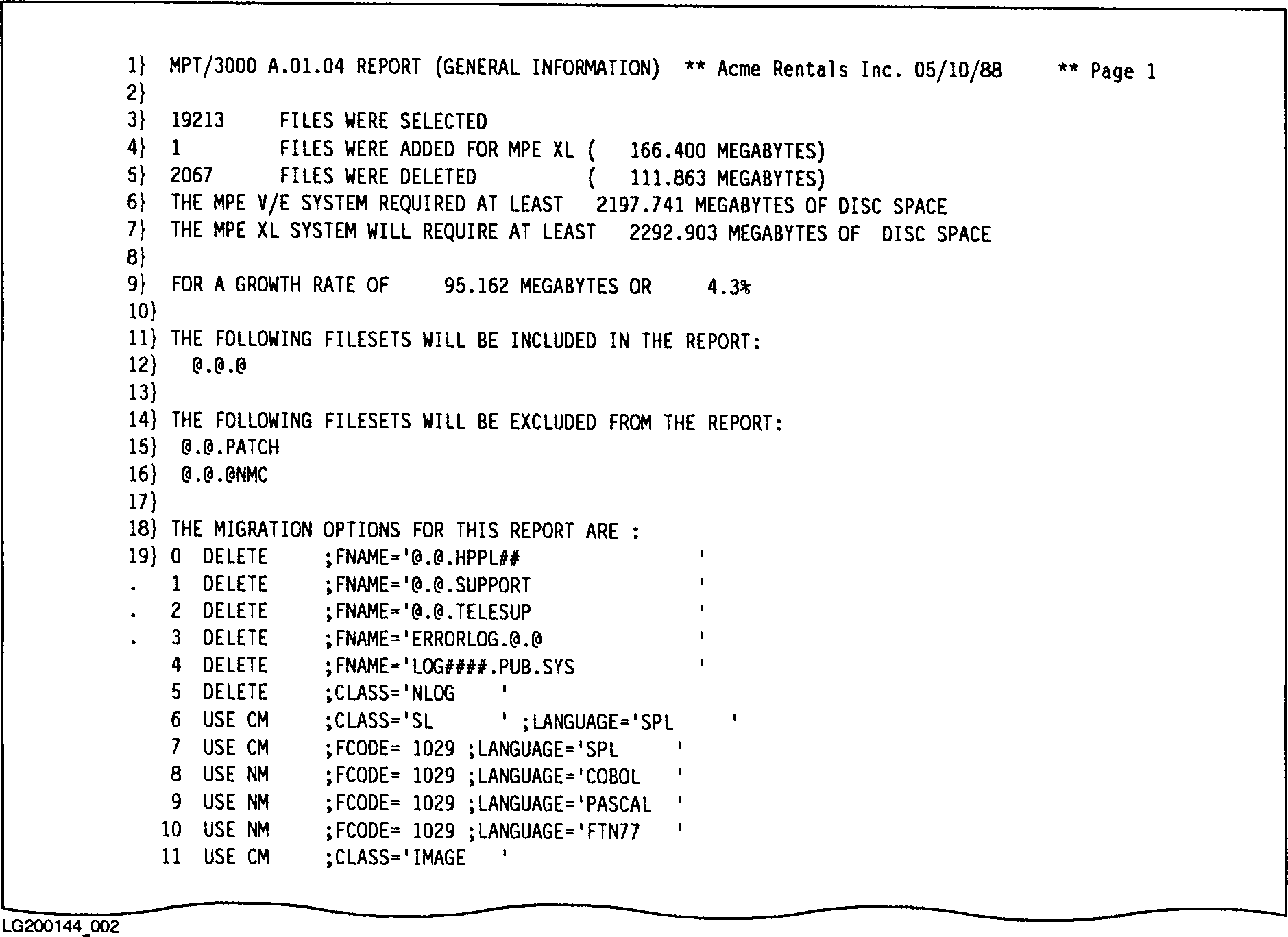 Figure I-3. Sample MPTREPT General Information Summary
Table I-1. MPTREPT General Information Summary Description.
--------------------------------------------------------------------------------------------
| | |
| LINE# | DESCRIPTION |
| | |
--------------------------------------------------------------------------------------------
| | |
| 1 | An MPT banner that identifies the report level printed on the current |
| | page (in this example, "GENERAL INFORMATION"), a custom report title |
| | you can specify using the INFO= parameter of the :RUN command (in this |
| | example, :RUN MPTREPT.MPT.TELESUP; INFO= "Acme Rentals Inc."), and the |
| | current date. |
| | |
--------------------------------------------------------------------------------------------
| | |
| 3 | The total number of file descriptions in the MPTDB database that meet |
| | the selection criteria (your responses to the ENTER FILESET: prompt of |
| | the MPTREPT program). |
| | |
--------------------------------------------------------------------------------------------
| | |
| 4 | The total number of files that meet the selection criteria but are not |
| | located in the MPTDB database because they represent new files that |
| | must be included in any report of MPE/iX disk space considerations. |
| | This number includes those files you specified in the MPTOPTNS |
| | parameter file (ACTION=ADD). Also listed is the disk space required by |
| | these files. |
| | |
--------------------------------------------------------------------------------------------
| | |
| 5 | The total number of files that meet the selection criteria but are |
| | deleted from these MPT reports. This number includes those files you |
| | specified in the MPTOPTNS parameter file (ACTION=DELETE). Also listed |
| | is the disk space required by these files. |
| | |
--------------------------------------------------------------------------------------------
| | |
| 6 | The MPE V/E disk space requirements for all files that met the |
| | selection criteria (including those that were deleted from the report, |
| | described in Line 5 above). |
| | |
--------------------------------------------------------------------------------------------
| | |
| 7 | The estimated MPE/iX disk space requirements for all files selected |
| | (including those that were added to the report, described in Line 4 |
| | above). This estimate is computed for selected files using the chosen |
| | migration modes you specified in the MPTOPTNS file, either CM, NM, or |
| | TM. (The default migration mode is CM.) |
| | |
--------------------------------------------------------------------------------------------
| | |
| 9 | The estimated growth rate indicated by the amount of additional disk |
| | space required by the selected (and ADDed) files when they are migrated |
| | to MPE/iX. The percentage is this value compared against the original |
| | MPE V/E value. |
| | |
--------------------------------------------------------------------------------------------
| | |
| 11...16 | The selection criteria you specified in response to the ENTER FILESET: |
| | prompt of the MPTREPT program. The list includes both the files you |
| | included and the files you excluded from the report. |
| | |
--------------------------------------------------------------------------------------------
| | |
| 18...n | Migration options applicable to this run of the MPTREPT program. This |
| | list includes those migration options you specified in the MPTOPTNS |
| | parameter file, including the chosen action to take (for example, |
| | DELETE, USE CM, or USE NM) for each of the indicated filesets. |
| | |
--------------------------------------------------------------------------------------------
System Summary Report Level One.
The System Summary Report Level One displays global migration information
that may be present on your system. This report is printed each time you
specify the value 1 in response to the ENTER THE LEVEL OF DETAIL YOU
DESIRE (1-6) prompt of the MPTREPT program.
The System Summary Report is a three-part report:
* Part One displays total numbers of migration events sorted by the
various file types recognized by MPT. Figure I-4 is a sample
of Part One of a System Summary Report Level One. Table I-2
describes the information returned in Part One.
* Part Two displays general information about the SL and program
files examined in the report. Figure I-5 is a sample of Part
Two of a System Summary Report Level Two. Table I-3 describes
the information returned in Part Two.
* Part Three displays disk space requirements for each of the
migration options sorted by both MPE V/E file codes and special
codes interpreted by MPT. Figure I-6 is a sample of Part Three
of a System Summary Report Level Three. Table I-4 describes
the information returned in Part Three.
Part One Description.
Part One of the System Summary Report Level One summarizes the number of
migration events, logged for both CM and NM according to file types and
languages.
Figure I-3. Sample MPTREPT General Information Summary
Table I-1. MPTREPT General Information Summary Description.
--------------------------------------------------------------------------------------------
| | |
| LINE# | DESCRIPTION |
| | |
--------------------------------------------------------------------------------------------
| | |
| 1 | An MPT banner that identifies the report level printed on the current |
| | page (in this example, "GENERAL INFORMATION"), a custom report title |
| | you can specify using the INFO= parameter of the :RUN command (in this |
| | example, :RUN MPTREPT.MPT.TELESUP; INFO= "Acme Rentals Inc."), and the |
| | current date. |
| | |
--------------------------------------------------------------------------------------------
| | |
| 3 | The total number of file descriptions in the MPTDB database that meet |
| | the selection criteria (your responses to the ENTER FILESET: prompt of |
| | the MPTREPT program). |
| | |
--------------------------------------------------------------------------------------------
| | |
| 4 | The total number of files that meet the selection criteria but are not |
| | located in the MPTDB database because they represent new files that |
| | must be included in any report of MPE/iX disk space considerations. |
| | This number includes those files you specified in the MPTOPTNS |
| | parameter file (ACTION=ADD). Also listed is the disk space required by |
| | these files. |
| | |
--------------------------------------------------------------------------------------------
| | |
| 5 | The total number of files that meet the selection criteria but are |
| | deleted from these MPT reports. This number includes those files you |
| | specified in the MPTOPTNS parameter file (ACTION=DELETE). Also listed |
| | is the disk space required by these files. |
| | |
--------------------------------------------------------------------------------------------
| | |
| 6 | The MPE V/E disk space requirements for all files that met the |
| | selection criteria (including those that were deleted from the report, |
| | described in Line 5 above). |
| | |
--------------------------------------------------------------------------------------------
| | |
| 7 | The estimated MPE/iX disk space requirements for all files selected |
| | (including those that were added to the report, described in Line 4 |
| | above). This estimate is computed for selected files using the chosen |
| | migration modes you specified in the MPTOPTNS file, either CM, NM, or |
| | TM. (The default migration mode is CM.) |
| | |
--------------------------------------------------------------------------------------------
| | |
| 9 | The estimated growth rate indicated by the amount of additional disk |
| | space required by the selected (and ADDed) files when they are migrated |
| | to MPE/iX. The percentage is this value compared against the original |
| | MPE V/E value. |
| | |
--------------------------------------------------------------------------------------------
| | |
| 11...16 | The selection criteria you specified in response to the ENTER FILESET: |
| | prompt of the MPTREPT program. The list includes both the files you |
| | included and the files you excluded from the report. |
| | |
--------------------------------------------------------------------------------------------
| | |
| 18...n | Migration options applicable to this run of the MPTREPT program. This |
| | list includes those migration options you specified in the MPTOPTNS |
| | parameter file, including the chosen action to take (for example, |
| | DELETE, USE CM, or USE NM) for each of the indicated filesets. |
| | |
--------------------------------------------------------------------------------------------
System Summary Report Level One.
The System Summary Report Level One displays global migration information
that may be present on your system. This report is printed each time you
specify the value 1 in response to the ENTER THE LEVEL OF DETAIL YOU
DESIRE (1-6) prompt of the MPTREPT program.
The System Summary Report is a three-part report:
* Part One displays total numbers of migration events sorted by the
various file types recognized by MPT. Figure I-4 is a sample
of Part One of a System Summary Report Level One. Table I-2
describes the information returned in Part One.
* Part Two displays general information about the SL and program
files examined in the report. Figure I-5 is a sample of Part
Two of a System Summary Report Level Two. Table I-3 describes
the information returned in Part Two.
* Part Three displays disk space requirements for each of the
migration options sorted by both MPE V/E file codes and special
codes interpreted by MPT. Figure I-6 is a sample of Part Three
of a System Summary Report Level Three. Table I-4 describes
the information returned in Part Three.
Part One Description.
Part One of the System Summary Report Level One summarizes the number of
migration events, logged for both CM and NM according to file types and
languages.
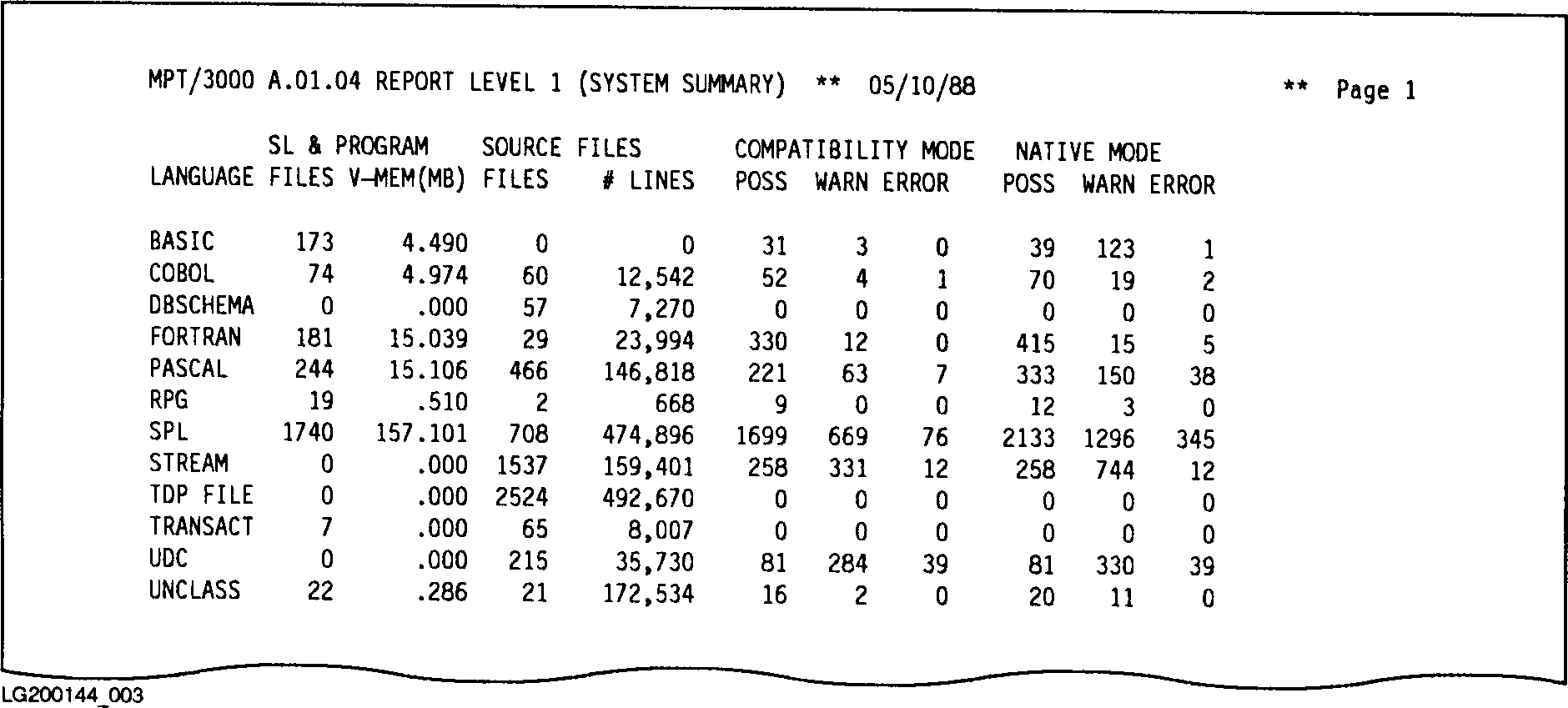 Figure I-4. Sample System Summary Report Level One (Part One)
Table I-2. System Summary Report Level One Description
--------------------------------------------------------------------------------------------
| | |
| COLUMN | DESCRIPTION(Part One). |
| | |
--------------------------------------------------------------------------------------------
| | |
| LANGUAGE | The programming language for source, SL, and program files |
| | (for example, COBOL, FORTRAN, Pascal, or SPL). The following |
| | codes indicate further classification of the file in some |
| | cases, including: |
| | |
| | SOURCE Unclassifiable program source files. |
| | |
| | |
| | STREAM ASCII files containing a job stream. |
| | |
| | TDP FILE Unprocessed TDP document files. |
| | |
| | UDC What MPT has interpreted to be ASCII |
| | UDC files. |
| | |
| | AUTO IMAGE automatic master data sets. |
| | |
| | DATASET1 IMAGE files containing a data set. |
| | |
| | DBSCHEMA IMAGE schema files. |
| | |
| | DETAIL IMAGE detail data sets. |
| | |
| | ILR IMAGE files used for Intrinsic Level |
| | Recovery. |
| | |
| | MANUAL IMAGE manual master data sets. |
| | |
| | REMOTE IMAGE remote database access files. |
| | |
| | ROOT IMAGE root files. |
| | |
| | blank The file does not fit any recognized |
| | category. |
| | |
--------------------------------------------------------------------------------------------
| | |
| SL & PROGRAM FILES | The number of SL and program files found for this language. |
| | |
| SL & PROGRAM VMEM(MB) | The size of virtual memory (code plus data stacks) for all |
| | program files and SLs in this language. |
| | |
--------------------------------------------------------------------------------------------
| | |
| SOURCE FILES FILES | The number of source files found for this language. |
| | |
| SOURCE FILES # LINES | The total number of lines (records) for all source files in |
| | this language. |
| | |
--------------------------------------------------------------------------------------------
| | |
| COMPATIBILITY MODE POSS | The total number of CM migration events classified as |
| | "POSSIBLE" identified in these files. |
| | |
| COMPATIBILITY MODE WARN | The total number of CM migration events classified as |
| | "WARNING" identified in these files. |
| | |
| COMPATIBILITY MODE ERROR | The total number of CM migration events classified as |
| | "ERROR" identified in these files. |
| | |
--------------------------------------------------------------------------------------------
| | |
| NATIVE MODE POSS | The total number of NM migration events classified as |
| | "POSSIBLE" identified in these files. |
| | |
| NATIVE MODE WARN | The total number of NM migration events classified as |
| | "WARNING" identified in these files. |
| | |
| NATIVE MODE ERROR | The total number of NM migration events classified as |
| | "ERROR" identified in these files. |
| | |
--------------------------------------------------------------------------------------------
Part Two Description.
Part Two of the System Summary Report Level One displays a number of
summary lines in a noncolumnar format. Figure I-5 is an sample of
the second part of a System Summary Report Level One. Table I-3
describes the information returned in this part of the System Summary.
Figure I-4. Sample System Summary Report Level One (Part One)
Table I-2. System Summary Report Level One Description
--------------------------------------------------------------------------------------------
| | |
| COLUMN | DESCRIPTION(Part One). |
| | |
--------------------------------------------------------------------------------------------
| | |
| LANGUAGE | The programming language for source, SL, and program files |
| | (for example, COBOL, FORTRAN, Pascal, or SPL). The following |
| | codes indicate further classification of the file in some |
| | cases, including: |
| | |
| | SOURCE Unclassifiable program source files. |
| | |
| | |
| | STREAM ASCII files containing a job stream. |
| | |
| | TDP FILE Unprocessed TDP document files. |
| | |
| | UDC What MPT has interpreted to be ASCII |
| | UDC files. |
| | |
| | AUTO IMAGE automatic master data sets. |
| | |
| | DATASET1 IMAGE files containing a data set. |
| | |
| | DBSCHEMA IMAGE schema files. |
| | |
| | DETAIL IMAGE detail data sets. |
| | |
| | ILR IMAGE files used for Intrinsic Level |
| | Recovery. |
| | |
| | MANUAL IMAGE manual master data sets. |
| | |
| | REMOTE IMAGE remote database access files. |
| | |
| | ROOT IMAGE root files. |
| | |
| | blank The file does not fit any recognized |
| | category. |
| | |
--------------------------------------------------------------------------------------------
| | |
| SL & PROGRAM FILES | The number of SL and program files found for this language. |
| | |
| SL & PROGRAM VMEM(MB) | The size of virtual memory (code plus data stacks) for all |
| | program files and SLs in this language. |
| | |
--------------------------------------------------------------------------------------------
| | |
| SOURCE FILES FILES | The number of source files found for this language. |
| | |
| SOURCE FILES # LINES | The total number of lines (records) for all source files in |
| | this language. |
| | |
--------------------------------------------------------------------------------------------
| | |
| COMPATIBILITY MODE POSS | The total number of CM migration events classified as |
| | "POSSIBLE" identified in these files. |
| | |
| COMPATIBILITY MODE WARN | The total number of CM migration events classified as |
| | "WARNING" identified in these files. |
| | |
| COMPATIBILITY MODE ERROR | The total number of CM migration events classified as |
| | "ERROR" identified in these files. |
| | |
--------------------------------------------------------------------------------------------
| | |
| NATIVE MODE POSS | The total number of NM migration events classified as |
| | "POSSIBLE" identified in these files. |
| | |
| NATIVE MODE WARN | The total number of NM migration events classified as |
| | "WARNING" identified in these files. |
| | |
| NATIVE MODE ERROR | The total number of NM migration events classified as |
| | "ERROR" identified in these files. |
| | |
--------------------------------------------------------------------------------------------
Part Two Description.
Part Two of the System Summary Report Level One displays a number of
summary lines in a noncolumnar format. Figure I-5 is an sample of
the second part of a System Summary Report Level One. Table I-3
describes the information returned in this part of the System Summary.
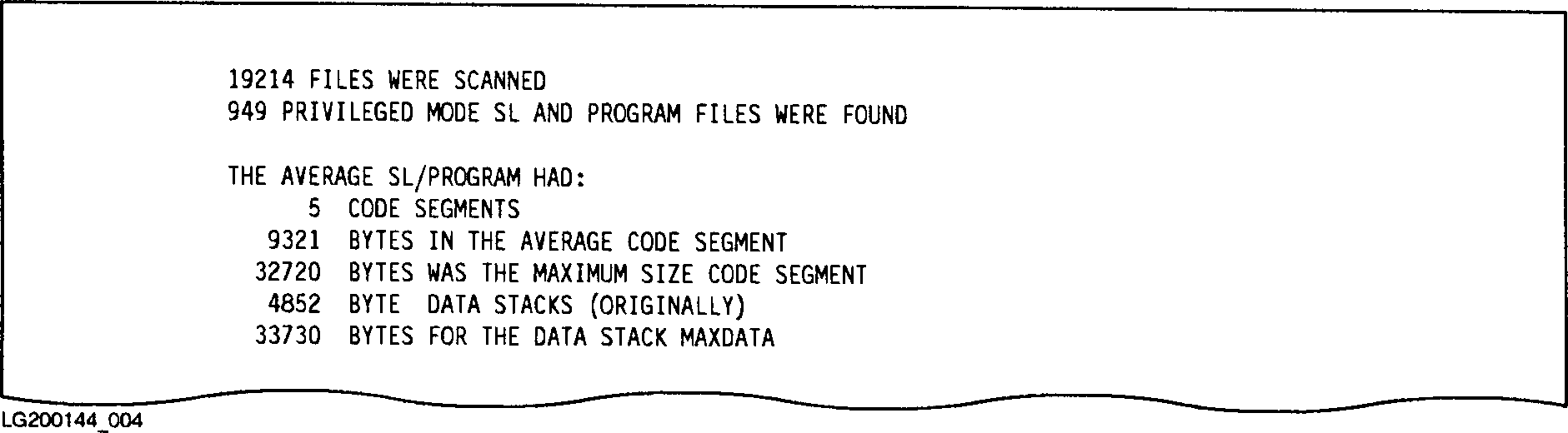 Figure I-5. Sample System Summary Report Level One (Part Two)
Table I-3. System Summary Report Level One Description (Part Two)
--------------------------------------------------------------------------------------------
| | |
| LINE# | DESCRIPTION |
| | |
--------------------------------------------------------------------------------------------
| | |
| 1 | The total number of disk file descriptions included in this report (both |
| | those files examined in the MPTDB database and those files ADDed to the |
| | report). |
| | |
--------------------------------------------------------------------------------------------
| | |
| 2 | The total number of SL and program files assigned Privileged Mode (PM) |
| | capability. |
| | |
--------------------------------------------------------------------------------------------
| | |
| 5 | The average number of code segments obtained by averaging the number of |
| | code segments in each SL and program file on the system. |
| | |
--------------------------------------------------------------------------------------------
| | |
| 6 | The number of bytes in an average-sized code segment. Divide this number |
| | by two to get 16-bit (MPE V/E) words. Divide by four to get 32-bit |
| | (MPE/iX) words. |
| | |
--------------------------------------------------------------------------------------------
| | |
| 7 | The largest code segment found in the SL and program files examined. |
| | |
--------------------------------------------------------------------------------------------
| | |
| 8 | The average initial stack size that the average program starts as. The |
| | stack can usually be expanded as needed, up to the MAXDATA size. |
| | |
--------------------------------------------------------------------------------------------
| | |
| 9 | The average MAXDATA size of the program files examined. |
| | |
--------------------------------------------------------------------------------------------
Part Three Description.
Part Three of the System Summary Report Level One displays disk space
requirements for each of the migration options sorted by both MPE V/E
file codes and special codes interpreted by MPT. Figure I-6 is an
sample of the third part of a System Summary Report Level One. Table I-4
describes the information returned in this part of the System
Summary.
Figure I-5. Sample System Summary Report Level One (Part Two)
Table I-3. System Summary Report Level One Description (Part Two)
--------------------------------------------------------------------------------------------
| | |
| LINE# | DESCRIPTION |
| | |
--------------------------------------------------------------------------------------------
| | |
| 1 | The total number of disk file descriptions included in this report (both |
| | those files examined in the MPTDB database and those files ADDed to the |
| | report). |
| | |
--------------------------------------------------------------------------------------------
| | |
| 2 | The total number of SL and program files assigned Privileged Mode (PM) |
| | capability. |
| | |
--------------------------------------------------------------------------------------------
| | |
| 5 | The average number of code segments obtained by averaging the number of |
| | code segments in each SL and program file on the system. |
| | |
--------------------------------------------------------------------------------------------
| | |
| 6 | The number of bytes in an average-sized code segment. Divide this number |
| | by two to get 16-bit (MPE V/E) words. Divide by four to get 32-bit |
| | (MPE/iX) words. |
| | |
--------------------------------------------------------------------------------------------
| | |
| 7 | The largest code segment found in the SL and program files examined. |
| | |
--------------------------------------------------------------------------------------------
| | |
| 8 | The average initial stack size that the average program starts as. The |
| | stack can usually be expanded as needed, up to the MAXDATA size. |
| | |
--------------------------------------------------------------------------------------------
| | |
| 9 | The average MAXDATA size of the program files examined. |
| | |
--------------------------------------------------------------------------------------------
Part Three Description.
Part Three of the System Summary Report Level One displays disk space
requirements for each of the migration options sorted by both MPE V/E
file codes and special codes interpreted by MPT. Figure I-6 is an
sample of the third part of a System Summary Report Level One. Table I-4
describes the information returned in this part of the System
Summary.
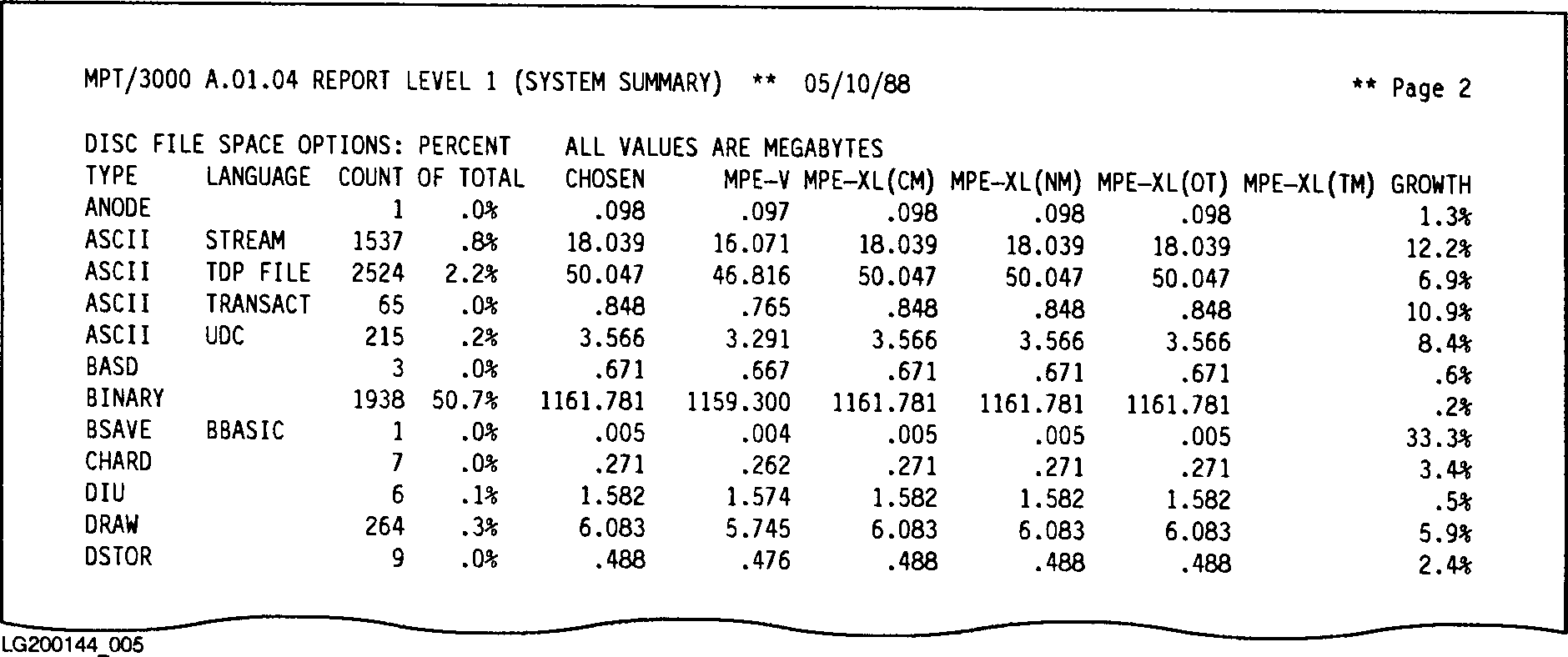 Figure I-6. Sample System Summary Report Level One (Part Three)
Table I-4. System Summary Report Level One Description (Part Three).
--------------------------------------------------------------------------------------------
| | |
| COLUMN | DESCRIPTION |
| | |
--------------------------------------------------------------------------------------------
| | |
| TYPE | The general MPE file type. This mnemonic comes from the |
| | file code (returned in LISTF,2 command). If the file code |
| | is zero, the following special interpretations are obtained |
| | by the analysis program: |
| | |
| | ASCII General character files. |
| | |
| | BINARY General binary data files. |
| | |
| | CIR Files of type Circular. |
| | |
| | MSG Files of type Message. |
| | |
| | RIO Files of type Relative Input/Output. |
| | |
| | KSAM Files of type KSAM. |
| | |
--------------------------------------------------------------------------------------------
| | |
| LANGUAGE | The programming language for source, SL, and program files |
| | (for example, COBOL, FORTRAN, Pascal, or SPL). The following |
| | codes indicate further classification of the file in some |
| | cases, including: |
| | |
| | SOURCE Unclassifiable program source files. |
| | |
| | |
| | STREAM ASCII files containing a job stream . |
| | |
| | |
| | TDP FILE Unprocessed TDP document files. |
| | |
| | UDC What MPT has interpreted to be ASCII |
| | UDC files. |
| | |
| | AUTO IMAGE automatic master data sets. |
| | |
| | DATASET1 IMAGE files containing a data set. |
| | |
| | DBSCHEMA IMAGE schema files. |
| | |
| | DETAIL IMAGE detail data sets. |
| | |
| | ILR IMAGE files used for Intrinsic Level |
| | Recovery. |
| | |
| | MANUAL IMAGE manual master data sets. |
| | |
| | REMOTE IMAGE remote database access files. |
| | |
| | ROOT IMAGE root files. |
| | |
| | blank The file does not fit any recognized |
| | category. |
| | |
--------------------------------------------------------------------------------------------
Table J-4. System summary Report Level One Description (Part Three).
--------------------------------------------------------------------------------------------
| | |
| COUNT | The number of disk files of this type examined in this |
| | report. |
| | |
--------------------------------------------------------------------------------------------
| | |
| PERCENT OF TOTAL | The percentage of the total disk space used that the disk |
| | files of this type will occupy on the MPE/iX-based system |
| | (based upon the migration option you selected in the |
| | MPTOPTNS parameter file). CM is the default. |
| | |
--------------------------------------------------------------------------------------------
| | |
| CHOSEN | The disk space requirements for the disk files of this type |
| | based upon the migration option you selected in the MPTOPTNS |
| | parameter file. CM is the default. |
| | |
--------------------------------------------------------------------------------------------
| | |
| MPE-V | The MPE V/E disk space requirements for the disk files of |
| | this type. |
| | |
--------------------------------------------------------------------------------------------
| | |
| MPE/iX(CM) | The estimated disk space requirements if the disk files of |
| | this type were migrated to an MPE/iX-based system and left |
| | in CM. |
| | |
--------------------------------------------------------------------------------------------
| | |
| MPE/iX(NM) | The estimated disk space requirements if the disk files of |
| | this type were migrated to an MPE/iX-based system, then |
| | converted into NM. For example, program and SL files would |
| | be recompiled using NM compilers. |
| | |
--------------------------------------------------------------------------------------------
| | |
| MPE/iX(OT) | Disregard this information. This column is reserved for |
| | expansion of the MPT tool to allow for the possibility of |
| | future migration paths. |
| | |
--------------------------------------------------------------------------------------------
| | |
| MPE/iX(TM) | The estimated disk space requirements if the disk files of |
| | this type were object code translated using the OCT utility. |
| | This column is printed only if these files are program or SL |
| | files. |
| | |
--------------------------------------------------------------------------------------------
| | |
| GROWTH | The relative growth of disk space usage for all disk files |
| | of this file type. This value represents the amount of |
| | additional disk space required when migrating these files to |
| | MPE/iX using the chosen migration option you identified in |
| | the MPTOPTNS parameter file. (Default chosen is CM.) A |
| | growth of 0% means that the files will occupy the same disk |
| | space on an MPE/iX-based system as they occupied on an MPE |
| | V/E-based system. A growth of 100% means the files will |
| | double in size. A negative growth indicates that the files |
| | will occupy less space on MPE/iX than they did on MPE V/E. |
| | |
--------------------------------------------------------------------------------------------
Account Summary Report Level Two.
The Account Summary Report Level Two breaks down the migration
information into account levels. The information returned in the Account
Summary Report enables you to determine accounts that may be responsible
for the majority of migration events or disk space. This report is
printed each time you specify the value 2 in response to the ENTER THE
LEVEL OF DETAIL YOU DESIRE (1-6) prompt of the MPTREPT program. Figure
I-7 is a sample of a portion of an Account Summary Report. Table I-5
describes the information returned in the MPTREPT Account Summary
Report Level Two.
Figure I-6. Sample System Summary Report Level One (Part Three)
Table I-4. System Summary Report Level One Description (Part Three).
--------------------------------------------------------------------------------------------
| | |
| COLUMN | DESCRIPTION |
| | |
--------------------------------------------------------------------------------------------
| | |
| TYPE | The general MPE file type. This mnemonic comes from the |
| | file code (returned in LISTF,2 command). If the file code |
| | is zero, the following special interpretations are obtained |
| | by the analysis program: |
| | |
| | ASCII General character files. |
| | |
| | BINARY General binary data files. |
| | |
| | CIR Files of type Circular. |
| | |
| | MSG Files of type Message. |
| | |
| | RIO Files of type Relative Input/Output. |
| | |
| | KSAM Files of type KSAM. |
| | |
--------------------------------------------------------------------------------------------
| | |
| LANGUAGE | The programming language for source, SL, and program files |
| | (for example, COBOL, FORTRAN, Pascal, or SPL). The following |
| | codes indicate further classification of the file in some |
| | cases, including: |
| | |
| | SOURCE Unclassifiable program source files. |
| | |
| | |
| | STREAM ASCII files containing a job stream . |
| | |
| | |
| | TDP FILE Unprocessed TDP document files. |
| | |
| | UDC What MPT has interpreted to be ASCII |
| | UDC files. |
| | |
| | AUTO IMAGE automatic master data sets. |
| | |
| | DATASET1 IMAGE files containing a data set. |
| | |
| | DBSCHEMA IMAGE schema files. |
| | |
| | DETAIL IMAGE detail data sets. |
| | |
| | ILR IMAGE files used for Intrinsic Level |
| | Recovery. |
| | |
| | MANUAL IMAGE manual master data sets. |
| | |
| | REMOTE IMAGE remote database access files. |
| | |
| | ROOT IMAGE root files. |
| | |
| | blank The file does not fit any recognized |
| | category. |
| | |
--------------------------------------------------------------------------------------------
Table J-4. System summary Report Level One Description (Part Three).
--------------------------------------------------------------------------------------------
| | |
| COUNT | The number of disk files of this type examined in this |
| | report. |
| | |
--------------------------------------------------------------------------------------------
| | |
| PERCENT OF TOTAL | The percentage of the total disk space used that the disk |
| | files of this type will occupy on the MPE/iX-based system |
| | (based upon the migration option you selected in the |
| | MPTOPTNS parameter file). CM is the default. |
| | |
--------------------------------------------------------------------------------------------
| | |
| CHOSEN | The disk space requirements for the disk files of this type |
| | based upon the migration option you selected in the MPTOPTNS |
| | parameter file. CM is the default. |
| | |
--------------------------------------------------------------------------------------------
| | |
| MPE-V | The MPE V/E disk space requirements for the disk files of |
| | this type. |
| | |
--------------------------------------------------------------------------------------------
| | |
| MPE/iX(CM) | The estimated disk space requirements if the disk files of |
| | this type were migrated to an MPE/iX-based system and left |
| | in CM. |
| | |
--------------------------------------------------------------------------------------------
| | |
| MPE/iX(NM) | The estimated disk space requirements if the disk files of |
| | this type were migrated to an MPE/iX-based system, then |
| | converted into NM. For example, program and SL files would |
| | be recompiled using NM compilers. |
| | |
--------------------------------------------------------------------------------------------
| | |
| MPE/iX(OT) | Disregard this information. This column is reserved for |
| | expansion of the MPT tool to allow for the possibility of |
| | future migration paths. |
| | |
--------------------------------------------------------------------------------------------
| | |
| MPE/iX(TM) | The estimated disk space requirements if the disk files of |
| | this type were object code translated using the OCT utility. |
| | This column is printed only if these files are program or SL |
| | files. |
| | |
--------------------------------------------------------------------------------------------
| | |
| GROWTH | The relative growth of disk space usage for all disk files |
| | of this file type. This value represents the amount of |
| | additional disk space required when migrating these files to |
| | MPE/iX using the chosen migration option you identified in |
| | the MPTOPTNS parameter file. (Default chosen is CM.) A |
| | growth of 0% means that the files will occupy the same disk |
| | space on an MPE/iX-based system as they occupied on an MPE |
| | V/E-based system. A growth of 100% means the files will |
| | double in size. A negative growth indicates that the files |
| | will occupy less space on MPE/iX than they did on MPE V/E. |
| | |
--------------------------------------------------------------------------------------------
Account Summary Report Level Two.
The Account Summary Report Level Two breaks down the migration
information into account levels. The information returned in the Account
Summary Report enables you to determine accounts that may be responsible
for the majority of migration events or disk space. This report is
printed each time you specify the value 2 in response to the ENTER THE
LEVEL OF DETAIL YOU DESIRE (1-6) prompt of the MPTREPT program. Figure
I-7 is a sample of a portion of an Account Summary Report. Table I-5
describes the information returned in the MPTREPT Account Summary
Report Level Two.
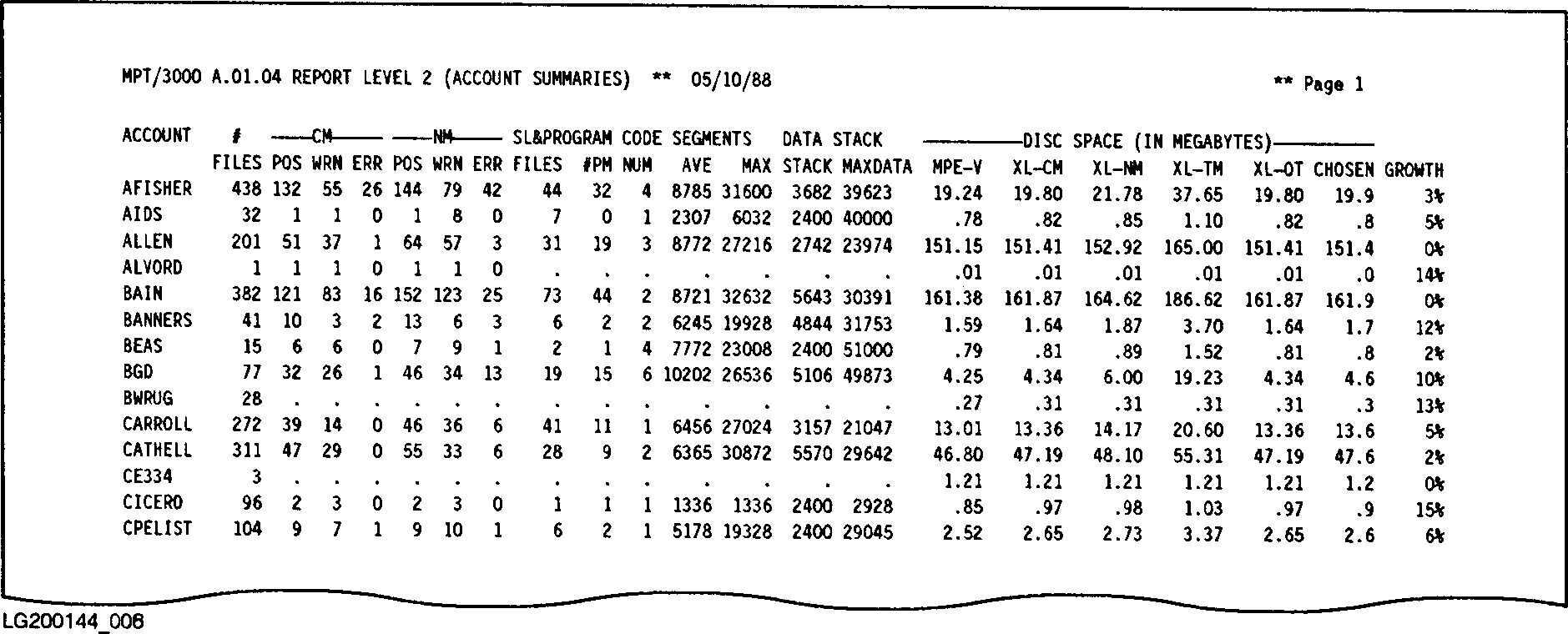 Figure I-7. Sample Account Summary Report Level Two
Table I-5. Account Summary Report Level Two Description.
--------------------------------------------------------------------------------------------
| | |
| COLUMN | DESCRIPTION |
| | |
--------------------------------------------------------------------------------------------
| | |
| ACCOUNT | The account name. |
| | |
--------------------------------------------------------------------------------------------
| | |
| # FILES | The number of files selected in this account. |
| | |
--------------------------------------------------------------------------------------------
| | |
| COMPATIBILITY MODE POS | The total number of CM migration events classified as |
| | "POSSIBLE" identified in the selected files in this account. |
| | |
| COMPATIBILITY MODE WRN | The total number of CM migration events classified as |
| | "WARNING" identified in the selected files in this account. |
| | |
| COMPATIBILITY MODE ERR | The total number of CM migration events classified as |
| | "ERROR" identified in the selected files is this account. |
| | |
--------------------------------------------------------------------------------------------
| | |
| NATIVE MODE POS | The total number of NM migration events classified as |
| | "POSSIBLE" identified in the selected files in this account. |
| | |
| NATIVE MODE WRN | The total number of NM migration events classified as |
| | "WARNING" identified in the selected files in this account. |
| | |
| NATIVE MODE ERR | The total number of NM migration events classified as |
| | "ERROR" identified in the selected files in this account. |
| | |
--------------------------------------------------------------------------------------------
| | |
| SL & PROGRAM FILES | The number of selected program and SL files located in this |
| | account. |
| | |
| SL & PROGRAM # PM | The number of selected program and SL files assigned |
| | Privilege Mode capability located in this account. |
| | |
--------------------------------------------------------------------------------------------
| | |
| CODE SEGMENTS NUM | The average number of code segments obtained by averaging |
| | the number of code segments in each selected SL and program |
| | file in this account. |
| | |
| CODE SEGMENTS AVE | The number of bytes in an average-sized code segment. |
| | Divide this number by two to get 16-bit (MPE V/E) words. |
| | Divide by four to get 32-bit (MPE-iX) words. |
| | |
| CODE SEGMENTS MAX | The largest code segment (in bytes) found in the selected SL |
| | and program files in this account. |
| | |
--------------------------------------------------------------------------------------------
Table J-5. Account summary Report Level Two Description. (Cont.)
--------------------------------------------------------------------------------------------
| | |
| DATA STACK STACK | The average initial stack size (in bytes) for all selected |
| | programs in this account. |
| | |
| DATA STACK MAXDATA | The average MAXDATA size ( in bytes) for all selected |
| | program files in this account. |
| | |
--------------------------------------------------------------------------------------------
| | |
| DISC SPACE MPE-V | The MPE V/E disk space requirements (in megabytes) for all |
| | selected files in this account. |
| | |
| DISC SPACE MPE-iX(CM) | The estimated disk space requirements (in megabytes) if the |
| | selected files in this account were migrated to an |
| | MPE/iX-based system and left in CM. |
| | |
| DISC SPACE MPE/iX(NM) | The estimated disk space requirements (in megabytes) if the |
| | selected files in this account were migrated to an |
| | MPE/iX-based system, then converted into NM. For example, |
| | program and SL files would be recompiled using MPE/iX NM |
| | compilers. |
| | |
| DISC SPACE | The estimated disk space requirements (in megabytes) if the |
| | selected files in this MPE/iX(TM) account were object code |
| | translated using the OCT utility. This column is printed |
| | only for selected program and SL files. |
| | |
| DISC SPACE | Disregard this information. This column is reserved for |
| | expansion of the MPE-iX(OT) MPT product to allow for the |
| | possibility of future migration paths. |
| | |
--------------------------------------------------------------------------------------------
| | |
| DISC SPACE CHOSEN | The disk space requirements (in megabytes) for the selected |
| | files in this account based upon the migration option you |
| | selected in the MPTOPTNS parameter file. (CM is the |
| | default.) |
| | |
| DISC SPACE GROWTH | The relative growth (in megabytes) of disk space usage for |
| | the selected files in this account. This value represents |
| | the amount of additional disk space required when migrating |
| | these files to MPE/iX using the "Chosen" migration option |
| | you identified in the MPTOPTNS parameter file. (The default |
| | "Chosen" is CM.) A growth of 0% means that the files will |
| | occupy the same disk space on an MPE/iX-based system they |
| | occupied on an MPE V/E-based system. A growth of 100% means |
| | the files will double in size. A negative growth indicates |
| | that the files will occupy less space on MPE/iX than they |
| | did on MPE V/E. |
| | |
--------------------------------------------------------------------------------------------
Group Summary Report Level Three.
The Group Summary Report Level Three is quite similar to the Account
Summary Report Level Two, except that it summarizes by group rather than
by account. This report is printed each time you specify the value 3 in
response to the ENTER THE LEVEL OF DETAIL YOU DESIRE (1-6) prompt of the
MPTREPT program. Figure I-8 is a sample of a portion of a Group
Summary Report Level Three.
The account name is given within the box of asterisks before each list of
groups associated with that account. The columns in the Group Summary
Level Three Report have exactly the same meaning as those in the Account
Summary Level Two report, except that they summarize all the files in a
group rather than in an account. Please refer to the description of the
columns in Table I-5 for details.
Figure I-7. Sample Account Summary Report Level Two
Table I-5. Account Summary Report Level Two Description.
--------------------------------------------------------------------------------------------
| | |
| COLUMN | DESCRIPTION |
| | |
--------------------------------------------------------------------------------------------
| | |
| ACCOUNT | The account name. |
| | |
--------------------------------------------------------------------------------------------
| | |
| # FILES | The number of files selected in this account. |
| | |
--------------------------------------------------------------------------------------------
| | |
| COMPATIBILITY MODE POS | The total number of CM migration events classified as |
| | "POSSIBLE" identified in the selected files in this account. |
| | |
| COMPATIBILITY MODE WRN | The total number of CM migration events classified as |
| | "WARNING" identified in the selected files in this account. |
| | |
| COMPATIBILITY MODE ERR | The total number of CM migration events classified as |
| | "ERROR" identified in the selected files is this account. |
| | |
--------------------------------------------------------------------------------------------
| | |
| NATIVE MODE POS | The total number of NM migration events classified as |
| | "POSSIBLE" identified in the selected files in this account. |
| | |
| NATIVE MODE WRN | The total number of NM migration events classified as |
| | "WARNING" identified in the selected files in this account. |
| | |
| NATIVE MODE ERR | The total number of NM migration events classified as |
| | "ERROR" identified in the selected files in this account. |
| | |
--------------------------------------------------------------------------------------------
| | |
| SL & PROGRAM FILES | The number of selected program and SL files located in this |
| | account. |
| | |
| SL & PROGRAM # PM | The number of selected program and SL files assigned |
| | Privilege Mode capability located in this account. |
| | |
--------------------------------------------------------------------------------------------
| | |
| CODE SEGMENTS NUM | The average number of code segments obtained by averaging |
| | the number of code segments in each selected SL and program |
| | file in this account. |
| | |
| CODE SEGMENTS AVE | The number of bytes in an average-sized code segment. |
| | Divide this number by two to get 16-bit (MPE V/E) words. |
| | Divide by four to get 32-bit (MPE-iX) words. |
| | |
| CODE SEGMENTS MAX | The largest code segment (in bytes) found in the selected SL |
| | and program files in this account. |
| | |
--------------------------------------------------------------------------------------------
Table J-5. Account summary Report Level Two Description. (Cont.)
--------------------------------------------------------------------------------------------
| | |
| DATA STACK STACK | The average initial stack size (in bytes) for all selected |
| | programs in this account. |
| | |
| DATA STACK MAXDATA | The average MAXDATA size ( in bytes) for all selected |
| | program files in this account. |
| | |
--------------------------------------------------------------------------------------------
| | |
| DISC SPACE MPE-V | The MPE V/E disk space requirements (in megabytes) for all |
| | selected files in this account. |
| | |
| DISC SPACE MPE-iX(CM) | The estimated disk space requirements (in megabytes) if the |
| | selected files in this account were migrated to an |
| | MPE/iX-based system and left in CM. |
| | |
| DISC SPACE MPE/iX(NM) | The estimated disk space requirements (in megabytes) if the |
| | selected files in this account were migrated to an |
| | MPE/iX-based system, then converted into NM. For example, |
| | program and SL files would be recompiled using MPE/iX NM |
| | compilers. |
| | |
| DISC SPACE | The estimated disk space requirements (in megabytes) if the |
| | selected files in this MPE/iX(TM) account were object code |
| | translated using the OCT utility. This column is printed |
| | only for selected program and SL files. |
| | |
| DISC SPACE | Disregard this information. This column is reserved for |
| | expansion of the MPE-iX(OT) MPT product to allow for the |
| | possibility of future migration paths. |
| | |
--------------------------------------------------------------------------------------------
| | |
| DISC SPACE CHOSEN | The disk space requirements (in megabytes) for the selected |
| | files in this account based upon the migration option you |
| | selected in the MPTOPTNS parameter file. (CM is the |
| | default.) |
| | |
| DISC SPACE GROWTH | The relative growth (in megabytes) of disk space usage for |
| | the selected files in this account. This value represents |
| | the amount of additional disk space required when migrating |
| | these files to MPE/iX using the "Chosen" migration option |
| | you identified in the MPTOPTNS parameter file. (The default |
| | "Chosen" is CM.) A growth of 0% means that the files will |
| | occupy the same disk space on an MPE/iX-based system they |
| | occupied on an MPE V/E-based system. A growth of 100% means |
| | the files will double in size. A negative growth indicates |
| | that the files will occupy less space on MPE/iX than they |
| | did on MPE V/E. |
| | |
--------------------------------------------------------------------------------------------
Group Summary Report Level Three.
The Group Summary Report Level Three is quite similar to the Account
Summary Report Level Two, except that it summarizes by group rather than
by account. This report is printed each time you specify the value 3 in
response to the ENTER THE LEVEL OF DETAIL YOU DESIRE (1-6) prompt of the
MPTREPT program. Figure I-8 is a sample of a portion of a Group
Summary Report Level Three.
The account name is given within the box of asterisks before each list of
groups associated with that account. The columns in the Group Summary
Level Three Report have exactly the same meaning as those in the Account
Summary Level Two report, except that they summarize all the files in a
group rather than in an account. Please refer to the description of the
columns in Table I-5 for details.
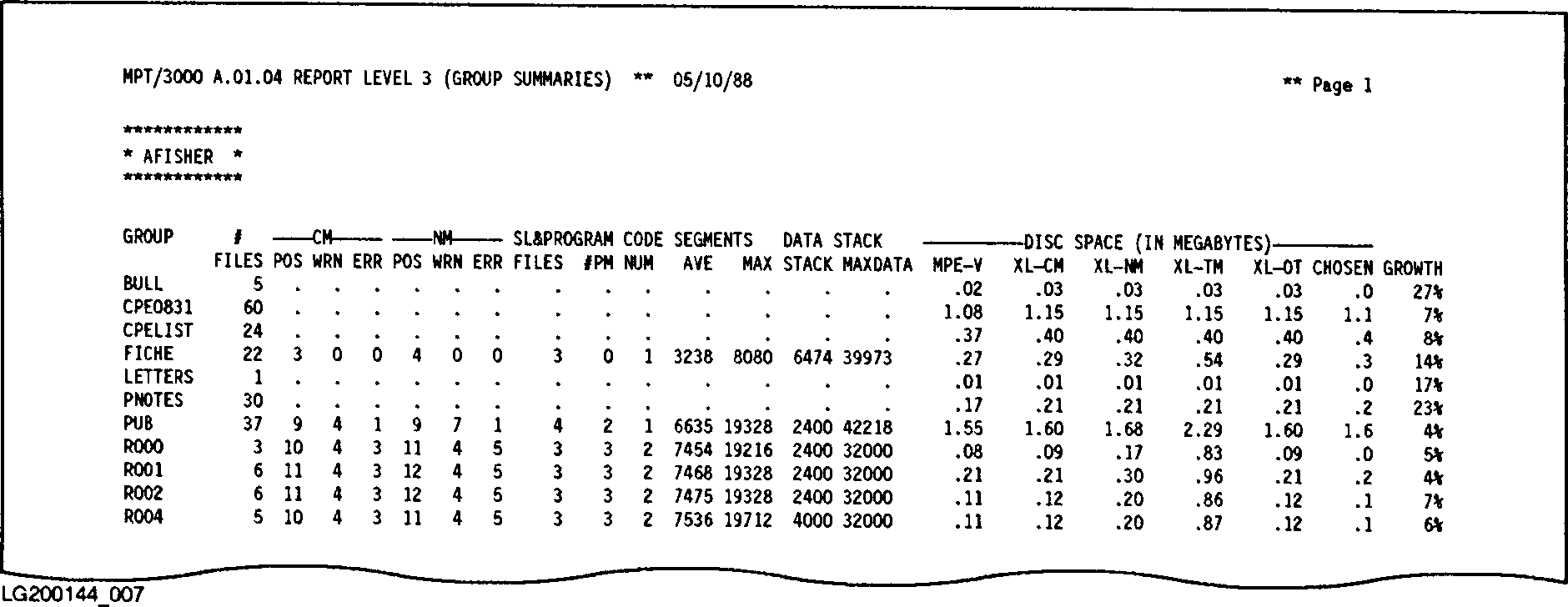 Figure I-8. Sample Group Summary Report Level Three
File Summary Report Level Four.
The File Summary Report Level Four provides summary information for each
file selected for the report. This report displays the event number and
severity level of all migration events located in each of the selected
files. You can use the information returned in this report to pinpoint
the files that need attention during migration.
This report is printed each time you specify the value 4 in response to
the ENTER THE LEVEL OF DETAIL YOU DESIRE (1-6) prompt of the MPTREPT
program. Figure I-9 is a sample of a portion of a File Summary
Report Level Four. Table I-6 summarizes the information returned in
the File Summary Report Level Four.
In the report, each group is identified in the box of asterisks preceding
the list of files (GROUP.ACCOUNT). At the end of the list of files
associated with each group is a group summary. The columns in this
single line have meanings identical to those in the Account Summary
Report Level Two, described in Table I-5 .
Figure I-8. Sample Group Summary Report Level Three
File Summary Report Level Four.
The File Summary Report Level Four provides summary information for each
file selected for the report. This report displays the event number and
severity level of all migration events located in each of the selected
files. You can use the information returned in this report to pinpoint
the files that need attention during migration.
This report is printed each time you specify the value 4 in response to
the ENTER THE LEVEL OF DETAIL YOU DESIRE (1-6) prompt of the MPTREPT
program. Figure I-9 is a sample of a portion of a File Summary
Report Level Four. Table I-6 summarizes the information returned in
the File Summary Report Level Four.
In the report, each group is identified in the box of asterisks preceding
the list of files (GROUP.ACCOUNT). At the end of the list of files
associated with each group is a group summary. The columns in this
single line have meanings identical to those in the Account Summary
Report Level Two, described in Table I-5 .
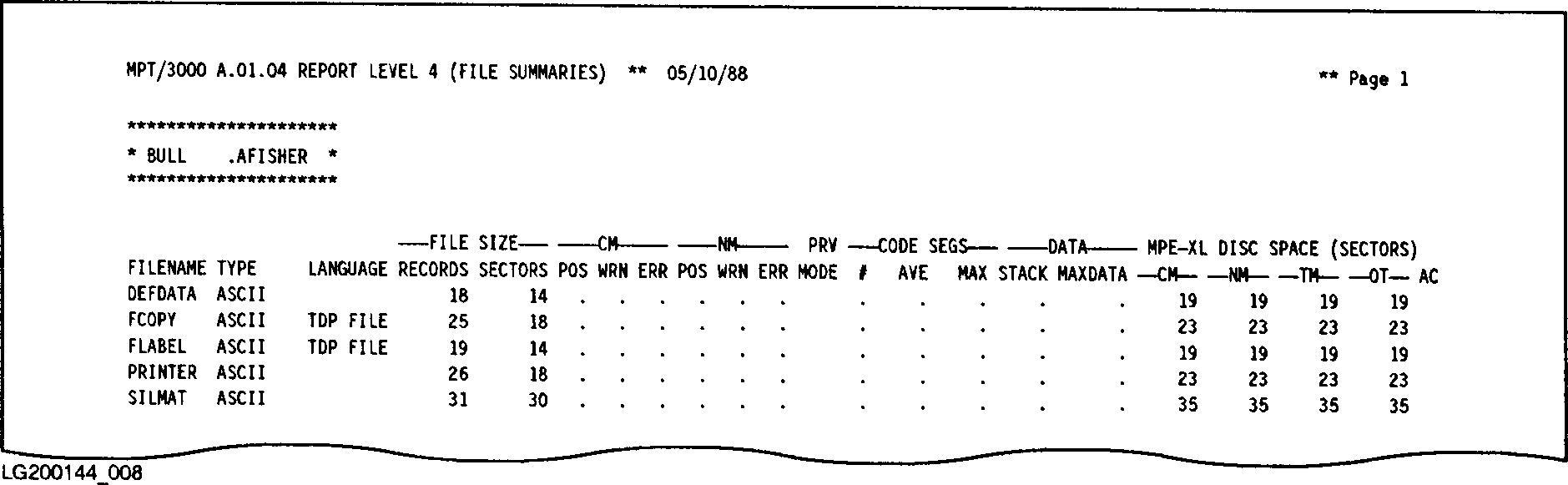 Figure I-9. Sample File Summary Report Level Four
Table I-6. File summary Report Level Four Description.
--------------------------------------------------------------------------------------------
| | |
| COLUMN | DESCRIPTION |
| | |
--------------------------------------------------------------------------------------------
| | |
| TYPE | The general MPE file type. This mnemonic comes from the |
| | file code (returned in :LISTF,2 command). If the file code |
| | is zero, the following special interpretations are obtained |
| | by the analysis program: |
| | |
| | ASCII General character files. |
| | |
| | BINARY General binary data files. |
| | |
| | CIR Files of type Circular. |
| | |
| | MSG Files of type Message. |
| | |
| | RIO Files of type Relative Input/Output. |
| | |
| | KSAM Files of type KSAM. |
| | |
--------------------------------------------------------------------------------------------
| | |
| LANGUAGE | The programming language for source, SL, and program files |
| | (for example, COBOL, FORTRAN, Pascal, or SPL). The following |
| | codes indicate further classification of the file in some |
| | cases, including: |
| | |
| | SOURCE Unclassifiable program source files. |
| | |
| | |
| | STREAM ASCII files containing a job stream. |
| | |
| | TDP FILE Unprocessed TDP document files. |
| | |
| | UDC What MPT has interpreted to be ASCII |
| | UDC files. |
| | |
| | AUTO IMAGE automatic master data sets. |
| | |
| | DATASET1 IMAGE files containing a data set. |
| | |
| | DBSCHEMA IMAGE schema files. |
| | |
| | DETAIL IMAGE detail data sets. |
| | |
| | ILR IMAGE files used for Intrinsic Level |
| | Recovery. |
| | |
| | MANUAL IMAGE manual master data sets. |
| | |
| | REMOTE IMAGE remote database access files. |
| | |
| | ROOT IMAGE root files. |
| | |
| | blank The file does not fit any recognized |
| | category. |
| | |
--------------------------------------------------------------------------------------------
| | |
| FILE SIZE RECORDS | The number of records in the file. |
| | |
| FILE SIZE SECTORS | The number of sectors of disk space used by the file on the |
| | MPE V/E-based system. |
| | |
--------------------------------------------------------------------------------------------
Table J-6. File Summary Report Level Four Description. (Cont.)
--------------------------------------------------------------------------------------------
| | |
| COMPATIBILITY MODE POS | The total number of CM migration events classified as |
| | "POSSIBLE" identified in this file. |
| | |
| COMPATIBILITY MODE WRN | The total number of CM migration events classified as |
| | "WARNING" identified in this file. |
| | |
| COMPATIBILITY MODE ERR | The total number of CM migration events classified as |
| | "ERROR" identified in this file. |
| | |
--------------------------------------------------------------------------------------------
| | |
| NATIVE MODE POS | The total number of NM migration events classified as |
| | "POSSIBLE" identified in this file. |
| | |
| NATIVE MODE WRN | The total number of NM migration events classified as |
| | "WARNING" identified in this file. |
| | |
| NATIVE MODE ERR | The total number of NM migration events classified as |
| | "ERROR" identified in this file. |
| | |
--------------------------------------------------------------------------------------------
| | |
| PRV MODE | Indicates if this file contains Privileged Mode (PM) code. |
| | This column can contain one of the following codes: |
| | |
| | (blank) The file does not contain Privilege Mode |
| | code. |
| | |
| | PM The file was assigned PM capability using |
| | :PREP. |
| | |
| | P The file contains at least one routine |
| | specifying $CONTROL PRIVILEGED. |
| | |
| | PP Both PM and P pertain to this file. |
| | |
--------------------------------------------------------------------------------------------
| | |
| CODE SEGS# | The number of code segments in this file (if applicable). |
| | |
| CODE SEGS AVE | The average size of the code segments (in bytes). |
| | |
| CODE SEGS MAX | The size of the largest code segment (in bytes). |
| | |
--------------------------------------------------------------------------------------------
| | |
| DATA STACK | The initial size of the data stack (in bytes). |
| | |
| DATA MAXDATA | The maximum size the data stack can grow to (bytes). |
| | |
--------------------------------------------------------------------------------------------
| | |
| DISC SPACE MPE/iX(CM) | The estimated disk space requirements (in megabytes) if this |
| | file were migrated to an MPE/iX-based system and left in CM. |
| | |
| DISC SPACE MPE/iX(NM) | The estimated disk space requirements (in megabytes) if this |
| | file were migrated to an MPE/iX-based system, then converted |
| | into NM. For example, program and SL files would be |
| | recompiled using MPE/iX NM compilers. |
| | |
| DISC SPACE MPE-iX(TM) | The estimated disk space requirements (in megabytes) if this |
| | file were object code translated using the OCT utility. |
| | This column if this file were object is printed for only |
| | selected program and SL files. |
| | |
| DISC SPACE MPE-iX(OT) | Disregard this information. This column is reserved for |
| | expansion of the MPT tool to allow for the possibility of |
| | future migration paths. |
| | |
--------------------------------------------------------------------------------------------
Table J-6. File Summary Report Level Four Description. (Cont.)
--------------------------------------------------------------------------------------------
| | |
| AC | This field indicates when a migration option (action) has |
| | been "Chosen" for this file. The default action is to |
| | migrate the file into CM and will show up as a blank in this |
| | field. The codes are: |
| | |
| | C Migrate into CM (same as the default) |
| | |
| | N Migrate into NM |
| | |
| | T Migrate into object code translated mode |
| | |
| | O Migrate into the "other" mode (disregard) |
| | |
| | A This file was ADDED for MPE/iX (It didn't exist |
| | under MPE V/E) |
| | |
| | D This file was DELETED (not migrated from MPE V/E to |
| | MPE/iX) |
| | |
--------------------------------------------------------------------------------------------
File Detail Report Level Five.
The File Detail Report Level Five returns information about the migration
events detected for a file, in addition to the information contained in
the File Summary Report Level Four (described in Table I-6 ). This
report is printed each time you specify the value 5 in response to the
ENTER THE LEVEL OF DETAIL YOU DESIRE (1-6) prompt of the MPTREPT program.
Figure I-10 is a sample of a portion of a File Detail Report Level
Five.
Figure I-9. Sample File Summary Report Level Four
Table I-6. File summary Report Level Four Description.
--------------------------------------------------------------------------------------------
| | |
| COLUMN | DESCRIPTION |
| | |
--------------------------------------------------------------------------------------------
| | |
| TYPE | The general MPE file type. This mnemonic comes from the |
| | file code (returned in :LISTF,2 command). If the file code |
| | is zero, the following special interpretations are obtained |
| | by the analysis program: |
| | |
| | ASCII General character files. |
| | |
| | BINARY General binary data files. |
| | |
| | CIR Files of type Circular. |
| | |
| | MSG Files of type Message. |
| | |
| | RIO Files of type Relative Input/Output. |
| | |
| | KSAM Files of type KSAM. |
| | |
--------------------------------------------------------------------------------------------
| | |
| LANGUAGE | The programming language for source, SL, and program files |
| | (for example, COBOL, FORTRAN, Pascal, or SPL). The following |
| | codes indicate further classification of the file in some |
| | cases, including: |
| | |
| | SOURCE Unclassifiable program source files. |
| | |
| | |
| | STREAM ASCII files containing a job stream. |
| | |
| | TDP FILE Unprocessed TDP document files. |
| | |
| | UDC What MPT has interpreted to be ASCII |
| | UDC files. |
| | |
| | AUTO IMAGE automatic master data sets. |
| | |
| | DATASET1 IMAGE files containing a data set. |
| | |
| | DBSCHEMA IMAGE schema files. |
| | |
| | DETAIL IMAGE detail data sets. |
| | |
| | ILR IMAGE files used for Intrinsic Level |
| | Recovery. |
| | |
| | MANUAL IMAGE manual master data sets. |
| | |
| | REMOTE IMAGE remote database access files. |
| | |
| | ROOT IMAGE root files. |
| | |
| | blank The file does not fit any recognized |
| | category. |
| | |
--------------------------------------------------------------------------------------------
| | |
| FILE SIZE RECORDS | The number of records in the file. |
| | |
| FILE SIZE SECTORS | The number of sectors of disk space used by the file on the |
| | MPE V/E-based system. |
| | |
--------------------------------------------------------------------------------------------
Table J-6. File Summary Report Level Four Description. (Cont.)
--------------------------------------------------------------------------------------------
| | |
| COMPATIBILITY MODE POS | The total number of CM migration events classified as |
| | "POSSIBLE" identified in this file. |
| | |
| COMPATIBILITY MODE WRN | The total number of CM migration events classified as |
| | "WARNING" identified in this file. |
| | |
| COMPATIBILITY MODE ERR | The total number of CM migration events classified as |
| | "ERROR" identified in this file. |
| | |
--------------------------------------------------------------------------------------------
| | |
| NATIVE MODE POS | The total number of NM migration events classified as |
| | "POSSIBLE" identified in this file. |
| | |
| NATIVE MODE WRN | The total number of NM migration events classified as |
| | "WARNING" identified in this file. |
| | |
| NATIVE MODE ERR | The total number of NM migration events classified as |
| | "ERROR" identified in this file. |
| | |
--------------------------------------------------------------------------------------------
| | |
| PRV MODE | Indicates if this file contains Privileged Mode (PM) code. |
| | This column can contain one of the following codes: |
| | |
| | (blank) The file does not contain Privilege Mode |
| | code. |
| | |
| | PM The file was assigned PM capability using |
| | :PREP. |
| | |
| | P The file contains at least one routine |
| | specifying $CONTROL PRIVILEGED. |
| | |
| | PP Both PM and P pertain to this file. |
| | |
--------------------------------------------------------------------------------------------
| | |
| CODE SEGS# | The number of code segments in this file (if applicable). |
| | |
| CODE SEGS AVE | The average size of the code segments (in bytes). |
| | |
| CODE SEGS MAX | The size of the largest code segment (in bytes). |
| | |
--------------------------------------------------------------------------------------------
| | |
| DATA STACK | The initial size of the data stack (in bytes). |
| | |
| DATA MAXDATA | The maximum size the data stack can grow to (bytes). |
| | |
--------------------------------------------------------------------------------------------
| | |
| DISC SPACE MPE/iX(CM) | The estimated disk space requirements (in megabytes) if this |
| | file were migrated to an MPE/iX-based system and left in CM. |
| | |
| DISC SPACE MPE/iX(NM) | The estimated disk space requirements (in megabytes) if this |
| | file were migrated to an MPE/iX-based system, then converted |
| | into NM. For example, program and SL files would be |
| | recompiled using MPE/iX NM compilers. |
| | |
| DISC SPACE MPE-iX(TM) | The estimated disk space requirements (in megabytes) if this |
| | file were object code translated using the OCT utility. |
| | This column if this file were object is printed for only |
| | selected program and SL files. |
| | |
| DISC SPACE MPE-iX(OT) | Disregard this information. This column is reserved for |
| | expansion of the MPT tool to allow for the possibility of |
| | future migration paths. |
| | |
--------------------------------------------------------------------------------------------
Table J-6. File Summary Report Level Four Description. (Cont.)
--------------------------------------------------------------------------------------------
| | |
| AC | This field indicates when a migration option (action) has |
| | been "Chosen" for this file. The default action is to |
| | migrate the file into CM and will show up as a blank in this |
| | field. The codes are: |
| | |
| | C Migrate into CM (same as the default) |
| | |
| | N Migrate into NM |
| | |
| | T Migrate into object code translated mode |
| | |
| | O Migrate into the "other" mode (disregard) |
| | |
| | A This file was ADDED for MPE/iX (It didn't exist |
| | under MPE V/E) |
| | |
| | D This file was DELETED (not migrated from MPE V/E to |
| | MPE/iX) |
| | |
--------------------------------------------------------------------------------------------
File Detail Report Level Five.
The File Detail Report Level Five returns information about the migration
events detected for a file, in addition to the information contained in
the File Summary Report Level Four (described in Table I-6 ). This
report is printed each time you specify the value 5 in response to the
ENTER THE LEVEL OF DETAIL YOU DESIRE (1-6) prompt of the MPTREPT program.
Figure I-10 is a sample of a portion of a File Detail Report Level
Five.
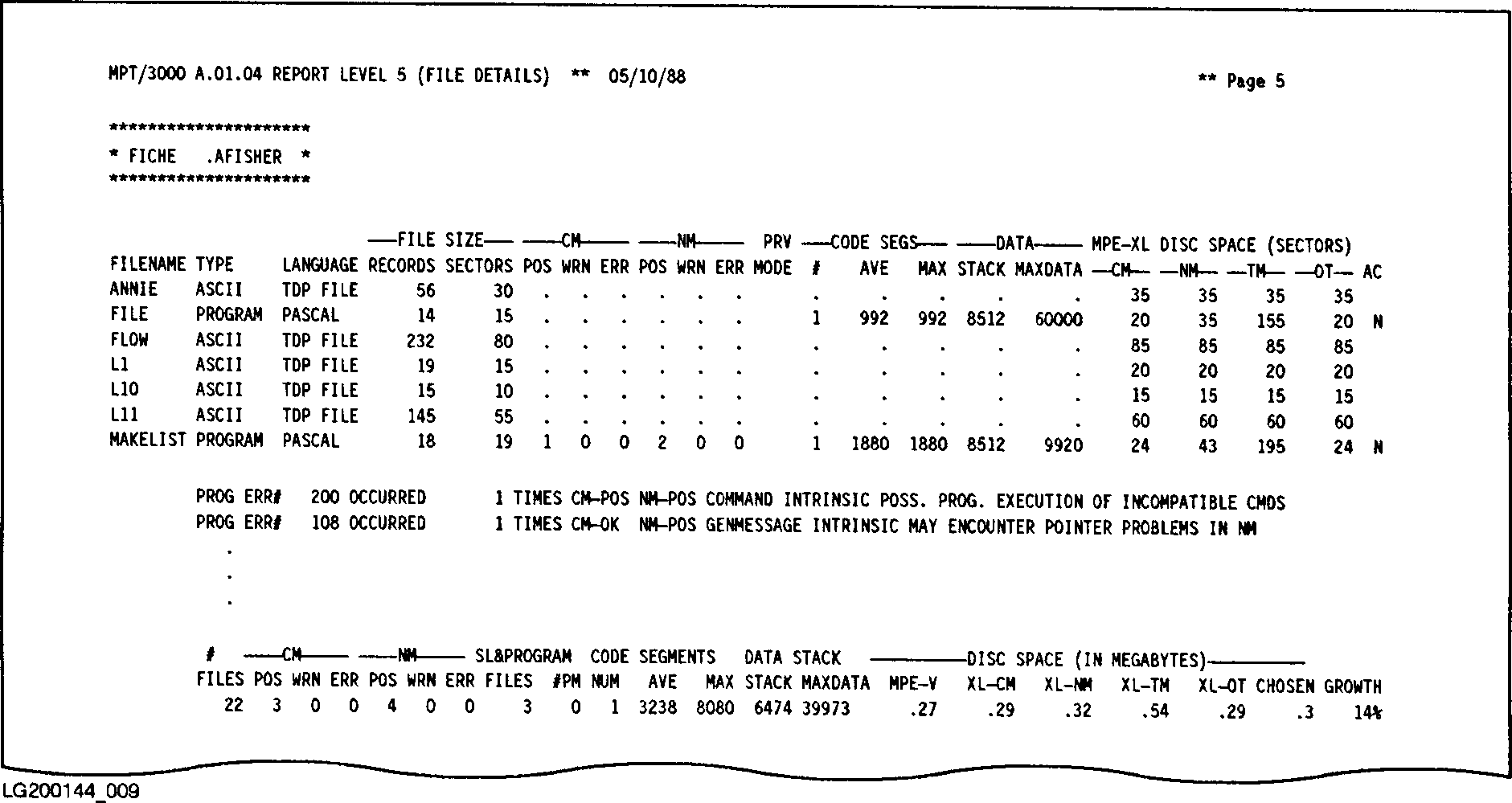 Figure I-10. Sample File Detail Report Level Five
You should recognize the majority of this report if you have examined the
File Summary Report Level Four . You might notice that it is the same
except for the lines following each file's information. These lines are
descriptions of each migration event that was found in the file. The
information returned is described below:
* The migration event type and unique identifying number is given
(example: PROG ERR# 106). The event type identifies what type of
event scanning detected the event. Possible events and their
sources are described earlier in this document.
* The ERR# indicates a unique migration event. You may look up the
event number in Appendix D, "Incompatibilities" to determine more
information about what causes the event, how to tell if it is
significant, and what corrective action can be taken if needed.
* The number of times the event occurred is listed. For RTM events,
this is the actual number of times the event was detected and
logged while RTM was enabled. For most other events, this number
will be one. The exception to this rule is where more than one
routine can cause the same event message. For example, calling a
system routine that is marked as "uncallable" (it requires the
calling program to be in Privileged Mode to make the call) will
generate a migration event. In this case, the occurrence count
will be the actual number of such routines detected in the program
(or SL).
* The CM and NM severity levels for the event are listed next. CMOK
or NMWRN would indicate that the event causes no problems if
migration is to CM (CMOK), but requires some changes in order to
migrate to NM (NMWRN).
* A brief description of the event is given. Remember that a more
detailed description of each event is located in Appendix D,
"Incompatibilities".
Event Detail Report Level Six.
The Event Detail Report Level Six is unlike the other reports generated
by MPTREPT in that the information in the report is sorted by migration
event, not by file, fileset, group, or account. This report lists each
migration event that occurred in the selected files, followed by all the
files in which that event was found. In this way it should be simple to
locate the files which need to be modified. You use this report once you
decide that a certain event will need to be corrected for the migration
and what steps you can take to correct it.
This report is printed each time you specify the value 6 in response to
the ENTER THE LEVEL OF DETAIL YOU DESIRE (1-6) prompt of the MPTREPT
program. Figure I-11 is a sample of a portion of an Event Detail
Report Level Six.
Figure I-10. Sample File Detail Report Level Five
You should recognize the majority of this report if you have examined the
File Summary Report Level Four . You might notice that it is the same
except for the lines following each file's information. These lines are
descriptions of each migration event that was found in the file. The
information returned is described below:
* The migration event type and unique identifying number is given
(example: PROG ERR# 106). The event type identifies what type of
event scanning detected the event. Possible events and their
sources are described earlier in this document.
* The ERR# indicates a unique migration event. You may look up the
event number in Appendix D, "Incompatibilities" to determine more
information about what causes the event, how to tell if it is
significant, and what corrective action can be taken if needed.
* The number of times the event occurred is listed. For RTM events,
this is the actual number of times the event was detected and
logged while RTM was enabled. For most other events, this number
will be one. The exception to this rule is where more than one
routine can cause the same event message. For example, calling a
system routine that is marked as "uncallable" (it requires the
calling program to be in Privileged Mode to make the call) will
generate a migration event. In this case, the occurrence count
will be the actual number of such routines detected in the program
(or SL).
* The CM and NM severity levels for the event are listed next. CMOK
or NMWRN would indicate that the event causes no problems if
migration is to CM (CMOK), but requires some changes in order to
migrate to NM (NMWRN).
* A brief description of the event is given. Remember that a more
detailed description of each event is located in Appendix D,
"Incompatibilities".
Event Detail Report Level Six.
The Event Detail Report Level Six is unlike the other reports generated
by MPTREPT in that the information in the report is sorted by migration
event, not by file, fileset, group, or account. This report lists each
migration event that occurred in the selected files, followed by all the
files in which that event was found. In this way it should be simple to
locate the files which need to be modified. You use this report once you
decide that a certain event will need to be corrected for the migration
and what steps you can take to correct it.
This report is printed each time you specify the value 6 in response to
the ENTER THE LEVEL OF DETAIL YOU DESIRE (1-6) prompt of the MPTREPT
program. Figure I-11 is a sample of a portion of an Event Detail
Report Level Six.
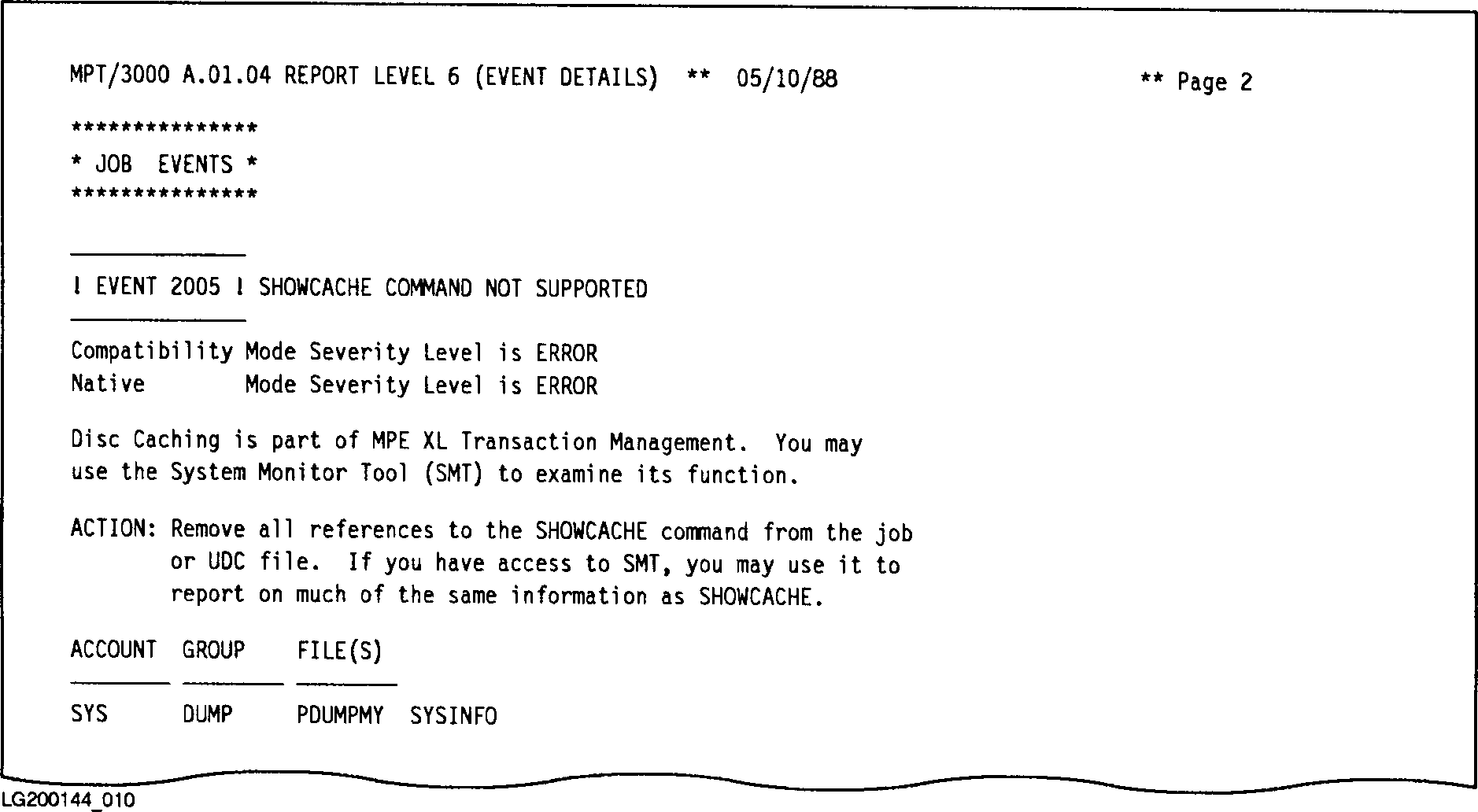 Figure I-11. Sample Event Detail Report Level Six