 HP 3000 Manuals HP 3000 Manuals




DIRMIG Operation
DIRMIG is an MPE/iX tool you use to migrate an MPE V/E operating
environment (U-MIT or later) to an MPE/iX-based computer system. DIRMIG
provides a friendly, menu-driven interface that enables you to easily
migrate operating environment information located on the MPE V/E SYSDUMP
tape created during the preparation stage of the migration process.
Refer to the discussion of creating the SYSDUMP tape in Chapter 3,
"Preparation".
DIRMIG enables you to migrate to the MPE/iX-based system these MPE V/E
operating environment components:
* Global RINs.
* User-logging identifiers.
* Directory structures, including account, group, and user
characteristics.
* Private volume environments associated with the migrated directory
structures.
* UDC environments and user files associated with the migrated
directory structures.
DIRMIG's menu-driven interface gives you the flexibility to select
different migration paths. You can choose to migrate the entire MPE V/E
operating environment at once, or migrate components separately. Figure
G-1 illustrates the different migration paths available in DIRMIG.
You will commonly run DIRMIG immediately after the MPE/iX operating
system has been successfully installed on the 900 Series HP 3000 computer
system. However, if you plan to migrate the MPE V/E operating
environment incrementally, you can run DIRMIG after any MPE/iX startup
procedure.
DIRMIG creates a log file each time it executes. DIRMIG log files
contain migration progress messages as well as error messages about
components that could not be migrated successfully. The log file
provides information for debugging and troubleshooting if a problem
occurs during migration. The DIRMIG log files are numbered so that you
can maintain a log file history of every execution of DIRMIG. You can
also enable the MPE/iX tracing facility to provide additional
troubleshooting information by running DIRMIG with the optional PARM=
parameter equal to one. (For more information about DIRMIG log files,
refer to "Examining DIRMIG Log Files".)
Who Can Use DIRMIG
DIRMIG should be run during the installation stage of the migration
process by a person with both System Manager (SM) and System Supervisor
(OP) capabilities. This person should have knowledge of:
* The overall migration process developed by the Migration Project
Team. The Migration Project Team is described in Chapter 2,
"Analysis and Planning".
* Detailed knowledge of the type of operating environment planned
for the MPE/iX-based system.
DIRMIG Security Considerations
To protect itself against accidental user intervention, DIRMIG enforces
the following security provisions:
* The user must be logged on to MANAGER.SYS,PUB and have both System
Manager (SM) and System Supervisor (OP) capabilities.
* No other jobs and sessions may be logged on to the system (other
than the session running DIRMIG either interactively or streaming
the one job running DIRMIG in batch mode).
* CONTROL-Y is not armed, although BREAK remains enabled.
* There is no access to MPE/iX commands.
CAUTION You should not interrupt or abnormally terminate DIRMIG once it
is started, since it is running in Privileged Mode (PM) updating
MPE/iX system tables and allocating directory space. Instead,
use the exit options provided to exit DIRMIG safely.
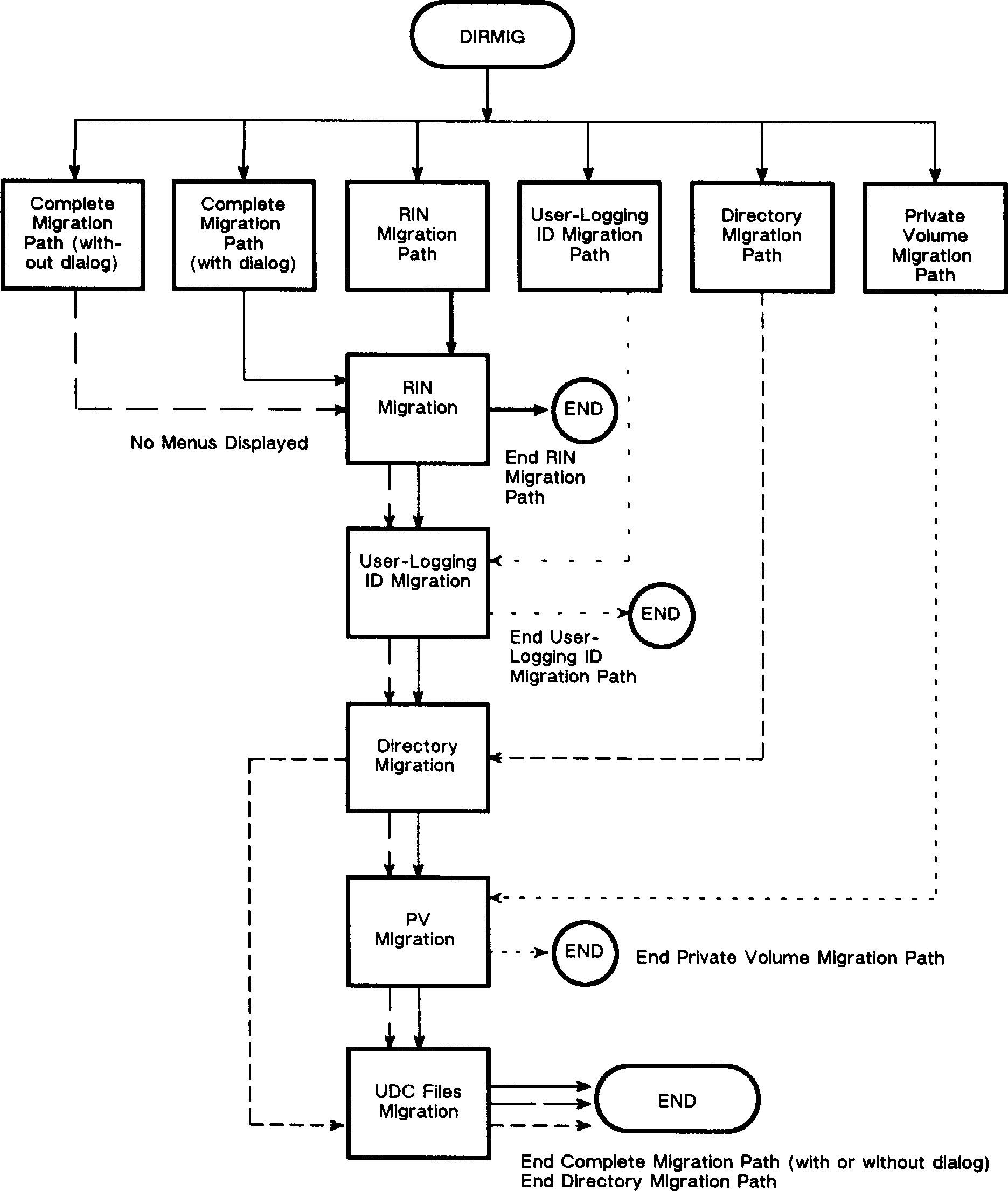 Figure G-1. Migration Paths Available in DIRMIG
If DIRMIG is executed interactively, it is recommended that the system be
in "single-user mode". Single-user mode is achieved by executing the
LOGOFF command at the system console:
CTRL A
=LOGOFF #Snnn
where #Snnn is the session number assigned to MANAGER.SYS which remains
logged on. Single-user mode guarantees that only one user is on the
system, and that no one else can log on until you disable single-user
mode after DIRMIG finishes execution. (You can also use the :LIMIT
command to prevent other users from logging on.)
If DIRMIG is executed in batch mode, it is recommended that the only
session on the system be the session that streamed the DIRMIG job.
Figure G-1. Migration Paths Available in DIRMIG
If DIRMIG is executed interactively, it is recommended that the system be
in "single-user mode". Single-user mode is achieved by executing the
LOGOFF command at the system console:
CTRL A
=LOGOFF #Snnn
where #Snnn is the session number assigned to MANAGER.SYS which remains
logged on. Single-user mode guarantees that only one user is on the
system, and that no one else can log on until you disable single-user
mode after DIRMIG finishes execution. (You can also use the :LIMIT
command to prevent other users from logging on.)
If DIRMIG is executed in batch mode, it is recommended that the only
session on the system be the session that streamed the DIRMIG job.
NOTE It is recommended that you run DIRMIG from the System Console where
you can maintain closer control over your MPE/iX system, as well as
monitor and reply to DIRMIG tape mount requests.