 HP 3000 Manuals HP 3000 Manuals




Migration Options and Solutions
You will need to develop strategies to migrate your users' operating
environment, data, programs, and databases. Hewlett-Packard has defined
various migration options, created various tools, and outlined various
strategies to help you to this successfully.
Migrating the Operating Environment
The user's operating environment contains:
* directory accounting structure.
* User Defined Command (UDC) structure.
* private volume configurations (volume sets and media).
* global Resource Identification Number (RIN) configurations.
* user logging identifiers.
* user files.
Hewlett-Packard recommends the use of the Hewlett-Packard supplied
directory migration tool, DIRMIG, to migrate your MPE V/E operating
environment to MPE/iX. Available on the MPE/iX installation tapes, DIRMIG
is a flexible, one-step migration tool that migrates the MPE V/E
operating environment from an MPE V/E SYSDUMP tape. Refer to Appendix G
"Using the Directory Migration Tool" for details on DIRMIG operation.
Migrating Data
Data structures in MPE V are consistent with the data structures in CM on
MPE/iX. However, there are two incompatabilities between CM and NM data
structures that the migration team must look for:
* data alignment
* floating-point real numbers
Data Alignment.
On MPE V/E-based systems and in CM, the natural alignment supported by
the compilers is 16 bits. Data is aligned on 16-bit boundaries. In NM
the natural alignment supported by the compilers and the architecture is
32 bits. The data is aligned on 32-bit boundaries.
Data ("flat") files generally contain byte streams of data. When the
data is read by a program, the program interprets the data according to
the program's internal data structures. The data structures are aligned
by compilers, as defined by the program, using the system's natural
alignment.
When MPE V/E programs are compiled to NM, the natural alignment changes
from 16 bits to 32 bits. But the data in the files (the byte stream)
does not change. What does change is the alignment of variables when CM
programs are compiled to NM. Data accessed by NM programs may be
interpreted inaccurately, even though the same data accessed by the same
programs is interpreted correctly while running in CM.
For example, an MPE V/E-based program that depended upon a 16-bit
alignment for its record structure may find that same record structure
aligned on a 32-bit boundary once the program is compiled to NM.
The migration project team needs to identify all such possibilities
before migrating to NM. Once identified, source code can be modified to
retain data compatibility. For optimal performance, data files should be
converted to the natural alignment for the 900 Series (32-bit).
You can use compiler options to minimize source modifications for data
compatibility. Each NM compiler supports directives that select data
compatibility with MPE V/E. For example, COBOL II/XL supports directives
that align synchronized data either on 16-bit or 32-bit boundaries. HP
Pascal/iX provides a compiler option that directs HP Pascal/XL to size
and align data the same way as MPE V/E. HP FORTRAN 77/iX provides a
similar compiler option.
Floating-point Representation.
MPE V supports the HP 3000 format for representing floating-point real
numbers. MPE/iX supports two formats for representing floating-point
real numbers: HP 3000 format is the default in CM, and IEEE format is
the default in NM.
MPE V/E programs running in CM are not affected by the incompatability.
For mixed-mode programs, select HP 3000 floating-point representation or
IEEE floating-point representation by using the same compiler options and
directives that are used to select data alignments. However, if full NM
performance and precision is necessary, you need to convert all
floating-point data to IEEE format.
Hewlett-Packard has provided an intrinsic, HPFPCONVERT, that will convert
a value represented by HP 3000 floating-point format to a value
represented by the IEEE floating-point format and vice versa.
Conversion of data files will affect program conversions. Thus,
migration is an iterative process; once all programs are in NM, then all
data should be converted to NM.
For complete information on data representation and floating-point
conversion, consult the appropriate language migration manual and Data
Types Conversion Programmer's Guide (32650-90015).
Migrating Data Communication Services
Data communication migration solutions apply to Hewlett-Packard
manufactured networking subsystem. DS/3000 is not supported on MPE/iX.
NS3000/iX is the supported data communication software on MPE/iX.
NS3000/iX provides most of the features supported by NS3000/V.
Hewlett-Packard recommends two solutions in migrating software dependent
upon data communications:
* Update the MPE V/E system from DS/3000 to NS3000/V; and convert
all applications, job files, and UDCs to use the NS3000/V
subsystem. (All NS3000/V features are supported by NS3000/iX.)
* Migrate all applications, job files, and UDCs directly to MPE/iX
and convert them to use the NS3000/iX subsystem.
Migrating Programs
The phased approach to migrating MPE V/E-based programs to NM over time
allows your migration project team several options to achieve their
goals. Hewlett-Packard has developed migration solutions for various
system components: programs, operating environment, data files, and data
communications. These solutions include:
* migration to CM.
* migration to NM.
* mixed mode applications.
Migrating database applications is a special case, and is discussed later
in this chapter.
Migration to CM.
CM is available to simplify the migration to the MPE/iX system, and to
provide an intermediate stage, if needed, between MPE V and NM. CM offers
an immediate migration path to MPE/iX-based systems and immediate
productivity on the new system. CM program development is available in
MPE/iX, but migration to CM should be considered the first stepping stone
on the path to NM execution. The OCT may be used to increase performance
with this solution.
This is extremely important in the cases where source code is not
available for application programs.
Programs may need to be modified before they can execute on MPE/iX if
they run in Privileged Mode or if incompatibilities have been identified.
Most non-Privileged Mode MPE V/E programs and data can be restored to an
MPE/iX system and run in CM without the need for recompilation.
CM offers a variety of MPE V/E compatible compilers, such as COBOL II/V,
HP FORTRAN 77/V, Pascal/V, BASIC/V, and HP Business ASIC/V. The MPE V
Segmenter is available for building and maintaining program and library
files for execution in CM on the 900 Series. After recompiling the
application, it is suggested that you thoroughly test the application to
ensure valid results.
Migration to Native Mode.
To get the full benefit of the features of MPE/iX and HP-PA, CM programs
need to be migrated to NM. This is achieved through source code
recompilation with MPE/iX compilers. Before attempting recompilation,
the migration project team should analyze the program for possible
incompatibilities between CM and NM. Any incompatibilities should be
resolved before recompilation. After recompiling the application, it is
suggested that you thoroughly test the application to ensure valid
results.
COBOL II, HP FORTRAN 77, and Pascal programs can be compiled into NM
using the appropriate MPE/iX optimizing compilers: COBOL II/XL, HP
FORTRAN 77/iX, and HP Pascal/iX, respectively.
NM employs LinkEditor to build and maintain program files, relocatable
libraries, and executable libraries.
The NM compilers offer three levels of optimization, levels 0 through 2.
Each incremental level provides a higher degree of execution performance.
Optimization level 0 is the equivalent of no optimization, while level 2
provides full optimization. The optimization levels are invoked through
compiler options and directives.
Hewlett-Packard recommends that programs be recompiled with level 0
optimization, tested, and subsequently recompiled with other optimization
levels. Refer to the appropriate language reference manual for specific
details on compiler optimization.
Migrating SPL programs to NM is more complex. Due to its dependence on
the architecture of MPE V/E-based systems, an NM SPL compiler is not
supported by Hewlett-Packard. Several solutions are available for SPL
programs:
* Leave SPL programs in CM and maintain them with the SPL/V CM
compiler available on MPE/iX.
* Translate SPL programs into HP-PA machine instructions using OCT.
Note that while the newly translated program will not incur the
overhead of the emulator, the program still adheres to the
restrictions imposed on any MPE V/E object file running in CM.
* Rewrite SPL programs using a high-level language that can be
compiled into NM; HP Pascal/iX or C/iX, for example.
* Leave the SPL routines in CM segmented libraries (SLs); migrate
the program to NM and access the SPL routines from SLs via the
Switch subsystem.
Mixed Mode Programs.
Recompilation to NM may not be a viable alternative for all programs
because source code may be missing, the program may be written in SPL, or
the program may be written in another language for which an NM optimizing
compiler is not available. The same holds true for segmented libraries
(SLs).
You may want to operate in mixed-mode if programs are executed with group
or account libraries, and the libraries cannot be migrated to NM. It is
possible to migrate the program to NM and leave the libraries in CM. The
NM program, however, must access the SL procedures via the MPE/iX Switch
subsystem because SLs are not directly accessible by programs executing
in NM.
Switching between modes usually does not require source code
modifications. In most cases, a program is recompiled to NM while the
libraries accessed by the program remain in CM. A switch stub is required
for every procedure that the program accesses from the CM SL. These
switch stubs are placed in a NM library which is linked with the program.
A switch stub is used to inform the Switch subsystem of the specifics of
a procedure in a CM SL. You can create switch stubs either using the
Switch Assist Tool (SWAT) or on your own, as discussed in the Switch
Programming Guide (32650-90014).
Note that mixed mode program execution can also define a CM program
accessing a routine in a NM executable library (XL). NM XLs (the NM
equivalent to SLs), are not directly accessible to programs executing in
CM, and must therefore be accessed through the Switch subsystem. Once
again, neither the program making the call, nor the procedure being
accessed, need to be modified.
Some overhead is incurred when using the Switch subsystem. The user
needs to understand the trade-off between the performance implications of
using the Switch subsystem and the effort necessary to recompile routines
to NM. A mixed-mode program can be either an intermediate step to full NM
operation or an alternative to rewriting or locating source code.
Mixed mode operation offers the highest degree of flexibility for the
phased migration of programs. Even users who choose to recompile
existing source code with the MPE/ iX version of compilers may need
Switch if the source contains calls to user-written procedures which
still remain in CM SLs. Switch is also needed by developers of new NM
applications that require the services of CM SL procedures.
If application size is a consideration, performance-sensitive portions of
the CM application may be rewritten or recompiled in NM first, allowing
CM programs to continue to call the procedures. Migrating critical
portions of an application to NM while the remainder of the application
executes in CM results in performance gains and allows for a continual,
incremental upgrade path.
Phased Migration of Databases
MPE/iX supports two database management systems: TurboIMAGE/XL in NM and
ALLBASE/SQL in NM.
Migrating ALLBASE.
The MPE V version of ALLBASE is ALLBASE/SQL, a database management system
that provides a relational database model called HP SQL. The MPE/iX
version is ALLBASE/SQL.
NOTE It is not possible to run the MPE/V version of ALLBASE/SQL in
compatibility mode on an MPE/iX system. You must migrate to
ALLBASE/XL.
Before migrating ALLBASE/SQL software and data from MPE/V to MPE/iX, you
must UNLOAD EXTERNAL and STORE the data in all tables. After migrating,
you must RESTORE the data, re-create all DBEnvironments, LOAD tables
EXTERNAL, and then re-preprocess and recompile all application programs.
The following steps are recommended in migrating an ALLBASE/SQL
DBEnvironment from MPE/V to MPE/iX:
1. On the MPE/V side, use the ISQL UNLOAD command with the EXTERNAL
option to create ASCII file containing all data currently stored
in each table in the DBEnvironment.
2. Copy the ASCII files and the description files created by the
UNLOAD command over to the MPE/iX system. You can STORE and
RESTORE the files, or you can use a disk copy utility.
3. Re-create the DBEnvironment on the MPE/iX system. Be sure to
create tables with the same column descriptions as in the MPE V
DBEnvironment.
4. On the MPE/iX side, use the ISQL LOAD command with the EXTERNAL
option to load the newly created tables in to the MPE/iX
DBEnvironment.
5. Copy all source files for application programs over to the MPE/iX
system.
6. Re-preprocess and re-compile each application program.
Migrating TurboIMAGE.
You can move data and applications from MPE V to MPE/iX separately. You
can move applications from MPE V to CM or to NM. You can move
applications from CM to NM in phases. These options give your migration
project team has some flexibility in planning and executing the migration
applications.
Whether you decide to move the applications to CM or to NM, the data
files are taken from MPE V and restored directly to NM on MPE/iX. DBSTORE
is used to store the database from the MPE V/E system and DBRESTOR may be
used to restore the database onto the MPE/iX system.
Additional information on migrating TurboIMAGE/V databases can be found
in Appendix H .
Option 1: CM.
With this option, you move your data to TurboIMAGE/XL in NM, and your
applications to CM. The CM programs rely on MPE V/E object code
compatibility. In most cases, the programs and databases are restored
from an MPE V/E STORE tape.
This option has several advantages:
* MPE V/E program files run with few or no modifications.
* The TurboIMAGE/XL database can be immediately accessed by the
program.
* Users are immediately productive.
* No overhead is incurred for migration software.
The CM option is considered the first step in application migration to
NM. While applications execute in CM, a migration project team can
perform program migration to NM without impacting productivity.
TurboIMAGE/XL runs in NM, and its intrinsics are NM intrinsics. When
your CM program calls a TurboIMAGE intrinsic, the process runs in mixed
mode. TurboIMAGE/XL uses the Switch subsystem to invoke the CM
intrinsics. You do not need to modify the intrinsic calls. Access to NM
TurboIMAGE/XL intrinsics is transparent to the application because
TurboIMAGE/XL intrinsic switch stubs exist in the MPE/iX CM System
Library.
Option 2: NM.
With this option, the application is recompiled with an NM compiler to
run in NM. It accesses the TurboIMAGE database retaining the
TurboIMAGE/XL intrinsic calls. The database remains in TurboIMAGE format
and is accessed in NM by existing TurboIMAGE/XL intrinsics. This option
offers the following advantages:
* The application's performance may improve over CM execution.
* The TurboIMAGE/XL intrinsic calls remain intact.
* The database is compatible with MPE V/E-based systems. Therefore,
programs that access the same database can be systematically
migrated to NM without impacting productivity of other CM programs
accessing the database.
* Remote TurboIMAGE/XL access is preserved.
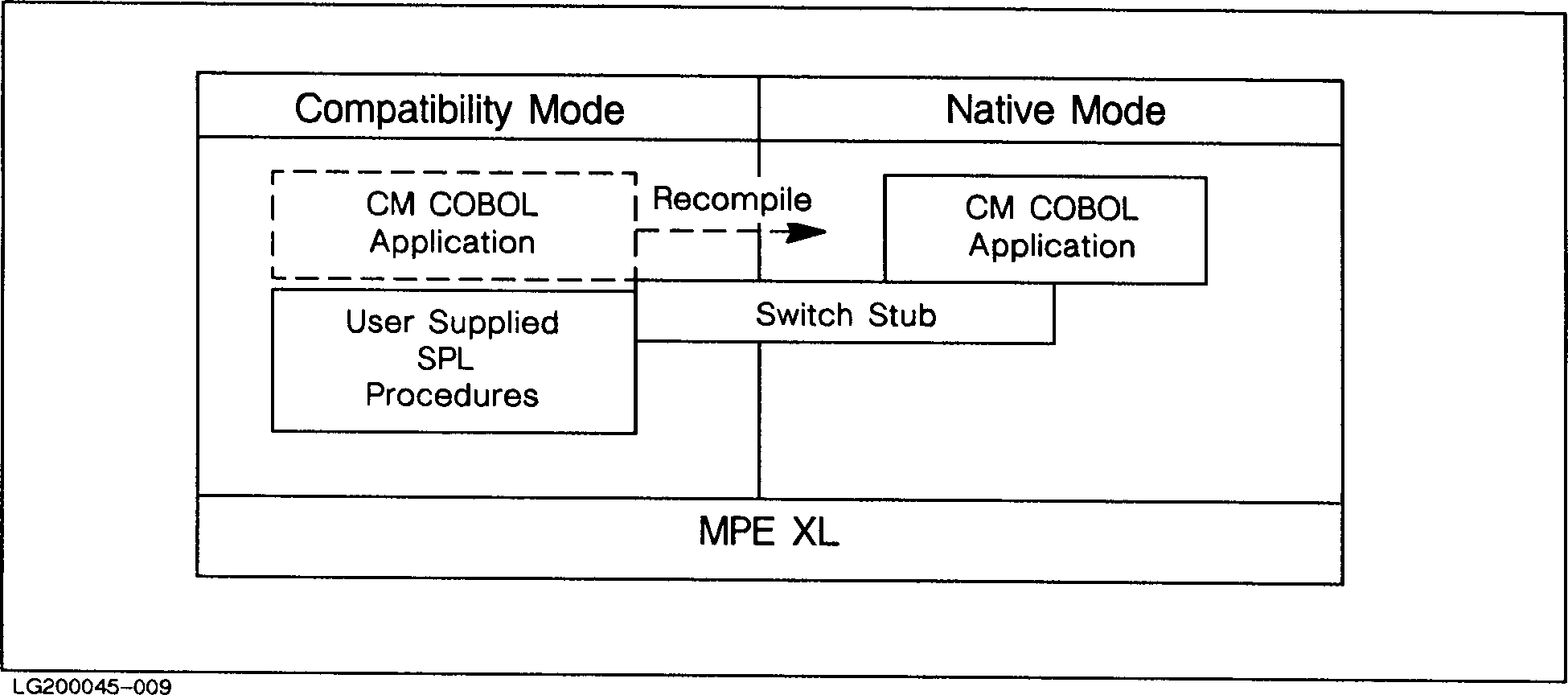 Figure 2-2. Option 2 with Switch
Migration Documentation, Training, and Tools
In addition to this manual, Hewlett-Packard has developed other manuals
and tools to assist with various aspects of migration.
Migration Documents
* General Information Manual (5954-7418) provides a general overview
of the 900 Series HP 3000 family.
* HP 3000 Computer Systems System Configuration Guide (5954-9354)
provides current information on supported peripherals.
* Introduction to MPE XL for MPE V Programmers (30367-90005) updates
programmers on topics that have changed from MPE V/E to MPE/iX and
pertain to the MPE programming environment. This manual is useful
when analyzing incompatibilities detected by the Migration
Toolset.
* FORTRAN 77/XL Migration Guide (31501-90004) informs the FORTRAN 77
programmer of changes in the FORTRAN 77/iX environment.
* HP COBOL II/XL Migration Guide (31500-90004) informs the COBOL II
programmer of changes in the COBOL II environment.
* HP Pascal/XL Migration Guide (31502-90004) informs the Pascal
programmer of changes in the Pascal environment.
* Introduction to MPE XL for MPE V System Administrators
(30367-90003) updates the System Administrator on topics that have
changed from MPE V/E to MPE/iX that relate to their day-to-day
activities.
* MPE V to MPE XL: Getting Started Self-Paced Training (30367-90002)
updates the general user on topics that have changed from MPE V/E
to MPE/iX that relate to their day-to-day activities.
* Switch Programming Guide (32650-90014) instructs the programmer on
Switch stub generation.
Migration Training
FastLane 3000 is a Hewlett-Packard consulting service that helps you
achieve more efficient use of time and resources as you migrate your
application to the 900 Series HP 3000 system. It helps you understand
how the migration process could impact your particular data processing
environment, and what actions you can take to streamline that process.
FastLane 3000 is delivered to your migration project team by a specially
trained Hewlett-Packard engineer and consists of two component services:
* System Planning builds the foundation of knowledge essential to
migration analysis and planning.
* Application Planning guides your project team through the steps of
developing a complete migration plan for one of your applications.
Migration Tools
HP has developed the following tools to help with migration:
* Migration Toolset (Version A.00.03) is three tools that find
possible incompatibilities between MPE V/E and MPE/iX: Migration
Planning Tool (MPT), Object Code Analyzer (OCA), and Run Time
Monitor (RTM).
* MPT, available on MPE V/E-based systems, provides an
initial look at an MPE V/E system by generating reports,
from a system-level down to a file detail level, examining
incompatibilities and MPE/iX disk space projections for MPE
V/E files. Operation of MPT is discussed in Appendix I,
"Using the Migration Planning Tool".
* OCA, available on both MPE V/E-based and MPE/iX-based
systems, uses MPE V/E object code files as input and
generates a list of possible incompatibilities between MPE
V/E and MPE/iX as output. Operation of OCA is discussed in
Appendix B, "Using the Object Code Analyzer".
* RTM, available on MPE V/E-based systems, provides customers
with a list of run-time incompatibilities by monitoring
applications as they execute on an MPE V/E-based system and
logging incompatibilities as they occur. Operation of RTM
is discussed in Appendix C, "Using the Run Time Monitor".
* Directory Migration Tool (DIRMIG) is an MPE/iX tool that migrates
the operating environment. Operation of DIRMIG is discussed in
Appendix G, "Using the Directory Migration Tool".
* Switch Assist Tool (SWAT) is an MPE/iX tool that facilitates
phased application migration from CM to NM and builds switch stubs
to allow mixed mode execution of applications. Operation of SWAT
is discussed in Switch Programming Guide (32650-90014).
* The Object Code Translator (OCT) is an MPE/iX tool that performs
an optimized translation of MPE V/E-based object code to
MPE/iX-based object code.
* Language conversion utilities are available to change applications
from FORTRAN 66/V to HP FORTRAN 77/V and from BASIC/V to HP
Business BASIC/V. The appropriate conversion utility is supplied
with HP FORTRAN 77/V, HP FORTRAN 77/iX, and HP Business BASIC/V.
* A data alignment compiler option is available with all MPE/iX NM
compilers, so that data can be aligned on 16-bit or 32-bit
boundaries for access from CM or NM programs, respectively.
* HPFPCONVERT is an MPE/iX intrinsic that converts between HP 3000
and IEEE floating-point representations.
* DBCONV is a utility that will convert your IMAGE/3000 database to
a TurboIMAGE database.
* SDCONV is a program that converts and loads data from Dictionary/V
to HP System Dictionary/iX.
Figure 2-2. Option 2 with Switch
Migration Documentation, Training, and Tools
In addition to this manual, Hewlett-Packard has developed other manuals
and tools to assist with various aspects of migration.
Migration Documents
* General Information Manual (5954-7418) provides a general overview
of the 900 Series HP 3000 family.
* HP 3000 Computer Systems System Configuration Guide (5954-9354)
provides current information on supported peripherals.
* Introduction to MPE XL for MPE V Programmers (30367-90005) updates
programmers on topics that have changed from MPE V/E to MPE/iX and
pertain to the MPE programming environment. This manual is useful
when analyzing incompatibilities detected by the Migration
Toolset.
* FORTRAN 77/XL Migration Guide (31501-90004) informs the FORTRAN 77
programmer of changes in the FORTRAN 77/iX environment.
* HP COBOL II/XL Migration Guide (31500-90004) informs the COBOL II
programmer of changes in the COBOL II environment.
* HP Pascal/XL Migration Guide (31502-90004) informs the Pascal
programmer of changes in the Pascal environment.
* Introduction to MPE XL for MPE V System Administrators
(30367-90003) updates the System Administrator on topics that have
changed from MPE V/E to MPE/iX that relate to their day-to-day
activities.
* MPE V to MPE XL: Getting Started Self-Paced Training (30367-90002)
updates the general user on topics that have changed from MPE V/E
to MPE/iX that relate to their day-to-day activities.
* Switch Programming Guide (32650-90014) instructs the programmer on
Switch stub generation.
Migration Training
FastLane 3000 is a Hewlett-Packard consulting service that helps you
achieve more efficient use of time and resources as you migrate your
application to the 900 Series HP 3000 system. It helps you understand
how the migration process could impact your particular data processing
environment, and what actions you can take to streamline that process.
FastLane 3000 is delivered to your migration project team by a specially
trained Hewlett-Packard engineer and consists of two component services:
* System Planning builds the foundation of knowledge essential to
migration analysis and planning.
* Application Planning guides your project team through the steps of
developing a complete migration plan for one of your applications.
Migration Tools
HP has developed the following tools to help with migration:
* Migration Toolset (Version A.00.03) is three tools that find
possible incompatibilities between MPE V/E and MPE/iX: Migration
Planning Tool (MPT), Object Code Analyzer (OCA), and Run Time
Monitor (RTM).
* MPT, available on MPE V/E-based systems, provides an
initial look at an MPE V/E system by generating reports,
from a system-level down to a file detail level, examining
incompatibilities and MPE/iX disk space projections for MPE
V/E files. Operation of MPT is discussed in Appendix I,
"Using the Migration Planning Tool".
* OCA, available on both MPE V/E-based and MPE/iX-based
systems, uses MPE V/E object code files as input and
generates a list of possible incompatibilities between MPE
V/E and MPE/iX as output. Operation of OCA is discussed in
Appendix B, "Using the Object Code Analyzer".
* RTM, available on MPE V/E-based systems, provides customers
with a list of run-time incompatibilities by monitoring
applications as they execute on an MPE V/E-based system and
logging incompatibilities as they occur. Operation of RTM
is discussed in Appendix C, "Using the Run Time Monitor".
* Directory Migration Tool (DIRMIG) is an MPE/iX tool that migrates
the operating environment. Operation of DIRMIG is discussed in
Appendix G, "Using the Directory Migration Tool".
* Switch Assist Tool (SWAT) is an MPE/iX tool that facilitates
phased application migration from CM to NM and builds switch stubs
to allow mixed mode execution of applications. Operation of SWAT
is discussed in Switch Programming Guide (32650-90014).
* The Object Code Translator (OCT) is an MPE/iX tool that performs
an optimized translation of MPE V/E-based object code to
MPE/iX-based object code.
* Language conversion utilities are available to change applications
from FORTRAN 66/V to HP FORTRAN 77/V and from BASIC/V to HP
Business BASIC/V. The appropriate conversion utility is supplied
with HP FORTRAN 77/V, HP FORTRAN 77/iX, and HP Business BASIC/V.
* A data alignment compiler option is available with all MPE/iX NM
compilers, so that data can be aligned on 16-bit or 32-bit
boundaries for access from CM or NM programs, respectively.
* HPFPCONVERT is an MPE/iX intrinsic that converts between HP 3000
and IEEE floating-point representations.
* DBCONV is a utility that will convert your IMAGE/3000 database to
a TurboIMAGE database.
* SDCONV is a program that converts and loads data from Dictionary/V
to HP System Dictionary/iX.