 HP 3000 Manuals HP 3000 Manuals




Mirrored disk installation
Installing mirrored disks consists of the following procedures:
* Configuring the disks into the system.
* Installing the disks.
* Booting the system with the mirrored disk configuration.
* Installing the mirrored disk software with the AUTOINST utility.
System configuration
Use SYSGEN to configure the mirrored disks into the system. Refer to the
System Startup, Configuration, and Shutdown Reference Manual
(32650-90042) for more information.
Disk installation
Install the disks according to the appropriate disk installation manual.
Use the following guidelines:
* The system must have at least two HP-FL cards or NIO SCSI cards.
Make sure that mirrored pairs are not connected to the same HP-FL
card or SCSI card. This ensures that if an HP-FL card or SCSI
card fails, it does not affect both partners of a mirrored pair.
* Install mirrored partners next to each other, so that you can see
the status lights of both partners of a pair.
* Label each mirrored disk pair. If a disk fails, you can easily
determine which disk partner to replace.
Figure 2-1 shows how mirrored disks can be connected to the system.
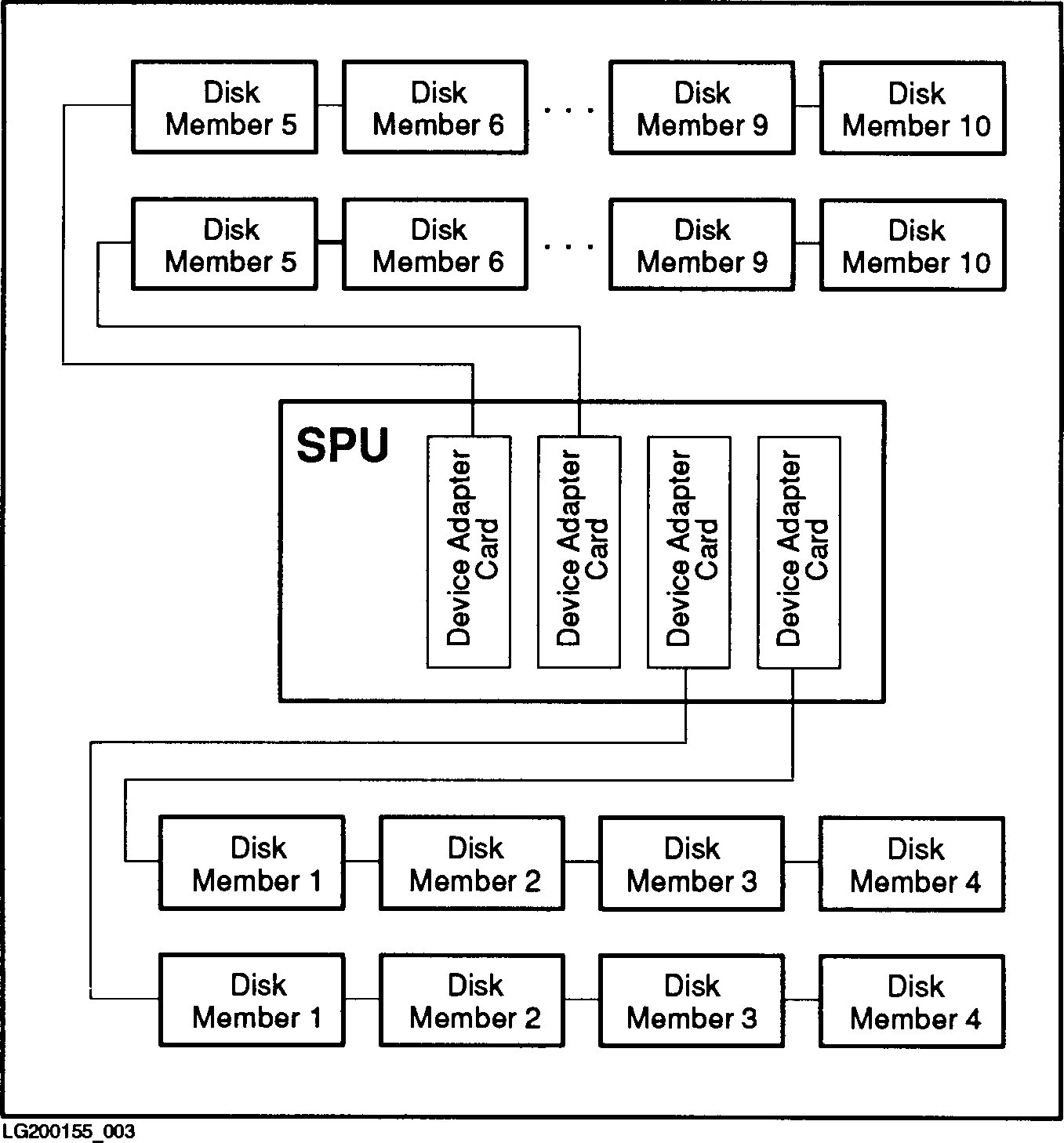 Figure 2-1. Sample Mirrored Disk Configuration
The above example shows four device adapter cards connected to twenty
disks (ten mirrored pairs).
Figure 2-2 shows how twenty disks can be installed next to their
partners in eight pack cabinets. Refer to the appropriate disk operating
and installation manual for any disk cabling restrictions.
Figure 2-1. Sample Mirrored Disk Configuration
The above example shows four device adapter cards connected to twenty
disks (ten mirrored pairs).
Figure 2-2 shows how twenty disks can be installed next to their
partners in eight pack cabinets. Refer to the appropriate disk operating
and installation manual for any disk cabling restrictions.
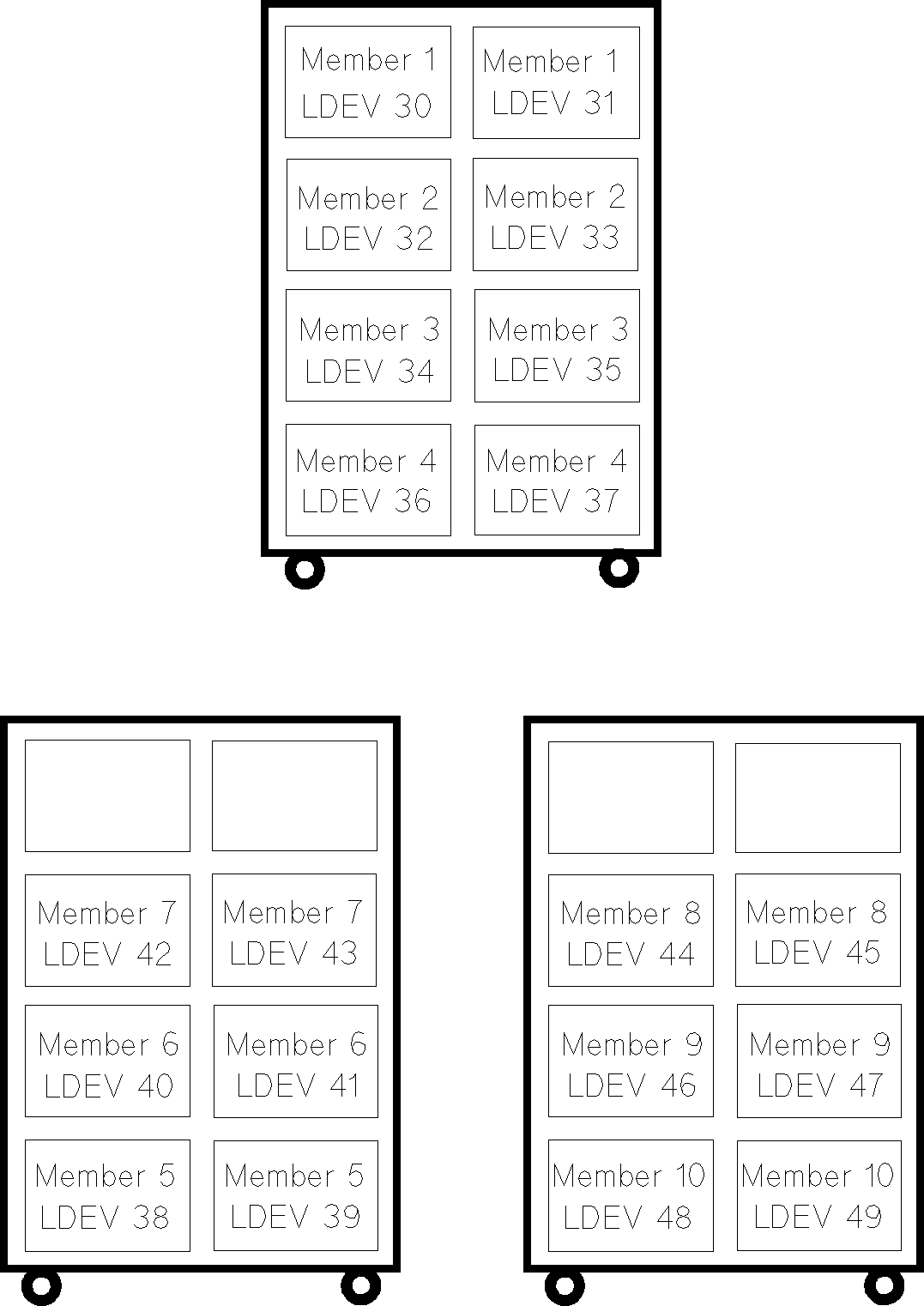 Figure 2-2. Sample Cabinet Installation
LDEVs 30, 31, 32, and 33 are the disks directly connected to HP-FL cards
or SCSI cards. All of the other disks are chained off those disks.
Figure 2-2. Sample Cabinet Installation
LDEVs 30, 31, 32, and 33 are the disks directly connected to HP-FL cards
or SCSI cards. All of the other disks are chained off those disks.
NOTE For quick reference, it is a good idea to draw a map of the
mirrored disks with member names and LDEV numbers and to mark which
disks are connected to the HP-FL cards or SCSI cards. This map
helps to easily identify the location of each disk.
System boot
Boot the system with the mirrored disk configuration group. Refer to the
System Startup, Configuration, and Shutdown Reference Manual
(32650-90042) for more information about booting the system.
Mirrored disk software
The mirrored disk product is distributed on a magnetic tape. Install the
tape using the AUTOINST utility described in the HP3000 MPE/iX
Installation and Update Manual (36123-90001).