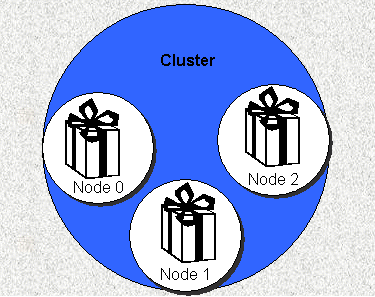
Figure 1. A Typical High Availability Cluster.
The high availability environment as implemented by HP-UX MC/Service Guard presents a new set of challenges to system administrators. The environment requires script designers to re-think some basic assumptions, including the presence or absence of application directories and home directories. Such routine tasks as running programs and scripts from cron and changing user's passwords must be re-examined.
Even without high availability, system administrators face the challenge of handling multiple versions of applications (to handle multiple customers, to do rolling upgrades, and/or to facilitate separate development/quality assurance/production environments). This is further complicated by version dependencies between an application and its supporting applications/tools.
Lear, an automotive supplier, implemented MC/Service Guard to run an ERP application. Lear designed a high availability environment to accommodate up to fifty separate manufacturing sites, each with it's own separate ERP tables, in a two system high availability cluster. This paper presents Lear's solutions to the challenges posed by implementing this environment. The solutions presented include:
The design of shell scripts for high availability environments as accomplished by the Lear Corporation systems is explained herein. The paper begins with a review of the situation at Lear prior to the use of this design philosophy. The theory behind the architecture is presented next, followed by a discussion of some of the key technology used to implement the system. Finally, the solutions to the problems are presented along with a few "lessons learned".
Lear has numerous manufacturing facilities . Until recently, a number of methods have been used to run each facility, ranging from sophisticated homegrown mainframe MRP systems to PC-based spreadsheets. A business decision was made to standardize on a centrally maintained ERP software suite. An estimated 50 separate sites would use the new systems to run manufacturing operations all over the world. HP UNIX systems were selected as the hardware platform; MC/Service Guard was selected to insure the uptime of the systems.
The ERP software selected was one of the MRP solutions already in use; about seven sites were already using QAD's MfgPro at the start of the project. Consequently, there was some history in running the product. Much of what had been done up to that point was appropriate for a small installations where each facility has a system located at the manufacturing site. Supporting up to fifty sites on two centrally located systems would require re-thinking several things.
For example, scripts routinely included environment variables via "include files" (using the POSIX/Korn shell . command). While this was a step in the correct direction, the include file name typically included the version number of the application. This makes sense from the perspective that the name accurately reflects what the file contains, however, when upgrading to a new version, each shell script that uses the include file must be updated. Even with good system documentation, the chances of missing one or more scripts are too high.
Another problem was the location of the include files. All include files were in the /environment directory. Duplicating the directory for each package and making the "packageized" directory a mount point that follows the package is trivial. However, the size of these files is quite small, bringing into question the amount of overhead required for creating a separate mount point for this directory. In addition, the /environment directory included some files that did not refer to any part of what was destined to be put into a package. Thus, each package would contain files that are exact duplicates and the files would need to be kept in sync.
The bulk of the user community shared an initial home directory in the pre-MC/Service Guard Lear environment. The common .profile then set (and changed to) the "real" home directory. The .profile also used information about a user's group membership to pull in various include files. Finally, a menu was displayed allowing the user to select among the different MfgPro databases on the system. The move to a high availability environment brought a number of issues with this procedure to light.
When the package moves, what happens with the actual home directory? Does it move with the package? Alternatively, should the common directory move?
How should users that will log into more than one package be accommodated?
When a user changes their password, how can the same user's password be updated on the systems to which the package can move?
How can the menu handle allowing the user to select from up to fifty different sites?
The issue of application versions also is sticky. Upgrading a site to a new version is tricky enough when the site has its own Unix box. With all of the sites on two systems, Lear faced the ugly potential of having to upgrade (at least) half the user environment in one big move. The thought of training requirements and getting 25 sites to agree on a good point in a business month for such a mammoth move still causes nightmares.
Further complicating the issue of version upgrades is application dependencies. The version of MfgPro that Lear uses, like many ERP applications, depends on a database backend. Lear uses Oracle for its database backend; MfgPro requires Progress as a "middle" layer. Naturally, a specific version of MfgPro can run on only certain versions of Progress. In turn, for any given version of Progress, only certain versions of Oracle are supported. Thus, even if the issue of which plant uses which version of MfgPro is resolved, making sure MfgPro uses the right version of Progress and that Progress version uses the right version of Oracle must still be addressed.
Review of Standard MC/Service Guard High Availability Terms and Concepts
The MC/Service Guard product creates a cluster, a group of one or more machines that, in some respects, can be treated as a single entity. Each machine is referred to as a node in the cluster. Each node can host one or more packages (see Figure 1). Packages consist of one or more applications, typically the core binaries and data, as well as all supporting code and data (e.g., configuration files, startup scripts, etc.). Packages can move between nodes, providing the high availability that we, the customers, pay so dearly for.
Figure 1. A Typical High Availability Cluster.
Dividing a Node into Two Contexts
The node, as mentioned above, is a computer in a cluster. Being a member of the cluster adds functionality to the system, but does not alter the fact that the node is a computer system in and of itself. Thus, each node performs certain duties and functions that do not relate to high availability, just as the node would if it were not a member of a cluster.
The package must be, more or less, self-contained. The package depends on a node to do anything useful, of course. However, as a minimum, the package must contain user/application data, and more likely, application code. It is possible to have application code loaded on any node upon which a package may be hosted, but this introduces more work to setup and maintain a node. The effort to patch or upgrade the application also would increase linearly with the number of nodes involved.
The node, having duties as a member of the cluster and duties that are unrelated to high availability, can be thought of as having one or more personalities. The first personality is the system-centric personality and it is the only independent personality. This personality is the same one the system had before it was "infected" with high availability and the one the system would have if the system was no longer a member of the cluster (i.e., cured of high availability?). Lear refers to this "personality" as the System Context, as in "within the context of the system personality.
The node also has a package-centric personality. This personality is fraught with conflict. The package must be as self-contained as possible, yet it is totally dependant on a node to do anything meaningful. In addition, the package can be passed around from one node to another, resulting in a like transfer of the personality. Lear refers to this conflicted personality as the Package Context.
Note that these contexts are simple abstractions used to guide system administrators and scriptwriters. There are no technical or physical barriers preventing system administrators, programmers, or users from operating in all contexts simultaneously.
Table 1 (below) shows some examples of scripts/code/data and the context they would be considered to be in.
| Script/Code/Data | Context |
| Oracle Table Space Files | Package |
| Backup Script | System |
| Application environment Include files |
Package |
| MfgPro ERP Software | Package |
| Printing | System |
Dividing the Package Context into Subsystems
High availability systems command a premium price; thus, these systems are typically used for enterprise, mission-critical applications. Rarely are such applications stand-alone. Frequently two or more interdependent applications are contained in a single package. In addition, even if the application(s) are stand-alone, it may be desirable to maintain more than one version of the application(s) on the package. For example, multiple versions would be needed if a rolling upgrade were being performed. All of these applications are in the package context and must be managed by the package (started, stopped, made available to end-users, etc.).
Since each of these components must be managed and each has its own set of attributes, Lear divided the package context into parts. The components were used as the level of granularity for the division. These divisions of the package context are referred to as subsystems in the Lear architecture.
Lear's ERP system consists of (at least) three major parts: the Oracle Database, the Progress middle-ware, and the MfgPro code itself. Since running any one of these without either of the other two would be meaningless, all are on the same package. Thus, the Lear system contains an Oracle Subsystem, a Progress Subsystem, and a MfgPro Subsystem.
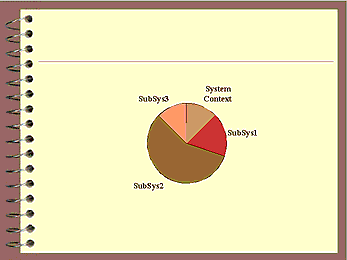
Figure 2. Node with System Context and Subsystems
This is discussed in detail in the Technology section below.
Development of these concepts led to the formation of a set of rules that were adhered to during the development of the system architecture. Failure to follow the rules was playfully referred to as "sins"; some of the rules, shown below, are commandments.
The Commandments.
Only system administrator accounts should log into the system context.
There is a penalty for electing to parameterize everything: performance. However, with the speed of today's systems and given the effort required to not parameterize, the cost seems well justified and may not be perceptible.
The enabling technology for the Lear implementation is discussed below.
Shell "Include" Files
Regarding the running of shell scripts, the O'Reilly Korn Shell book states: "…there are two ways to run it…type . scriptname (i.e., the command is a dot). The second way to run a script is simply to type its name and hit RETURN…". This is, of course, true, but there is a major difference between the two methods. The second method, probably the most common, causes the current shell to fork/exec a new shell in which the script runs. The first method, however, executes the contents of the file in the current shell.
While using . is a perfectly acceptable way to run a shell script, it also provides a way around an old problem. In virtually every variant of Unix, a child process cannot alter the environment of its parent. This means that when a shell script is run in a separate process (the second method above), changes made to environment variable and environment variables created by the script have no affect on the parent shell.
Frequently, this is a good thing; this functionality offers a layer of protection to the parent shell. Using the . command to "include" the contents of a text file that contains environment variable definitions and shell function definitions allows the construction of shell script libraries. These libraries can prepare the shell for running a particular application. Alternatively, the library can add shell functions to the current environment to access data or redefine commands (via the shell alias function).
Shell Script Data Structures
The POSIX shell offers a number of desirable features, but like most shells, there is no true data structure support. The shell does provide a simple, one-dimensional array however. Because of the essentially typeless nature of shell arrays, the contents of the array can store virtually anything: strings, numbers, even shell functions. Most importantly, the array does not need to be homogeneous with respect to the contents of the structure. This allows arrays to be used as a crude data structure mechanism. The type and order of the structure members are by user-defined convention; there is no explicit support for this feature in the shell. For example, if a structure was needed to contain a number, a description, and a hostname, the structure might look like this:
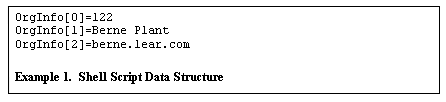
In this example, the structure size is three. Thus extending this array to the required number of elements creates an array of structures . Traversing the array can be accomplished by "skipping" by the size of the structure. For example, the following code fragment shows how to traverse the above array, displaying all members of the structure :
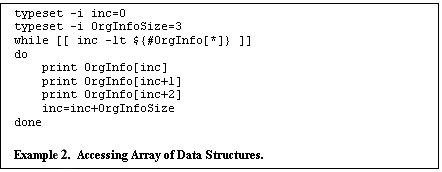
Note that the typeset command was used to declare the inc and OrgInfoSize as integers. This allows these variables to be used without being de-referenced with the $ operator and allows arithmetic to be performed by the shell (as opposed to using expr or one of the standard calculator utilities).
The use of data structures and arrays of data structures permeates the implementation of Lear's system architecture.
Package Subsystems
Each package consists of a group of subsystems. Subsystems are identified by a subsystem name, version, an environmental variable include file, state, and a start/stop script. This information is represented in an array of data structures, called SubSys. Example 3, shown below, contains the SubSys entry for a version of Oracle:
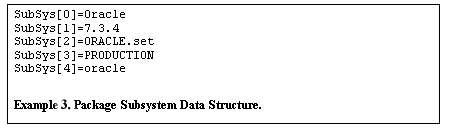
Attributes tracked
The first element in the structure is the subsystem name. This is typically a simple one-word description of the subsystem. The name can be anything, but this component, when combined with the version, must be unique among all subsystem data structure. For example, using Oracle as a subsystem name may be fine if the Oracle Database server is the only Oracle product involved. However, if the cluster contains (and it is desirable to maintain in a separate subsystem) Oracle's financial package as well as the database server, better subsystem names would be OracleServer and OracleFinancials.
The version member of the SubSys data structure is the second half of the uniqueness constraint. The version number used is typically whatever the manufacturer of the software gives it (Lear uses 1.0 for in-house software that previously did not get version numbers). Some vendors will update version numbers based on the patch level of their product. How much of the version number used here will depend on at what level a separate copy of the application will be maintained.
For example, suppose ACME Software's Widgets version 4.3a has been installed on a system. If a patch is released and ACME calls it version 4.3a03, a separate subsystem would be made only if it is desirable to install 4.3a03 as a separate product. Note that one may wish to have slightly different version selection criteria on a test system than on a production system.
The include file contains environment variables and shell functions required to run the application. The include file can be different for each version of an application; however, by convention the version is passed to the include file, allowing a single include file to be used for multiple versions of an application.
The next structure element is the state. The system architecture currently supports these states: PRODUCTION, LIMPROD, TEST, and QUALITY. The PRODUCTION state is designated for subsystems that are for production use; when multiple versions of a subsystem exist on a package, exactly one subsystem must be designated as PRODUCTION. The LIMPROD state is defined for use when transitioning from one production version to another; the "old" version of the subsystem still has a state of PRODUCTION; the "new" version has a state of LIMPROD. Once the transition is complete, the subsystem with the LIMPROD state is changed to the PRODUCTION state; the "old" version is either removed from the array of structures or the state is changed to a different value.
The final element of the subsystem structure is the start/stop script. This is the name of a script in the packages' initialization directory. Upon package startup or shutdown, the subsystem array of structures is swept and each start/stop script is run (with an argument of start or stop, as appropriate). This script is also used to signal a subsystem that backup is starting or ending. If the subsystem needs to perform any pre- or post-backup activities, this mechanism is used to initiate them.
The technique of breaking the package into subsystems and making a version number required for uniqueness in the subsystem list gives rise to an (easier) solution to version dependencies.
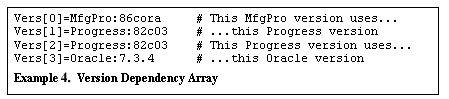
A simple dependency list is maintained in the package context. This list is in the form of a duplex of array values; the first entry is the independent member and the subsequent entry the dependant member. See the example below. Each array value consists of a subsystem name followed by a colon and a version number. By listing independent values in one duplex as the dependant member of another duplex, a string of dependencies can be constructed.
Group Login Scripts
Classifying users into UNIX groups to control access to files is a common practice. Using groups to initialize the shell environment would also be helpful. Unlike other operating systems such as Novell Netware or Windows NT, no group login script facility is provided with HP-UX. Fortunately, it is relatively straightforward to add this functionality.
Lear created login groups that reflect the application(s) a user would primarily use or job function that a user performs. For example, qad_users is the group that refers to all users that use QAD's MfgPro application. Members of the dba group are Data Base Administrators.
Group login scripts are files named the same as the UNIX group. There are system context group login scripts and package context login scripts. Each group login script contributes information (variables, shell functions, etc) to its respective context.
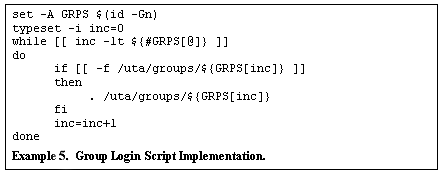
The group login scripts are implemented in a straightforward manor (see example below). The id(1) command is used to obtain the list of groups of which the user is a member. The .profile script traverses this list looking for a file in a predetermined directory (/uta/groups in Lear's case ) having a file name the same as the group name. If the file exists, the file is included via the . command.
Determining the Package Being Accessed
The Problem
A central question that Lear felt must be addressed was "How does the system know which package the user has logged into?" The answer to this question yields much insight as to what information could be presented and how the information might be presented. Clearly, if there is only one package on the system, the answer is obvious. However, knowing what the user wants in the general case of N packages running on the system must still be addressed. In addition, knowing what site the user is logging in from would allow us to narrow the information presented to the user even further, hopefully resulting in a higher "hit" ratio in the "do what the user really wants" cache. To put it succinctly, we wanted to know where the user was coming from and where he or she was going.
Theoretically, this is quite simple. Since users access the system via the network (typically via a telnet program), there is a socket on a port for each connection. The kernel maintains information about the connection on the port. It is just a matter of getting the kernel to divulge this information. Unfortunately, there was no readily available way to get at this information.
Solutions Considered
The obvious alternative was to simply ask the user, via a menu choice or other on-screen prompt. Moreover, if the scripts detect a lsof(1) malfunction, the user is prompted for a package during the log in process. While prompting the user is a much simpler solution, it does require the user to know what a package is (at least to the extent of why he or she needs to select one).
The other problem concerns user perception. To get to a login prompt, the user has to have already selected the package that he/she wants access to. To ask again leaves the user wondering why he has to answer the same question twice.
The use of packet tracing was tried without any success. Lear also searched for a supported API that would yield the desired information, but found none.
Using lsof
The solution was to use a public domain utility, lsof(1). This utility displays information about open files on a per process basis. Following the Unix premise that everything is a file, the kernel manages sockets via the open file table and thus presents sockets as file descriptors to an application. Since telnet daemons are started by inetd(1m), the open sockets are "mapped" to file descriptors 0, 1, and 2 (standard in, standard out, and standard error). This leads to the following algorithm:
The source IP address (the address of the user's PC or other system) can be used to find out what site the user is logging in from. Lear uses routers in each site; by convention, each site has its own IP segment. According to Lear standards, the router's Ethernet port is always at IP address <local_segment>.1. Thus, a user's location can be determined by stripping the last octet from the source IP address, substituting a .1, passing the result to nslookup(1), and performing a simple lookup on the result.
Once the target site has been ascertained, support for the data of that site must be determined. If the target package contains the site's ERP data, then a menu of available options for the site is displayed. If the target package does not contain data for the site, the user is presented with a menu of the sites that are supported on the package. This accommodates those users that are at one site but have a business need to access a different site. In this case, if the user fails to select a site, he or she is logged off immediately. This may not be appropriate in all implementations.
Limitations
The biggest limitation to this method is the use of a third party utility that has to resort to unsupported methods to gather data. The use of lsof(1) produces a dependency on the author of the utility to update lsof(1) in response to kernel changes made by the computer vendor (HP).
The lsof(1) utility is free of any purchase cost or usage charges, so the author is not obligated in any way to continue to develop and support the utility. This would place Lear in the undesirable position of having to modify the authors code (supplied with the utility) to maintain its current level of service to the users.
Responsibility
An API is desperately needed to query information about the cluster. For starters, being able to obtain the names of the packages on the cluster and the IP addresses for each package programmatically would be very useful.
The lack of an API, or command, that would present socket information as is supplied by the lsof(1) utility places a burden on developers. HP's customers should not have to go "dumpster-diving" in the kernel and /dev/kmem for relatively benign information such as the foreign IP address.
Lear has contacted HP with these concerns. It is possible that an expansion of the HP-UX API will include a function that will give Lear the capabilities needed to be less dependant on third party utilities such as lsof(1).
PAM Module
The Problem
A user account typically represents a user's business need to access applications or data on a package. This would indicate that authentication is the responsibility of the package context; this feature is not provided with HP-UX or MC/Service Guard. There is no facility to define a user account to the package; this is done in the system context alone (/etc/passwd). When a package switches from one node to another, the user accounts in the new node will have to either be reset or copied from the prior node. Copying the account information introduces problems if the same user actively logs into more than one context. Unless account names are coded to the package (see below), it would be impossible for a user to maintain separate accounts for separate packages.
Solutions Considered
It is possible to use NIS (or similar) to maintain a single database of user names. Using NIS does relieve the password synchronization problem, but NIS does not readily allow for restricting access on a per package basis. Using NIS also introduces a single point of failre (the NIS master). Finally, NIS depends on NFS, which is not the most stable of infrastructures. Unless there is some other business need for NFS, using NFS in a high availability environment would seem ill advised.
The user authentication problem could be handled manually by stealing one or two characters of the user's account name and reserving this for identifying the package that a user 's account is targeted for. At package shutdown, the user accounts that match the package being shutdown would be removed from /etc/passwd (and presumably saved in a file on the package context). At package startup, the accounts could be added to the (system) password database.
This solution has a number of problems. The usable size of the account ID diminishes by the number of characters reserved for package ID. The number of package ID characters reserved limits the number of packages the cluster can support. Also consider what happens if the package is moved to anther system as result of a hardware fault. The package will not be stopped via the package shutdown script. Thus when the package starts on an alternate node, the package password database would likely be out of date with respect to information in the system password database on the failed node. This could result in accounts disappearing, or accounts with stale passwords. Even worse, it is possible that there were one or more accounts that were deleted from the system password database on the failed node. This error could remain undetected for a long time, creating a serious security problem.
The Lear libpam_ha.1 Module
Lear addressed the problem of user password synchronization between packages by creating a Plugable Authentication Module (see pam(3)), libpam_ha.1. The PAM architecture allows users to be authenticated via means other than the standard /etc/passwd file. PAM is frequently used to integrate smart cards or bio-identification (e.g., thumb print, retinal scan, and voice-print) devices to Unix systems. Lear's defined a directory in the package context to put a password file. This file has the same structure as /etc/passwd. The PAM module:
If all of these test pass, the module reports to login that the user is authenticated and the normal login process continues. If the tests fail, the standard Unix module (as provided by HP) is passed the user ID and the password entered by the user.
Because the package password file is on a disk file system that moves with the package, there are no issues with synchronization of the package password. And since the module determines the package that the user is logging into, the presence and absence of packages is handled without requiring the user to perform any special tasks or requiring any special knowledge.
Limitations
The Lear PAM module relies on the correct operation of lsof(1) to determine the package to which the user is requesting authentication. Failure to run this utility can endanger the login process.
The process of finding the IP addresses of the packages involves running a shell script. This introduces two dependencies (the shell and the script) and a potential security problem. The use of a shell script was motivated by the amount of development time required. The shell script does not perform any functions that cannot be accomplished in C; therefore, the script may be removed at a future time.
The module must provide services that allow users to change their password. To minimize development time, the sophisticated password generation rules (e.g., new passwords cannot be circular shifts of old passwords, passwords must have at least one character and one numeric or punctuation character, etc) were not coded in the initial module. This omission allows users to pick less secure passwords than they would if the rules were present. If HP does not provide a PAM module for high availability in the near future, these rules may be added to the Lear module.
Responsibility
While the solution implemented by Lear works very well, this problem would seem to be better addressed by the high availability vendor (Hewlett Packard).
Shell Script Debugging
The volume of shell scripts required to implement the Lear system is quite extensive. Code paths are not always obvious; on a couple of occasions, situations have been observed that defy explanation.
The state of debugging shell scripts has yet to attain the same level of technical sophistication that debugging higher level languages (e.g., C, Pascal, FORTRAN, and BASIC) enjoy . Consequently, the first level of debugging shell scripts is an old friend: sprinkling the code heavily with statements to display where in the code that execution is taking place or the state of various variables.
The debugging features are controlled by an environment variable, DEBUG_ON (set to YES or NO). To minimize confusion, this variable can be set to YES on a per-user basis. This is done by including the users' login name in the text file /etc/debugusers. This technique allows administrators to turn debugging on without any modifications to the system scripts. In addition, since debugging is enabled on a per-user basis, only the user experiencing problems (or a representative user, if a group of users are involved) need be annoyed by debug messages.
The debug messages are sent to both a file and to the screen. The messages are sent to the screen since not all error messages are captured to the debug file, so it is frequently useful to see debug messages interspersed with the error message (if any) or other anomalous behavior. The problem with this technique was that with a fast server over a fast LAN/WAN with code that clears the screen periodically, the useful messages were flying by without giving anyone a chance to read the message. The solution to this was a sleep command after each debug output. The sleep command's argument is another environment variable (DEBUG_SLEEP) whose default value is zero.
The next step in debugging capabilities was to add an interactive debugger. The debugger is based on the debugger included in the O'Reilly book "Learning the Korn Shell" by Bill Rosenblatt. The Mr. Rosenblatt's debugger does not handle include files very well and (obviously) is for the Korn shell, not the POSIX shell. A few modifications where made to adapt the debugger for Lear's purposes, but some important functions remain unusable (e.g., displaying code being executed, line number management). One capability that was added was using a INT trap to jump into the debugger.
Menus
The main vehicle for Lear Telnet users to access the ERP application is via a series of text menus. The motivation to use menus is an old one: insulating the user community from the shell prompt. This motivation is rooted in equal parts fear and laziness. Giving users access to the shell prompt would open the door (wider) to accidental and intentional security breaches (ergo, the fear) and require a perpetual training effort (ergo, the laziness).
The menu system has some routine requirements:
The resulting menu system does employ a single, simple C program. This concession to the "no C" rule was done to use the curses library routines. The use of curses permits single character responses to menu selections (pressing enter not required).
The C program (dispmenu) reads a text file and displays the lines on the screen. The first two lines are used as header lines; the remainder of the lines is treated as selection options. An environment variable (Opts) is obtained to determine acceptable responses.
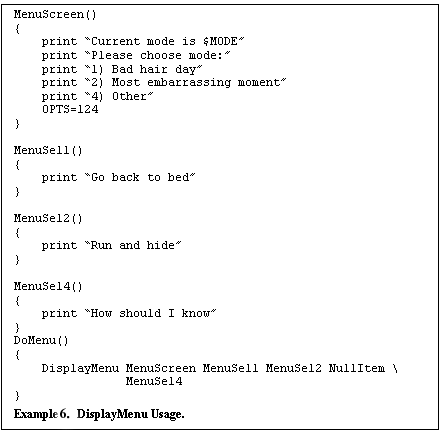
The dispmenu program is not typically accessed directly. Instead, a shell function, DisplayMenu is the typical point of entry (see example below). This function takes a variable number of arguments. The first argument is the name of a shell function that is called to generate the menu screen (formatted as discussed above). The remaining arguments are taken as shell functions that implement the action taken when a menu item is selected. Thus if '1' is selected on the menu, the function named by argument 2 is called, if '2' is selected, the function named by argument 3 is called, and so on.
Lessons Learned
Detecting a login at the system console
One of the first hurdles faced was when a hardwired, dumb terminal (e.g., the system console) is used to log in. In the case of a general user, the answer is simple: hardwired terminals are not supported. For a high availability environment to be effective, users must log into the package context; it is not possible to separate a hardwired terminal from the system context.
System administrators are a different story. It is perfectly normal for a SA to log into the system console. It was desirable to have the system administrator accounts use the "standard" login scripts although they would not use the applications in the packages. The decision was made to detect logging in from the console and to handle it gracefully in order to make the login scripts more robust. A side effect of this was that the places in the login scripts that can detect a user logging into the system context were readily apparent. This was explicitly disallowed except for system administrators.
As a first attempt to detect a login from the system console, the tty command was added to /etc/profile and the output was used to compare against /dev/console. This consistently fails to detect a console login and it took some research to find out why. The tty(1) command uses system calls to determine if standard input (inherited from the shell) is from a tty (or pseudo tty). What is not evident is that standard input is not open until after /etc/profile has been processed. Thus, the tty(1) command is useless.
Lear's solution ultimately examines the ps(1) command's output. A process that is a parent (at some level) of the current shell who has a parent that is the inetd process is searched for. This only occurs if the user has logged in over the network (using telnet, rlogin, or equivalent). A side effect of this is that a SA can successfully use su to troubleshoot a package user's login problems.
The Shell History File
Using a common login directory presented another minor challenge for those (few) users that access the shell prompt: the shell history file. This defaults to ~/.sh_history. Unfortunately, at the time that the shell sets this, the users home directory is the common directory. This directory is not writable by most users. Resetting the HISTFILE environment variable after the HOME variable is reset does not appear to work for anyone except root accounts. Changing HISTFILE from within /etc/profile works fine, but, as is explained above, setting the users HOME variable does not happen until long after execution has left /etc/profile.
Empirically, it appears that the shell has an invalid or inaccessible HISTFILE, the shell uses an in-core history list. The history mechanism works, but no file contains the information. The information in the history list does not survive to successive login sessions, adding further fuel to the in-core history list theory.
This presents a couple of problems. First, it is desirable that the user has a history list that persists across login sessions. Secondly, resetting HISTFILE after leaving /etc/profile results in the confusing situation of HISTFILE "lying". The HISTFILE is set, but the file referenced is not created and (if it already exists) nor is it updated. The solution used was to have a common history directory in the System Context.
The File System Layout
The System Context portion of the file system layout is pictured in Figure 3. The Package Context is pictured in Figure 4.
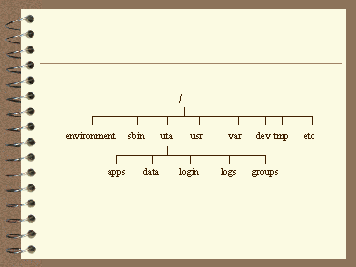
Figure 3. The System Context File System
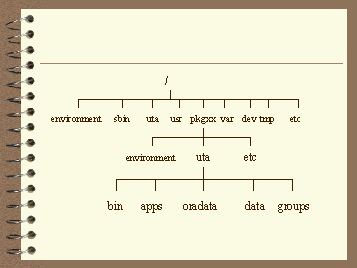
Figure 4. The Package Context File System
Subsystem Versions as an integral part of the file system
The Lear directory hierarchy impacts the standard HP-UX file system in a limited number of places. There are two System Context directories, /environment and /uta. In addition, there is one mount point for each package, just off the root directory. The package context mount point is named the same as the package.
One of the important principals used in the design of the Lear file system was the use of application version numbers. Very early in the file system design, the standard was set to install applications in /<pkg name>/uta/apps/<app name>/<version number>, unless limited by the application. Ironically, Oracle, the application that (in part) inspired this file system design does not strictly conform to this standard.
This design decision is what led to the strict requirement that all subsystem have a version number. Moreover, using version numbers as a part of the directory structure enables Lear to cleanly support multiple versions of the same application simultaneously.
Each package has a mount point directly under root that is named the same as the package for which it is used.
Data Structures
The heart of designing shell scripts in a high availability environment is the use of data structures and arrays of data structures (implemented as outlined in the Technology section, above). Here, the major data structures are reviewed along with their purpose and relevance to the design.
The structure PACKAGES is list of all the packages defined to the cluster. This structure is filled using the cmviewcl command. The PACKAGE_ENVIRONMENT structure is built from this structure. The PACKAGE_ENVIRONMENT structure contains pointers to the package context environment include file directory. For both PACKAGES and PACKAGE_ENVIRONMENT, the integer variable PkgID is used as an offset into these structures, typically representing the current package. Thus, PkgID is the lynch pin of the package context: what PkgID points to is the current package context.
The system context contains the OrgInfo structure. This is essentially a (mostly) static database of limited information about each site. The members are the name of the site, the organization number (or Org number) and the DNS name for the router at the site. The first twenty positions in the array of structures is reserved for either a node-specific site list or a package specific site list.
For each package, there is a list of sites that are "on" the package, i.e., the ERP tables are contained in the Oracle schema that resides on the package. This structure is Orgs and OrgID is used as an offset into the structure array to denote the current site. As indicated below, the current site is either selected for the user by virtue of the IP segment where the client is located or else the current site is explicitly selected by the user from a menu. In the case of non-interactive scripts, the current site is typically set.
The SUBSYS data structure is the master list of the subsystems that are on the package. The contents of this structure are described in the Technology/Package Subsystems section above. This structure is referenced for virtually all operations. Package shutdown and startup is accomplished by enumerating this structure and de-referencing the start/stop script member. The system maintains per-site pointers into this structure to define the version of an application that the site will use. The Vers structure creates an application dependency chain by relating entries in SUBSYS. Another structure, ShellVers, contains pointers into SUBSYS identifying the environments available to users that access the shell prompt.
The Login Process
Many of the Lear customizations are revealed during the login process. Thus it is somewhat instructive to walk through the login process. Figure 5 is a graphical depiction of a "normal" login process; Figures 6 and 7 are a depiction of the Lear login process. So climb on board the login tour bus; it looks like a login is about to start.
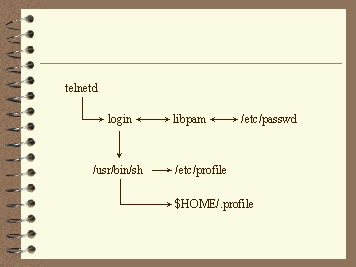
Figure 5. Standard login Process
Overview of a standard login process
The first stop on our tour is a non-Lear system. If you look out of the left side of the bus, you will see a login binary just being moved from the disk buffer cache into main memory. The Lear login process differs somewhat from what is found on most typical Unix systems. Frequently, the /etc/profile file and a user's profile file set a handful of environment or shell variables, and either start "the" application, dump the user to a shell prompt or present a simple, static, text menu.
The Lear login process: The Long, Winding Road
Our next stop is the star attraction: a Lear system. The Lear login process, to put it mildly, is somewhat more complex. The login process starts the same, but Lear customizations appear just when a user attempts to logon (before the shell is executed).
The TERM variable is "coerced" into one of a standard set of more easily supported terminal types. Then the packages are enumerated, the source location of the user's login is determined, a package context is set, and the plants supported by the package are enumerated. System and Package group login scripts are run. Finally, one or more menus are presented to the user, displaying only the pertinent information for that user.
System Context Activities
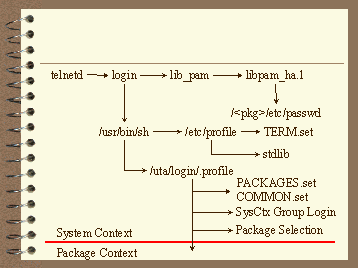
Figure 6. The Lear Login Process - System Context
Enhancement to Authentication
The next photo opportunity on the login tour is here as the login binary begins to perform its functions. Lens caps off everyone! Login prompts for the user's account and then passes control to the (now) standard PAM system. Eventually, PAM calls the Lear module, which either authenticates the user in the package context or else, passes responsibility to the HP supplied PAM module for authentication. If neither module authenticates the user, the login process rejects the login attempt.
Once PAM tells login that the user is authenticated, a shell is exec(2)ed. And that is our signal to re-board the bus and move along.
The System Profile
The standard user shell is the POSIX shell, so the first point of system control is /etc/profile. Most of this file is as it is provided "out of the box", but a few modifications were made. An environment include file that does some Lear-specific terminal-type determination is called from /etc/profile. The debug facility is also initialized in /etc/profile (see above for detail on the debug process). A call to include a Lear standard shell library is also included in /etc/profile.
The Common User Profile
All users have the same login directory (/uta/login). This directory contains a .profile file and the common history directory (see above). This common .profile is the next point of control in the login process. In this file, the system context file PACKAGES.set is included. This file populates a shell array of all packages on the cluster. The shell then determines which packages are actually present on the system by checking for the existence of the .status file (in the package environment directory). The check for the presence or absence of a package could be done by examining the output of the cmviewcl command, but testing for the presence of a file in a package specific directory requires less effort.
System Context Group Login Scripts
The design of the Group Login scripts brought up the questions: to which context do group login scripts belong? User groups are undoubtedly a system context attribute, but it is desirable to perform package-level operations for an entire group. Performing package operations from a system context script would be sinful. Thus, there can be two group-login scripts for any group: one in the system context and one in the package context.
The system context group login scripts are run at this point. These scripts may not assume the presence or absence of any package or anything package related.
Determining the Package
The details of the user's TCP/IP connection to the system are now examined. This is accomplished by tracing the process list for the current terminal until a process is found whose parent is inetd. This process must be a telnet daemon, rlogin daemon, or equivalent. The resultant process's PID is passed to lsof(1) along with a request for the details about standard in (file descriptor 0). The result generated by lsof(1) gives the foreign IP/port and local IP and port. These two IP addresses are saved.
The local IP must then correspond to the package that the user has logged on to. Thus the local IP address obtained as explained above is checked against each package's configuration. Once a match is found, the package being telneted to is known. Note there is no need to see if the requested package is present: it must be in order for the telnet session to have gotten this far.
At this point (drum roll please), the login process has crossed into the package context. Best get back on the bus - be sure you have collected all of your belongings. Our next stop is in a new world: the package context.
Package Context Activities
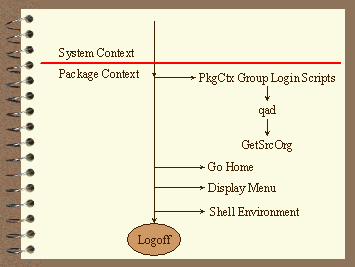
Figure 7. The Lear Login Process - Package Context
Package Context Group Login Scripts
One of the package context group files is for the ERP application, MfgPro. This group login file fills an array with the versions of MfgPro that will be used. To allow for rolling upgrades, the version array can be filled using "standard" versions or they can be filled from a site-specific file. Thus for the system context group login script to correctly fill the version array, at this point in the login process is when the site that the user is logging in from must be determined.
The foreign IP that was saved from the use of lsof(1) is used to determine which the site the user is located. This is accomplished by replacing the host octet (the "least significant digit") in the foreign IP with a 1. The resulting IP address is used as an argument to nslookup and the Names returned is parsed and searched for in the OrgInfo structure.
Go Home
Our tour is nearing the end of the ride. At this point, virtually the entire environment has been initialized, loaded, run, and generated. The remaining few items are what is found in more typical login scripts than what has occurred up to this point.
As mentioned earlier, in this high availability model, user accounts exist in the package context. Although not strictly necessary, this implies that the user's home directory is in the package context. Clearly this is not something that can be coded in /etc/passwd; such a move would assume a package's presence on a particular machine. The package passwd file would be a good place for this information. Unfortunately, while the login process does use PAM for authentication, login and many other Unix programs utilize API's that access /etc/passwd directly. Obviously, setting the home directory in the package passwd file. So the question becomes how is it possible to go from the common home directory (see above) to a home directory in the package context?
The Lear answer is to reset the home directory once the login process has entered the package context. This is fairly easily accomplished - just reset the value of the HOME environment variable. And that is what is done at this point in the login process. A few other variables are set (e.g., the history file), and the current directory is changed to the (new) home directory (if it exists). As a fail-safe, if the user's package context home directory does not exist, the user is logged off. To minimize the time to correct such a situation, an e-mail is sent to the Lear Help Desk when this condition is detected.
Application Access
The journey through the login process has reached the money round - at long last we are prepared to crank up the application. Valid questions might be what application is to be accessed and how should the client access be accomplished. Fortunately, these challenges are easily met.
Client access is accomplished using the menu technology discussed previously. Typically the user is given the choice of running one or more versions of an application, a menu selection for miscellaneous things (for example, to change passwords), and to quit. At the present time, a call in the individual user's profile file determines which application is targeted.
Controlling who gets to the Shell
Like many companies, Lear limits access to the Unix shell prompt. Once the list of users who have legitimate need for Unix shell access was determined, the question became "how can shell access be granted"?
The solution chosen was to use a shell variable to control access to the shell prompt. If the variable is set, access is granted; if the variable does not exist or is set incorrectly, the user is silently logged out when choosing quit at the top level menu. An entire group can thereby be granted access to the shell by setting the variable in the appropriate group login script. It is also possible to set the variable in individual users profile file, but this practice is discouraged.
Controlling what environment the shell has
Once the question of granting access to the shell is answered, the next challenge is to setup the environment in a manner that is consistent with what the user needs.
The solution that was settled on was to present a menu on exit if the user is allowed shell access. The menu includes items that represent valid shell options. Each menu option references a subsystem. The subsystems that have valid environments for shell options are controlled by the ShellVers array. There was no clear, obvious way so control the selection of subsystems without this separate vector.
Well that concludes our login tour. Thanks for riding Login Tours; watch your step as you step off the bus.
Cron
The cron scheduling facility of HP-UX presented another challenge. Lear needed to schedule package context activities, but cron is inherently a system context facility. If a crontab file references a non-existent file, an error would be generated. This is not exactly the end of the world, but a more elegant solution is called for.
The Lear solution attacks the problem on several fronts. First, only accounts assigned to the package context are allowed to submit crontab entries. This restriction is somewhat artificial, as package context logins are delimited by interactive use; in cron's view, all accounts exist only in the system context.
Next, by convention, the architecture requires that each crontab entry utilize a precursor script. This script (runcron) takes an argument to specify the package that the batch job is intended to run on. Another argument specifies the command that is to be run. The precursor script verifies that the requested package is present on the node before allowing the job to run. If the package is present, runcron sets the environment by switching to the package context and active subsystem using PKGENV.set, ORGENV.set, or SUBSYSENV.set, as appropriate. If the requisite package is not on the node, the script makes a log entry noting that fact and exits without error.
The Lear handling of cron also mandates that the exact same crontab must exist on both packages. This requirement depends on the functionality of runcron. If jobs A, C, and Q are to run on pkg01, jobs B, D, E, M, N, and O are to run on pkg02, and jobs F - L and P run on pkg03, then all jobs, A-Q are on the crontab of pkg01, pkg02, and pkg03. The crontab entries all utilize runcron. If all three packages are on different nodes, the pkg01 will get "no such package" log messages (but no cron errors) for jobs B, D - P. Similarly, pkg02 will get "no such package" log messages for jobs A, C, F - L, and P; pkg03 will get "no such package" log messages for jobs A - E, M - O, and Q.
The implementation of this architecture has met the design goals that were set out for it:
The successful completion of these design goals has been realized in the form of easily adding new versions of software and new plants to the systems.
The architecture benefits from contributions of more individuals than could be listed here. In particular, however, without my partner and friend, Chris Giancarli, the architecture would never have been worth writing about.